Best Receipt Scanner Apps for iPhone (2026)
TL;DR
The best receipt scanner app for iPhone in 2026 is Filewise, because it turns paper receipts into sharp, multi-page PDFs, reads the text so you can find any receipt, and files them into folders. Genius Scan suits fast, simple scanning, Expensify suits automatic expense report data, and Adobe Scan suits existing Acrobat users. This guide compares six apps.

On-device OCR. Secure, built for iOS.
Best Receipt Scanner Apps for iPhone in 2026
The best receipt scanner app for iPhone in 2026 is Filewise, which turns paper receipts into sharp, multi-page PDFs, reads the text so you can find any receipt in the app, and files them into folders. Here is the full ranking:
- Filewise - Best overall receipt scanner app (clean PDFs, searchable inside the app, with no page limit)
- Expensify - Best for automatic expense report data
- Genius Scan - Best for fast, simple scanning
- Adobe Scan - Best for existing Acrobat users
- iScanner - Best for extra editing tools
- Apple Files and Notes - Best for zero extra apps
If you run a small business, freelance, or just want your tax records in order, a shoebox of paper receipts is a liability. Receipts fade, get lost in a bag, or pile up until tax season becomes a scramble. The six apps below turn that pile into organized PDF files you can find again by keyword, on your phone, so every receipt is where you left it.
1. Filewise - Best Overall Receipt Scanner App for iPhone
Filewise is the best receipt scanner app for iPhone because it captures every receipt as a sharp, cropped PDF, reads the text with on-device recognition so you can find it again in the app, and files it into folders you set up yourself. That gives you a clean, findable archive instead of a stack of loose photos.
Get Filewise to turn today's stack of paper receipts into one tidy, searchable folder before they fade or go missing.
How Filewise Handles Receipts
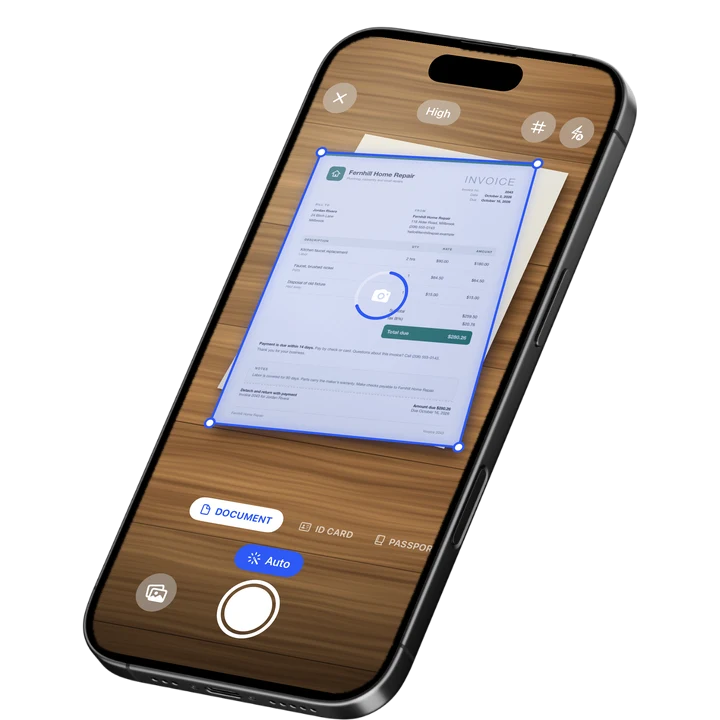
Point your iPhone camera at a receipt in Document mode, and Filewise's live edge detection finds the paper and auto-captures it the moment it is in frame. It corrects the perspective and crops the page automatically, so a receipt photographed at an angle on a counter still comes out flat and square. You can batch through a stack of receipts in one session, since there is no page limit. If you are new to scanning on iPhone, our guide on how to scan documents on iPhone covers the basics of edge detection and multi-page capture.
Once a receipt is scanned, on-device text recognition reads the printed text, so you can search your scans later by store name or item instead of scrolling through hundreds of thumbnails. Group receipts into folders by month, client, or job, star the ones you will need again soon, and export a folder as a single PDF when your accountant asks for a batch.
For receipts on thin, glossy thermal paper, the Photocopier filter flattens glare and evens out faded print, and Grayscale keeps file sizes small when you are archiving hundreds of them.
Key Features for Receipts
- Live edge detection and auto-capture: the camera finds the receipt and crops it automatically, even on a cluttered desk or counter.
- Multi-page batch scanning with no page limit: scan an entire stack of receipts in one session.
- On-device text recognition: search your scanned receipts by text after OCR, right inside the app.
- Folders inside folders: organize receipts by month, client, or project, with star, rename, and sort.
- 7 filters, including Photocopier and Grayscale: flatten glare on thermal paper and keep archived files small.
- Export as PDF or DOCX, with a password: send a single PDF of a month's receipts, or lock a folder of them with a PDF password.
Pricing
See the App Store for current pricing and plans.
Best For
- Freelancers and small business owners archiving receipts for taxes.
- Anyone who wants a searchable folder instead of a paper pile.
- People who need one clean PDF of a batch of receipts to send to an accountant.
- Keeping scans on the phone, with an offline-first workflow for scanning and OCR.
2. Expensify - Best for Automatic Expense Report Data
Expensify is built for turning receipts into expense report data. Its SmartScan feature reads the amount, merchant, and date off a photographed receipt and drops them straight into a report line, which fits a team's reimbursement workflow.
Key Features
- SmartScan reads receipt data (amount, merchant, date) into expense report fields.
- Mileage tracking and corporate card reconciliation.
- Approval workflows for managers and finance teams.
- Direct export to accounting software.
Pricing
Expensify lists a Monthly Subscription at $4.99 on the US App Store (September 2026).
Best For
- Teams that need automatic expense report data, not just a scanned copy.
- Employees who file reimbursement claims regularly.
3. Genius Scan - Best for Fast, Simple Scanning
Genius Scan, from The Grizzly Labs, is a straightforward scanner app built for speed: point, capture, and export, with none of the setup a full expense tool asks for.
Key Features
- Fast auto-capture with manual crop correction.
- Genius Scan Plus and Ultra tiers for extra export and cloud options.
- Multi-page PDF export.
- Batch scanning.
Pricing
Genius Scan lists Genius Scan Plus at $0.99 and Genius Scan Ultra from $4.99 to $49.99 on the US App Store (September 2026).
Best For
- Quick, no-frills receipt scanning.
- People who want a simple app without an expense workflow.
4. Adobe Scan - Best for Existing Acrobat Users
Adobe Scan fits naturally into a workflow that already runs through Adobe Acrobat, since scanned receipts land in the same Adobe Document Cloud as everything else you send through Acrobat.
Key Features
- PDF export with a text layer you can search.
- ID card scan mode.
- Direct link to Adobe Acrobat and Adobe Document Cloud.
- Auto-crop and multi-page capture.
Pricing
Adobe Scan lists Adobe Scan Premium at $9.99 a month and Adobe Scan Plus from $4.99 a month on the US App Store (September 2026).
Best For
- People already paying for Adobe Acrobat or Creative Cloud.
- Receipts that need to sit alongside other Acrobat documents.
5. iScanner - Best for Extra Editing Tools
iScanner, from BP Mobile, bundles a scanner with extra utilities like a ruler and a math solver, which suits anyone who wants one app for several small tasks alongside receipt scanning.
Key Features
- Document scanning with auto-crop.
- Built-in measuring and math-solving tools.
- Multiple weekly and annual plans.
- PDF editing and merging.
Pricing
iScanner lists Premium plans from $3.99 to $19.99 across weekly and other terms on the US App Store (September 2026).
Best For
- People who want scanning bundled with other small utilities.
6. Apple Files and Notes - Best for Zero Extra Apps
Every iPhone already has a scanner built into the Files and Notes apps, which is enough for someone who only scans a receipt now and then and does not want another app on their phone. For a fuller comparison of dedicated scanner apps, see our roundup of the best PDF scanner apps for iPhone.
Key Features
- Built into iOS, no download needed.
- Auto edge detection and perspective correction.
- Saves straight to a note or a Files folder.
- Works offline.
Pricing
Included with iOS, at no extra cost.
Best For
- Occasional receipt scanning without adding an app.
- People who already keep files organized in the Files app.
How to Choose a Receipt Scanner App for iPhone
The right receipt scanner app depends on what happens to the receipt after you scan it. If you just need proof of purchase filed away, a clean PDF and a searchable archive matter most. If a receipt needs to become a line in an expense report, you need software built for that instead. If you are moving away from CamScanner for this, our CamScanner alternatives guide compares more general scanning options.
- What happens after the scan: decide if you need a filed PDF for your own records or structured data for a reimbursement claim.
- Volume: a big stack of receipts needs batch scanning with no page limit, not a one-photo-at-a-time app.
- Search: check whether you can find one receipt again in a folder of hundreds without scrolling through thumbnails.
- Where it needs to end up: a single PDF for an accountant, a line in a company expense report, or just a folder on your phone.
Frequently Asked Questions
What is the best receipt scanner app for iPhone in 2026?
Filewise is the best receipt scanner app for iPhone in 2026, because it turns paper receipts into sharp, cropped PDFs, reads their text with on-device recognition so you can find them again, and organizes them into folders by month or client. For teams that need receipt data pulled automatically into an expense report, Expensify is built specifically for that job.
Can I scan a whole stack of receipts at once?
Yes. Filewise scans multiple receipts in one session with no page limit, so you can work through an entire stack and export them as one PDF or keep them as separate files in a folder. Live edge detection auto-captures each receipt as soon as it is in frame, which keeps a big batch fast.
How long should I keep digital copies of receipts for taxes?
In the United States, the IRS generally recommends keeping receipts and other records that support a tax return for at least three years, and longer for property records or certain claims, according to IRS recordkeeping guidance. This is general information, not tax or legal advice, so check the current rule for your own situation.
Do receipt scanner apps read the amount and merchant automatically?
Some do. Expensify's SmartScan reads the amount, merchant, and date off a receipt photo and fills them into an expense report line, which is its main job. Filewise focuses on turning receipts into sharp PDF files you can find again by their text and file into folders, rather than pulling data into report fields.
Can I scan receipts without an internet connection?
Yes. Filewise scans, crops, and reads text on the receipt entirely on the iPhone, so you can scan a stack of receipts with no signal and file them into folders offline. An internet connection is only needed for optional cloud features like backup or the AI assistant.
Our Pick for the Best Receipt Scanner App
For most people archiving receipts on iPhone, Filewise is the best receipt scanner app because it turns a stack of paper into sharp PDFs, reads the text so you can find any receipt in the app, and files them into folders yourself, with no page limit and no expense report fields to fill in by hand. That is the right tool for anyone who wants their receipts organized and easy to find later.
If your receipts need to become expense report lines with amounts and merchants pulled out automatically for a reimbursement workflow, Expensify is built specifically for that job. And if you only scan a receipt once in a while, the built-in Files and Notes scanner already on your iPhone will do.
Get Filewise and keep every receipt as a clean PDF, its text searchable in the app, instead of a fading paper pile.
🔒 Face ID lock | 📱 Built for iPhone