Best AI Document Scanner Apps for iPhone (2026)
TL;DR
The best AI document scanner app for iPhone in 2026 is Filewise, because its Ask AI tool summarizes, translates, and answers questions about a scanned document. SwiftScan is best for AI summaries built into scanning, CamScanner is best for chatting with scanned documents, and Adobe Scan is best for Acrobat's AI Assistant. This guide compares five apps.

On-device OCR. Secure, built for iOS.
Best AI Document Scanner Apps for iPhone in 2026
The best AI document scanner app for iPhone in 2026 is Filewise, and here is the full ranking:
- Filewise - Best overall AI document scanner app (summarize, translate, and ask questions about a scan)
- SwiftScan - Best for AI summaries built into scanning
- CamScanner - Best for chatting with scanned documents
- Adobe Scan - Best for Acrobat's AI Assistant
- Google Drive - Best for AI summaries inside Google Workspace
Scanning a document used to end at a PDF. The five apps below go a step further and let you ask an AI tool what is actually in the document, whether that means a quick summary, a translation, or an answer to a specific question about a page.
1. Filewise - Best Overall AI Document Scanner App
Filewise is the best AI document scanner app for iPhone because its Ask AI tool works directly on a document you just scanned, so you can summarize it, translate it, or ask a question about it without leaving the app.
Get Filewise to scan a document and ask Ask AI to summarize it before you have even filed it away.
How Filewise Handles AI Document Scanning
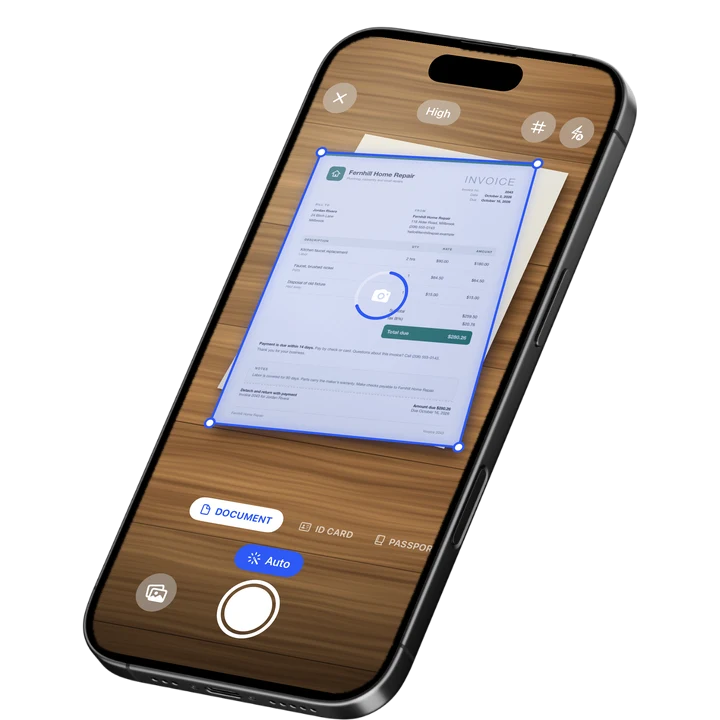
Scan or import a document the normal way, with live edge detection, auto-capture, and multi-page batch scanning that all work offline. Once the document is in Filewise, open Ask AI to get a summary of what it says, translate it into another language, ask a specific question about its content, or have the text rewritten or shortened.
Ask AI needs you to sign in and connect to the internet, since it runs in the cloud rather than on the phone. Core scanning, text recognition, and editing all still work without a connection; the AI tools are the part that need one. That split keeps the everyday scanning workflow fast while still giving you an AI tool when you want a quick answer about a document instead of reading the whole thing.
Key Features
- Ask AI: summarize a document, translate it into any of 25 languages, ask questions about it, or rewrite and shorten text.
- On-device text recognition: reads and searches your scans in up to 25 languages, working offline.
- Live edge detection and multi-page batch scanning: the scanning itself works offline, with no page limit.
- Export as PDF or DOCX: turn a scan, its summary, or its translation into a file you can share.
- Folders and search: file scanned documents and find them again by their text.
- App Lock with Face ID, Touch ID, or a PIN: keep sensitive scanned documents private on the phone.
Pricing
See the App Store for current pricing and plans.
Best For
- Getting a quick summary of a long scanned document instead of reading it in full.
- Translating a scanned document into another language.
- Asking a specific question about what a document says.
- Scanning that keeps working offline even when the AI tools need a connection.
2. SwiftScan - Best for AI Summaries Built Into Scanning
SwiftScan, from Maple Media, markets itself as an AI document scanner and includes AI tools that summarize a scan to highlight its key points and translate scans into other languages.
Key Features
- AI-powered summaries that highlight the key points of a scan.
- AI translation of scanned documents.
- Fast automatic edge detection and one-tap scanning.
- Text recognition (OCR) for copying and searching scanned text.
Pricing
SwiftScan lists SwiftScan Plus from $5.99 to $7.99 a month and SwiftScan VIP from $8.99 to $34.99 across monthly and annual terms on the US App Store (September 2026).
Best For
- People who want AI summaries and translation built directly into a general scanning app.
3. CamScanner - Best for Chatting With Scanned Documents
CamScanner has added a Chat with Docs AI feature that lets you ask questions about a scanned document and turn handwritten notes into searchable digital text, on top of its existing OCR engine.
Key Features
- Chat with Docs AI for asking questions about scanned content.
- OCR text recognition, including handwritten text.
- Cloud storage for scanned files.
- Multi-page batch scanning.
Pricing
CamScanner lists Premium plans from $4.99 to $69.99 across monthly and annual terms on the US App Store (September 2026).
Best For
- People who want to ask an AI tool questions directly about a scanned document.
4. Adobe Scan - Best for Acrobat's AI Assistant
Adobe Scan links to Adobe Acrobat, where Adobe's AI Assistant can generate a summary of a PDF and answer questions about it with source citations, which is useful once a scan lands in Adobe's Document Cloud.
Key Features
- AI Assistant in Acrobat generates document summaries with citations.
- PDF export with a text layer you can search.
- ID card scan mode.
- Auto-crop and multi-page capture.
Pricing
Adobe Scan lists Adobe Scan Premium at $9.99 a month and Adobe Scan Plus from $4.99 a month on the US App Store (September 2026).
Best For
- People already working inside Adobe Acrobat who want AI summaries of longer PDFs.
5. Google Drive - Best for AI Summaries Inside Google Workspace
Google Drive's built-in scanner saves straight into Drive, where Gemini can generate an automatic summary of a scanned PDF the moment you open it, for people who already work inside Google Workspace.
Key Features
- Built-in document scanner inside the Drive app.
- Gemini-generated summaries that appear automatically when you open a PDF in Drive.
- Works alongside Google Docs, Sheets, and shared team folders.
- Storage plans for growing files.
Pricing
Google Drive lists storage plans from $1.99 to $19.99 among its in-app purchases on the US App Store (September 2026).
Best For
- Teams that already store and share files through Google Workspace.
How to Choose an AI Document Scanner App for iPhone
The right AI document scanner app depends on what you want the AI to actually do with a scan, not just whether it has an AI label at all.
- What you need the AI for: a quick summary, a translation, or answers to a specific question are different jobs, and not every app does all three.
- Where the document already lives: an AI tool tied to Acrobat or Google Workspace works best if you already keep files there.
- Offline scanning: check that the core scanning still works without a connection, since AI features generally need one.
- What happens to the file afterward: decide if you need the original scan, a summary, a translation, or all three saved somewhere searchable.
Frequently Asked Questions
What is the best AI document scanner app for iPhone?
Filewise is the best AI document scanner app for iPhone, because its Ask AI tool works on a document right after you scan it, letting you summarize it, translate it into another language, or ask a specific question about it. The scanning itself stays fast and works offline, with Ask AI available when you are signed in and connected.
Does an AI document scanner need an internet connection?
The AI features do, since they run in the cloud, but scanning itself does not have to. In Filewise, capturing, cropping, and reading text off a document all work offline, and only Ask AI needs you to be signed in and connected, since that part runs in the cloud.
Can an AI document scanner translate a scanned document?
Yes, several apps offer this. Filewise's Ask AI translates a scanned document into any of 25 languages, and SwiftScan includes AI translation of scans as well. Check which languages an app supports before relying on it for a document in a specific language.
Can I ask an AI tool questions about a document I scanned?
Yes. Filewise's Ask AI answers questions about a document you scanned, and CamScanner's Chat with Docs feature and Adobe's AI Assistant in Acrobat offer a similar question-and-answer tool for scanned or imported PDFs. This is different from a plain text search, since you can ask about the content in your own words.
Is an AI document scanner the same as OCR text recognition?
No. OCR text recognition reads the printed or handwritten text on a page so you can copy or search it, and it works offline in Filewise. An AI document scanner adds a layer on top of that, like summarizing, translating, or answering questions about what the text actually says, and that layer typically needs an internet connection.
Our Pick for the Best AI Document Scanner App
For most people, Filewise is the best AI document scanner app because Ask AI works right on a document you just scanned, offering a summary, a translation, or an answer to a question, while the core scanning stays fast and works offline. For a broader look at scanning basics, see our guide on how to scan documents on iPhone.
If your documents already live in Adobe Acrobat or Google Workspace, Adobe Scan and Google Drive bring AI summaries into those same tools instead. And if AI is only one part of what you need from a scanner, our roundup of the best scanner apps for small business covers signing, redaction, and organizing too.
Get Filewise and ask Ask AI to summarize your next scanned document in seconds.
🔒 Face ID lock | 📱 Built for iPhone