Best Scanner App for Small Business (2026)
TL;DR
The best scanner app for small business in 2026 is Filewise, because it scans contracts and invoices into signed, password-protected PDFs you can organize into folders. Scanner Pro is best for fax and expense report add-ons, Adobe Scan is best for Acrobat users, and CamScanner is best for a wide feature set. This guide compares six apps.

On-device OCR. Secure, built for iOS.
Best Scanner App for Small Business in 2026
The best scanner app for small business in 2026 is Filewise, and here is the full ranking:
- Filewise - Best overall scanner app for small business (contracts, invoices, and forms into signed, protected PDFs)
- Scanner Pro - Best for fax and expense report add-ons
- Adobe Scan - Best for existing Acrobat users
- CamScanner - Best for a wide feature set
- Genius Scan - Best for fast, simple scanning
- Google Drive - Best for teams on Google Workspace
Running a small business means a steady stream of paperwork: signed contracts, vendor invoices, client forms, and receipts that all need to end up somewhere organized. The six apps below turn that paperwork into clean PDFs on your iPhone, so nothing sits in a drawer or gets lost in a text thread.
1. Filewise - Best Overall Scanner App for Small Business
Filewise is the best scanner app for small business because it takes a contract, invoice, or form from paper to a signed, organized PDF in one place, without printing or a second app for signatures. That covers most of what a small business owner actually does with paperwork day to day.
Get Filewise to scan, sign, and file your next client contract before you leave the meeting.
How Filewise Handles Small Business Paperwork
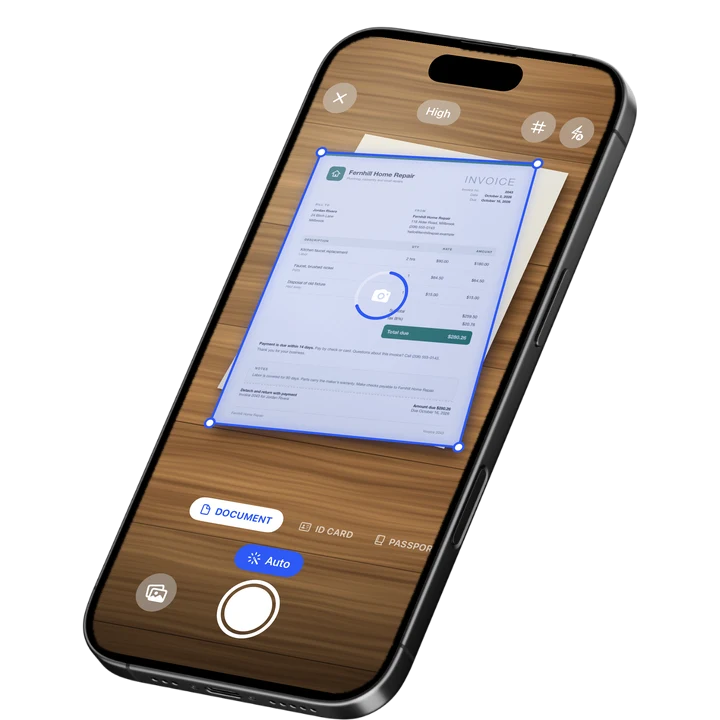
Scan a contract or invoice in Document mode, and live edge detection captures and crops the page automatically. Multi-page batch scanning with no page limit means a full contract or a stack of invoices goes in one session, not one photo at a time.
Once a document is scanned, add your signature directly on the page before sending it back to a client or vendor, and copy that signature to every page a longer contract needs. Our guide on how to sign a PDF on iPhone covers the full signing steps in more detail. If a document has sensitive numbers or client details you do not want visible in a shared copy, redact or blur those lines before exporting, and the redaction is burned into the final PDF so it cannot be undone by the person who receives it. A watermark and page numbers add a more finished look to documents you send out under your business name.
Text recognition reads the printed text on invoices and forms, so you can search for a specific client or invoice number later instead of opening files one by one, and folders let you organize everything by client or project as you build up an archive.
Key Features for Small Business
- Multi-page batch scanning with no page limit: scan a full contract or a stack of invoices in one session.
- Signature tool: sign a contract or invoice on the page and copy the signature to every page that needs it.
- Redaction and blur: hide sensitive lines before you share a document, burned into the exported PDF.
- Watermark and page numbers: give documents you send out a more finished, consistent look.
- PDF password: protect a sensitive contract or financial document before you send it.
- Folders inside folders: organize scans by client or project, with star, rename, and sort.
Pricing
See the App Store for current pricing and plans.
Best For
- Signing contracts and forms without printing them first.
- Protecting sensitive client or financial details before sharing a document.
- Keeping invoices and receipts organized and searchable by client or project.
- Working offline while scanning and signing on the go.
2. Scanner Pro - Best for Fax and Expense Report Add-Ons
Scanner Pro, from Readdle, adds fax sending and an expense report add-on on top of standard scanning, which suits a small business that occasionally needs to fax a document or file a reimbursement claim.
Key Features
- Fax Pack add-on for sending documents by fax.
- Expense Report add-on.
- Multi-page PDF export.
- Auto-crop and batch scanning.
Pricing
Scanner Pro lists Scanner Pro Plus from $3.99 to $59.99 and a Fax Pack at $0.99 on the US App Store (September 2026).
Best For
- Businesses that still need to fax documents occasionally.
- Filing the occasional expense report from a receipt photo.
3. Adobe Scan - Best for Existing Acrobat Users
Adobe Scan fits naturally into a business that already runs contracts and forms through Adobe Acrobat, since a scan lands in the same Adobe Document Cloud as everything else.
Key Features
- PDF export with a text layer you can search.
- ID card scan mode.
- Direct link to Adobe Acrobat and Adobe Document Cloud.
- Auto-crop and multi-page capture.
Pricing
Adobe Scan lists Adobe Scan Premium at $9.99 a month and Adobe Scan Plus from $4.99 a month on the US App Store (September 2026).
Best For
- Businesses already paying for Adobe Acrobat or Creative Cloud.
4. CamScanner - Best for a Wide Feature Set
CamScanner, from INTSIG, packs in a wide range of features including OCR and cloud storage, and it has the largest rating count in the category, which points to a large, established user base.
Key Features
- OCR text recognition.
- Cloud storage for scanned files.
- Fax credits as an add-on.
- Multi-page batch scanning.
Pricing
CamScanner lists Premium plans from $4.99 to $69.99 across monthly and annual terms on the US App Store (September 2026).
Best For
- Businesses that want a large, well-established feature set in one app.
5. Genius Scan - Best for Fast, Simple Scanning
Genius Scan, from The Grizzly Labs, keeps scanning fast and simple, which suits a business owner who wants to scan a document and move on without extra setup.
Key Features
- Fast auto-capture with manual crop correction.
- Genius Scan Plus and Ultra tiers for extra export and cloud options.
- Multi-page PDF export.
- Batch scanning.
Pricing
Genius Scan lists Genius Scan Plus at $0.99 and Genius Scan Ultra from $4.99 to $49.99 on the US App Store (September 2026).
Best For
- Quick scans with no extra features to learn.
6. Google Drive - Best for Teams on Google Workspace
Google Drive has a built-in scanner that saves straight into Drive, which is a natural fit for a small business that already stores files and shares folders with a team through Google Workspace.
Key Features
- Built-in document scanner inside the Drive app.
- Scans save directly into shared Drive folders.
- Works alongside Google Docs, Sheets, and team sharing.
- Storage plans for growing files.
Pricing
Google Drive lists storage plans from $1.99 to $19.99 among its in-app purchases on the US App Store (September 2026).
Best For
- Teams that already share files and folders through Google Workspace.
How to Choose a Scanner App for Small Business
The right scanner app depends on what kind of paperwork moves through your business most, not on any one feature alone. A business built on signed contracts needs different tools than one built on invoices or receipts.
- Signing: if contracts and forms need a signature before they go back out, look for a built-in signature tool instead of printing and rescanning.
- Protecting sensitive information: check for redaction and a password option if documents include client, financial, or personal details.
- Volume: a steady stream of invoices or receipts needs batch scanning with no page limit, not a one-photo-at-a-time app.
- Where files need to live: decide if you need files organized on your phone, shared with a team in the cloud, or sent by fax.
If receipts are a big part of your paperwork, our guide on the best receipt scanner apps for iPhone looks at that job specifically, and if you also collect ID copies for onboarding, see our roundup of the best ID card scanner apps for iPhone.
Frequently Asked Questions
What is the best scanner app for small business?
Filewise is the best scanner app for small business in 2026, because it scans contracts, invoices, and forms into clean PDFs, lets you sign them on the page, and adds redaction and a password for sensitive documents, all organized into folders you set up yourself. For businesses that also need fax or expense report tools, Scanner Pro adds those as extras.
Can I sign contracts with a scanner app on iPhone?
Yes. Filewise lets you draw a signature on a scanned contract or add a saved signature, then copy it to every page a longer contract needs, so you can sign and send a document without printing it.
How do I protect sensitive business documents I scan?
Filewise lets you redact or blur sensitive lines before exporting, so the hidden information cannot be recovered from the shared file, and you can add a password to the exported PDF for an extra layer of protection. This works well for contracts, financial statements, or anything with client details you do not want visible to everyone who sees the file.
Can I scan and organize invoices for my accountant?
Yes. Filewise scans invoices as sharp PDFs, reads the text with on-device recognition so you can search them later, and lets you file them into folders by month or client, then export a folder as a single PDF for your accountant.
Do I need to scan employee ID documents for onboarding?
Some small businesses do need a copy of an employee's ID as part of onboarding paperwork. Filewise's ID Card mode captures both sides of a card on one page at real size, which fits what most onboarding forms ask for.
Our Pick for the Best Small Business Scanner App
For most small businesses, Filewise is the best scanner app because it covers the whole loop from paper to signed, protected PDF, contracts, invoices, and forms included, without switching between separate apps for scanning and signing.
If fax or an expense report add-on matters for your business, Scanner Pro covers those extras, and if your team already lives in Google Workspace, Google Drive's built-in scanner keeps everything in shared folders you already use.
Get Filewise and turn your next stack of business paperwork into signed, organized PDFs.
🔒 Face ID lock | 📱 Built for iPhone