Best ID Card Scanner Apps for iPhone (2026)
TL;DR
The best ID card scanner app for iPhone in 2026 is Filewise, because its ID Card mode captures both sides of a card on one page at real size. Adobe Scan is best for Acrobat users with its own ID card mode, and Genius Scan is best for fast, simple scans. This guide compares five apps.
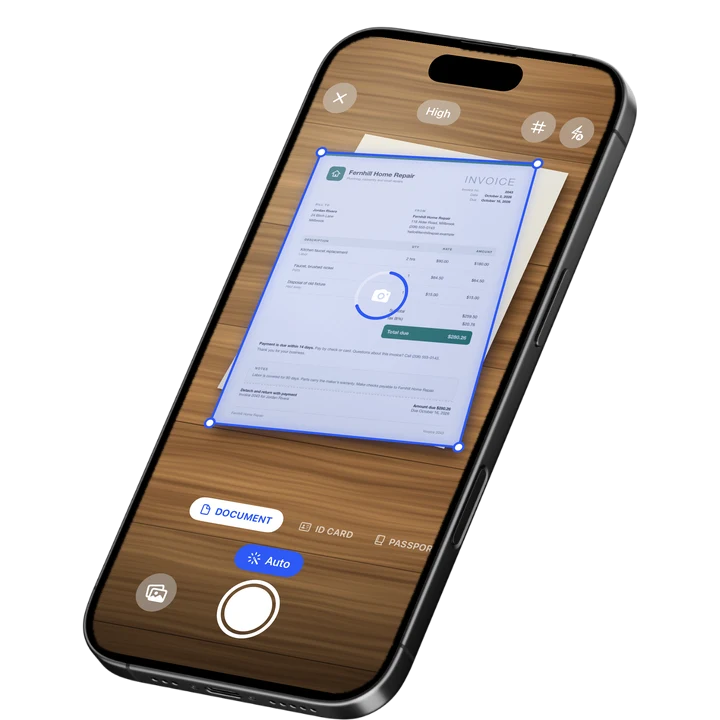

On-device OCR. Secure, built for iOS.
Best ID Card Scanner Apps for iPhone in 2026
The best ID card scanner app for iPhone in 2026 is Filewise, and here is the full ranking:
- Filewise - Best overall ID card scanner app (both sides on one page, at real size)
- Scanner - Scan PDF, ID and Docs - Best for an app built specifically around ID scanning
- Adobe Scan - Best for Acrobat users who also need ID card mode
- Genius Scan - Best for fast, simple scanning
- iScanner - Best for extra editing tools
Landlords, hotels, banks, and plenty of everyday forms ask for a copy of your ID card, front and back. Instead of photocopying it or taking two loose photos, the five apps below capture both sides cleanly on your iPhone so you have one file ready whenever it is asked for.
1. Filewise - Best Overall ID Card Scanner App for iPhone
Filewise is the best ID card scanner app for iPhone because its ID Card mode captures the front and back of a card on one page, at the card's real size, instead of two separate photos at random sizes. That single page is exactly what most forms and printed copies expect.
Get Filewise to scan both sides of an ID card onto one clean page in a few seconds.
How Filewise Handles ID Cards
Open Filewise and choose ID Card mode. Scan the front of the card, then flip it over and scan the back. Filewise places both sides on one A4 page at the card's actual size, so if you print the page or hand it over as a PDF, it reads like a real photocopy rather than two cropped phone photos of different sizes.
Because an ID card is more sensitive than an ordinary document, Filewise gives you a few ways to keep it private. You can lock the whole app with Face ID, Touch ID, or a PIN, or move a scanned ID into a Safe Folder for an extra layer of protection. ID and passport scans also stay off automatic cloud backup by default, so a copy of your card is not sent anywhere unless you choose to.
For travel, the same approach works with a passport in Passport mode, which captures the passport page the same clean way.
Key Features
- ID Card mode: both sides of a card on one page, at real size.
- Passport mode: a clean scan of a passport page for travel and applications.
- App Lock with Face ID, Touch ID, or a PIN: keep the app itself locked.
- Safe Folder: an extra layer of protection for sensitive scans.
- ID and passport scans excluded from backup by default: a copy stays on the phone unless you choose otherwise.
- Export as PDF or JPG, with a password: send a protected copy when a form asks for one.
Pricing
See the App Store for current pricing and plans.
Best For
- Renting an apartment or checking into a hotel that asks for an ID copy.
- Keeping a private backup of your ID or passport for travel.
- Forms and applications that ask for both sides of a card on one page.
- Anyone who wants a scanned ID to stay off automatic cloud backup.
2. Scanner - Scan PDF, ID and Docs - Best for an ID-Focused App
This app from Luni is built around scanning IDs and documents into PDFs, which makes it a natural pick for someone who wants an app named for exactly that job.
Key Features
- Document and ID scanning in one app.
- Multiple premium plan options.
- PDF export.
- General document editing tools.
Pricing
The app lists Premium plans from $4.99 to $19.99 on the US App Store (September 2026).
Best For
- People who want an app marketed specifically around ID and document scans.
3. Adobe Scan - Best for Acrobat Users
Adobe Scan includes its own ID card scan mode and fits naturally into a workflow that already runs through Adobe Acrobat, since a scanned card lands in the same Adobe Document Cloud as everything else you send through Acrobat.
Key Features
- ID card scan mode.
- PDF export with a text layer you can search.
- Direct link to Adobe Acrobat and Adobe Document Cloud.
- Auto-crop and multi-page capture.
Pricing
Adobe Scan lists Adobe Scan Premium at $9.99 a month and Adobe Scan Plus from $4.99 a month on the US App Store (September 2026).
Best For
- People already paying for Adobe Acrobat or Creative Cloud.
4. Genius Scan - Best for Fast, Simple Scanning
Genius Scan, from The Grizzly Labs, scans an ID card the same way it scans any document: point, capture, and export, without a dedicated ID layout.
Key Features
- Fast auto-capture with manual crop correction.
- Genius Scan Plus and Ultra tiers for extra export and cloud options.
- Multi-page PDF export.
- Batch scanning.
Pricing
Genius Scan lists Genius Scan Plus at $0.99 and Genius Scan Ultra from $4.99 to $49.99 on the US App Store (September 2026).
Best For
- Quick scans of a single card or document with no extra setup.
5. iScanner - Best for Extra Editing Tools
iScanner, from BP Mobile, bundles a scanner with extra utilities like a ruler and a math solver, useful for anyone who wants one app for several small tasks alongside scanning an ID.
Key Features
- Document and card scanning with auto-crop.
- Built-in measuring and math-solving tools.
- Multiple weekly and annual plans.
- PDF editing and merging.
Pricing
iScanner lists Premium plans from $3.99 to $19.99 across weekly and other terms on the US App Store (September 2026).
Best For
- People who want scanning bundled with other small utilities.
How to Choose an ID Card Scanner App for iPhone
The right ID card scanner app comes down to how the copy will be used and how private it needs to stay. A card that only needs to be emailed once is a different job than one you will keep on your phone for months.
- Real size and layout: check whether the app fits both sides on one page at actual size, which is what most printed forms expect.
- Privacy on the phone: look for an app lock, a private folder, and control over whether ID scans get backed up automatically.
- Offline scanning: a card is sensitive enough that scanning without sending anything over the internet is worth having.
- Export format: confirm you can export as a PDF or image and add a password if you are sending it somewhere. For general scanning basics, see our guide on how to scan documents on iPhone.
Frequently Asked Questions
What is the best ID card scanner app for iPhone?
Filewise is the best ID card scanner app for iPhone, because its ID Card mode captures both sides of a card on one page at the card's real size, instead of two separate photos. It also keeps ID and passport scans off automatic backup by default and lets you lock the app with Face ID, Touch ID, or a PIN.
Can I scan both sides of my ID card onto one page?
Yes. Filewise's ID Card mode scans the front, then the back, and places both on a single A4 page at the card's actual size, which matches what most forms and printed copies expect. Adobe Scan also offers a dedicated ID card mode if you already use Acrobat.
Is it safe to keep a scanned copy of my ID on my phone?
Filewise lets you lock the app with Face ID, Touch ID, or a PIN, move sensitive scans into a Safe Folder, and keeps ID and passport scans off automatic backup by default, so a copy stays on your phone unless you choose otherwise. How protected any file is also depends on how you secure your phone overall, such as using a passcode and keeping iOS up to date.
Do ID card scans get backed up to the cloud automatically?
No, not by default. ID and passport scans in Filewise are excluded from automatic backup, so a scanned card stays on your phone unless you choose to back it up yourself. This is different from a regular document scan, which can back up automatically if you are signed in.
Can I scan a passport with the same app?
Yes. Filewise has a separate Passport mode built for capturing a passport page cleanly, alongside the ID Card mode for cards like a driver's license or a national ID. Both work the same way as Document mode, just sized and laid out for that type of document.
Our Pick for the Best ID Card Scanner App
For most people who need to hand over a copy of an ID card, front and back, on one page, Filewise is the best ID card scanner app because its ID Card mode is built for exactly that layout, and it keeps ID and passport scans off automatic backup by default. If a lease is part of the paperwork, our guide on how to sign a PDF on iPhone covers adding your signature afterward.
If you already run your documents through Adobe Acrobat, Adobe Scan's own ID card mode keeps everything in one ecosystem. For a broader comparison of scanner apps, see our roundup of the best PDF scanner apps for iPhone.
Get Filewise and turn the front and back of any ID card into one clean page.
🔒 Face ID lock | 📱 Built for iPhone