Best Passport Scanner App for iPhone (2026)
TL;DR
The best passport scanner app in 2026 is Filewise, because its dedicated Passport mode lines up the photo page with a frame guide and keeps the scan off the Filewise cloud by default. Adobe Scan is best for a general ID card mode, CamScanner for the widest feature set, and Genius Scan for simple scanning. This guide compares 6 apps.

On-device OCR. Secure, built for iOS.
Best Passport Scanner App for iPhone in 2026
A passport scanner app turns your passport's photo page into a clean digital copy, sized and lined up correctly instead of cropped or skewed like a general document scan. Filewise ranks first because its dedicated Passport mode uses a frame guide built for the photo page and keeps those scans off the Filewise cloud by default.
The best passport scanner app for iPhone in 2026 are:
- Filewise - Best overall for scanning a passport (Passport mode with a frame guide, kept off the Filewise cloud by default)
- Adobe Scan - Best for a dedicated ID card mode
- CamScanner - Best for the widest feature set
- Scanner Pro - Best for reliable, polished scanning
- Genius Scan - Best for simple, clean scanning
- Built-in iPhone Scanner - Best for a quick capture with no extra app
Whether you are applying for a visa, checking in for a trip, or keeping a backup of your travel documents before you leave, you want a copy that is sharp enough to read every digit and every stamp. If you also need to scan a driver's license or a national ID card, our guide to the best ID card scanner app for iPhone covers that job specifically.
1. Filewise - Best Overall Passport Scanner App for iPhone
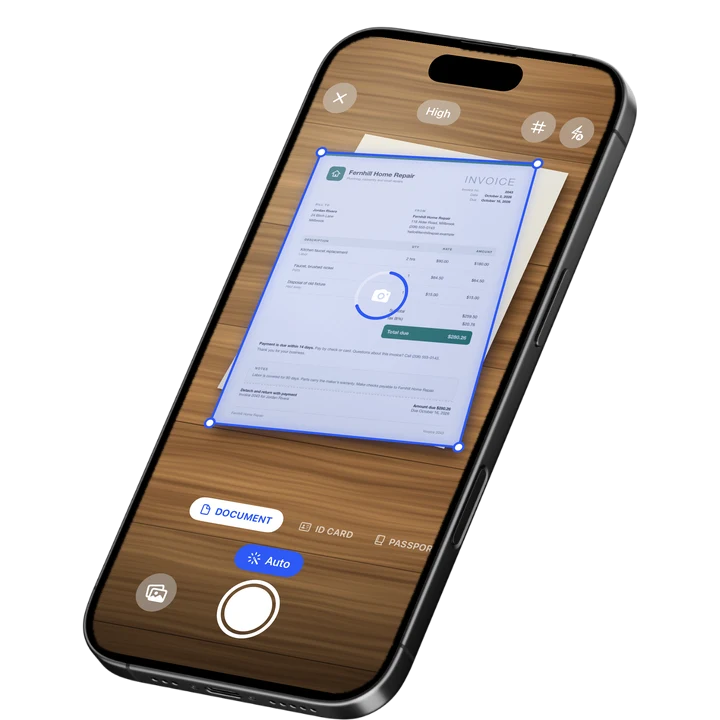
Filewise scans a passport's photo page with a dedicated Passport mode, so the frame guide lines up the page at the right size instead of guessing with a general document scan. The result is a sharp, straight copy of the photo page, ready to save or share as a PDF.
Get Filewise to scan your passport's photo page into a clean, correctly sized copy in seconds.
How Filewise Handles Passport Scans
Open Filewise and choose Passport from the scan modes. The on-screen frame guide shows exactly where to line up the photo page, so the camera captures it at the right size instead of a rough crop from a general document scan. Auto-capture waits for a steady, well-lit shot, then corrects the perspective and sharpens the page.
Because a passport carries sensitive personal data, Filewise keeps ID and passport scans off the Filewise cloud by default. You can still lock the app with Face ID, file the scan into a folder, or export it as a PDF or JPG to send to an airline, a visa office, or a bank that asks for a copy.
Key Features for Passport Scanning
- Passport mode: A frame guide sized for the photo page lines up the scan correctly, so the photo and the printed lines are not cropped or skewed.
- Kept off the cloud by default: ID and passport scans are not backed up to the Filewise cloud unless you choose to.
- Face ID lock: Lock the whole app, or a single document, behind Face ID, Touch ID, or a PIN.
- Sharp, corrected pages: Auto-capture and perspective correction turn the photo page into a straight, readable scan.
- PDF and JPG export: Export the scan as a PDF or JPG and share it through the share sheet, AirPrint, or Save to Files.
- PDF password: Add a password to the file before you send a copy of your passport anywhere.
Pricing
See the App Store for current pricing and plans.
Best For
- Travelers who want a backup copy of their passport before a trip
- Anyone applying for a visa or filling out a form that asks for a passport copy
- People who want their passport scan locked behind Face ID
- Frequent travelers who keep ID copies organized in folders
2. Adobe Scan - Best for a Dedicated ID Card Mode
Adobe Scan is a scanner from Adobe with a dedicated ID card mode built for photographing identity documents, and it holds a 4.88 rating from about 1.59 million ratings on the US App Store (September 2026). It ties into the Acrobat ecosystem, which makes it a natural pick for anyone who already uses Adobe's PDF tools.
Key Features
- ID card mode for photographing identity documents
- Automatic edge detection and perspective correction
- Text recognition on the scanned page
- Exports straight into Acrobat and Adobe's other PDF tools
Pricing
In-app purchases on the US App Store range from about $3.99 to $69.99, including an Adobe Scan Premium monthly plan at $9.99 (September 2026).
Best For
- People who already use Adobe Acrobat for other PDF work
3. CamScanner - Best for the Widest Feature Set
CamScanner from INTSIG is the most reviewed scanner on the US App Store, with a 4.84 rating from about 1.92 million ratings (September 2026), and it packs in text recognition, cloud storage, and a large template library. That range of tools makes it a common pick for people who want one app for scanning, filing, and sharing many kinds of documents, passports included.
Key Features
- Wide template library for many document types
- Text recognition
- Cloud storage and sync
- Batch scanning tools
Pricing
In-app purchases on the US App Store range from $0.99 to $69.99, including a Premium Account yearly plan at $59.99 (September 2026).
Best For
- Users who want one app that covers many scanning tasks beyond passports
4. Scanner Pro - Best for Reliable, Polished Scanning
Scanner Pro by Readdle is a long-running iOS scanner with a 4.87 rating from about 336,000 ratings on the US App Store (September 2026), known for a clean, native-feeling interface and dependable edge detection. It is a solid choice for travelers who want a straightforward scan without a steep learning curve.
Key Features
- Reliable automatic edge detection
- Text recognition and in-app search
- Several export formats
- Clean, native iOS design
Pricing
In-app purchases on the US App Store range from $0.99 to $59.99, including Scanner Pro Plus at $29.99 (September 2026).
Best For
- Travelers who want a simple, dependable scan without extra setup
5. Genius Scan - Best for Simple, Clean Scanning
Genius Scan by The Grizzly Labs holds the highest average rating among the major scanner apps, 4.9 from about 1.37 million ratings on the US App Store (September 2026), thanks to a simple interface that gets out of the way. It is a good fit for anyone who wants a fast scan of their passport page without extra steps.
Key Features
- Fast automatic edge detection and cropping
- Batch scanning into one file
- Biometric app lock
- Clean, minimal interface
Pricing
In-app purchases on the US App Store range from $0.99 to $49.99, including Genius Scan Ultra at $39.99 a year (September 2026).
Best For
- People who want the fastest, simplest scan with no extra steps
6. Built-in iPhone Scanner (Notes and Files) - Best for a Quick Capture
The scanner built into Notes and Files on iPhone photographs a document, corrects the perspective, and saves it as a PDF at no cost with no extra app to install. It works for a passport page in a pinch, though it is a general document scanner rather than one built for the size and shape of a passport's photo page. See our full walkthrough of how to scan documents on iPhone for the exact steps.
Key Features
- Built into iOS, no extra app
- Automatic edge detection and perspective correction
- Saves as a PDF to Notes or Files
- Live Text can read text in the photo
Pricing
Built into iOS at no cost.
Best For
- A one-off scan when you do not want to install another app
How to Choose a Passport Scanner App for iPhone
The most important factor is a frame guide sized for a passport's photo page, so the scan is not cropped or stretched like a general document scan. After that, look at how the app protects the file, whether it locks behind Face ID, and how easily you can export a clean PDF.
- A guide built for the photo page: A generic document scan can crop or skew a passport's photo page. A dedicated Passport or ID mode lines the page up at the right size the first time.
- Where the scan is stored: Decide whether you want a copy backed up automatically or kept only on the device until you choose to share it.
- Locking the file: Since a passport scan carries your name, photo, and passport number, look for an app that can lock the document behind Face ID, Touch ID, or a PIN.
- Export format: Confirm the app exports a PDF you can attach to an email, upload to a portal, or print, and that you can add a password before sending it.
If you scan more than just travel documents, our roundup of the best PDF scanner apps for iPhone compares the wider field.
Frequently Asked Questions
What is the best passport scanner app for iPhone in 2026?
Filewise is the best passport scanner app for iPhone in 2026 because its Passport mode uses a frame guide sized for the photo page, so the scan lines up correctly on the first try. It also keeps ID and passport scans off the Filewise cloud by default and lets you lock the file behind Face ID before you export it as a PDF.
Is it safe to scan my passport on my iPhone?
Scanning your passport on your iPhone is generally fine as long as you control where the copy is stored and who can open it. Look for an app that lets you lock the scan behind Face ID or a PIN, and check whether the app backs up ID documents automatically or keeps them on the device until you choose to share them.
Can I scan a passport with the built-in iPhone scanner?
Yes. The scanner built into Notes and Files on iPhone can photograph a passport's photo page, correct the perspective, and save it as a PDF at no cost. It is a general document scanner rather than one sized for a passport page, so the crop and framing are less precise than a dedicated Passport mode.
What format should I use to save a scanned passport?
A PDF is the most widely accepted format for sharing a scanned passport with an airline, a visa office, or a bank, since it keeps the page as one file and prints cleanly. A JPG works too if a form specifically asks for an image file.
Do I need to scan both the photo page and the visa pages?
Most requests only ask for the photo page, which carries your name, photo, passport number, and expiry date. Read the specific instructions from the airline, embassy, or office asking for the copy, since some visa applications also ask for a recent entry stamp or a particular visa page.
Our Pick for the Best Passport Scanner App
Filewise is the strongest overall pick because its Passport mode is built for the shape and size of a passport's photo page, and it keeps that sensitive scan off the Filewise cloud by default. That combination of a correctly framed scan and sensible privacy handling is exactly what you want before a trip or a visa application.
If you already live inside Adobe's PDF tools, Adobe Scan's ID card mode is a reasonable alternative, and if you want the simplest possible interface, Genius Scan gets a clean scan with the fewest taps.
Get Filewise and scan your passport's photo page into a sharp, correctly sized copy before your next trip.
🔒 Face ID lock | 📱 Built for iPhone