Best App to Scan Documents for Visa Applications
TL;DR
The best app to scan documents for a visa application in 2026 is Filewise, because its Passport mode and Document mode turn a passport page or a bank statement into a clean PDF ready to upload. Adobe Scan suits OCR accuracy, Genius Scan suits quick single pages, and iScanner suits editing after the scan. This guide compares 6 apps.
 Filewise - PDF Scanner
Scan documents to PDF on iPhone
- Get a sharp, professional PDF in one tap.
- Find any word later with on-device text recognition.
- Sign and send polished documents.
- Confidential files stay locked behind Face ID.
- Reliable and native, built for iOS.
On-device text recognition. Secure, built for iOS.
Best App to Scan Documents for Visa Applications in 2026
The best apps to scan documents for a visa application in 2026 are:
- Filewise - Best overall for passport pages, forms, and financial proof in one clean set
- Adobe Scan - Best for OCR accuracy on printed statements
- Genius Scan - Best for a quick single-page scan
- iScanner - Best for editing a scan after capture
- CamScanner - Best for a large batch of supporting documents
- Scanner Pro - Best for power users who scan often
A visa application usually comes with a checklist: your passport's bio page, a completed application form, bank statements, an invitation or accommodation letter, sometimes a photo. Most consulates and visa centers want these as clean, legible files, not blurry phone photos with a corner of the table in frame. A good scanning app to scan documents for a visa application turns that stack of paper into a set of PDFs a visa officer can actually read, using the same core scanning steps that work for any paperwork on iPhone.
1. Filewise - Best Overall App to Scan Documents for Visa Applications
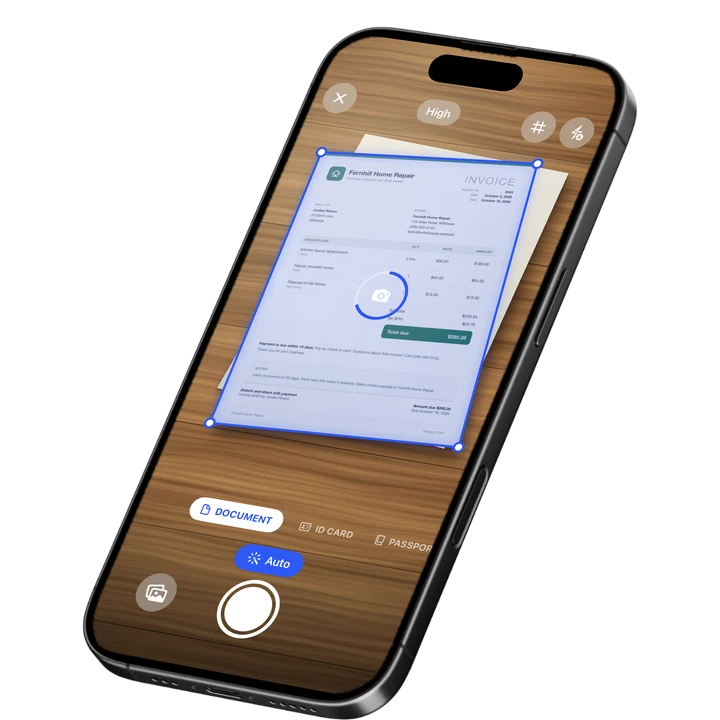
Filewise has a dedicated Passport mode and a Document mode, so a passport's photo page and a bank statement each get scanned the right way, sharp, cropped straight, and ready as a PDF. That matters when a visa portal rejects a blurry or crooked upload and sends you back to the start.
Get Filewise to scan your passport page, forms, and financial proof into clean PDFs before you sit down to fill out the application.
How Filewise Handles Visa Application Documents
A visa checklist is really several different kinds of paper: a passport page, a printed bank statement, an invitation letter, maybe a printed itinerary. Filewise's Passport mode captures the passport photo page at the right proportions, while Document mode handles standard letter-size paper like statements and letters, with live edge detection squaring up each page automatically.
Once everything is scanned, multi-page batch scanning with no page limit means a 6-page bank statement stays as one PDF instead of six separate images. Page size options (Original, A4, Letter, Legal) let you match whatever size the paper actually is, so the scan looks like the original document, not a stretched or cropped version of it.
Before you upload or email the set, a PDF password protects the file, which is worth doing for anything containing bank statements or a passport image. Folders keep the whole application's documents together in one place, so nothing gets missed when a consulate asks for the full set again at the interview.
Key Features for Visa Application Documents
- Passport mode: Captures a passport's photo page at the correct proportions for a clean, legible scan.
- Document mode with page sizes: Matches the scan to the paper's real size (A4, Letter, Legal), so statements and letters look right.
- Multi-page batch scanning: Scan every page of a bank statement or a multi-page letter as one PDF, with no page limit.
- On-device OCR: Text recognition reads the scan so you can search your documents by name or date before you submit them.
- PDF password: Protect a file containing financial or passport information before you email or upload it.
- Folders: Group everything for one application in a single folder, so the full set travels together.
Pricing
See the App Store for current pricing and plans.
Best For
- Applicants who need a passport page, forms, and financial proof scanned cleanly in one session
- Anyone submitting documents through an online visa portal that rejects blurry uploads
- Families scanning multiple passports and statements for a group application
- Applicants who want the whole document set organized in one folder before an interview
2. Adobe Scan - Best for OCR Accuracy
Adobe Scan (Adobe Inc.) is rated 4.88 from 1,594,067 ratings (September 2026) and is known for accurate text recognition on printed pages. It suits applicants who want to double-check that a scanned bank statement reads correctly before submitting it.
Key Features
- Strong OCR on printed statements and letters
- ID card capture mode
- Links to Adobe Acrobat for further edits
Pricing
Adobe Scan lists Premium at $9.99 monthly and other tiers on the US App Store (September 2026).
Best For
- Applicants who want to verify OCR text on a printed statement
- Readers who already use Adobe Acrobat for other paperwork
3. Genius Scan - Best for a Quick Single Page
Genius Scan (The Grizzly Labs) is rated 4.9 from 1,365,119 ratings (September 2026), the highest average rating among the major scanner apps. It suits scanning one form or one letter quickly without extra steps.
Key Features
- Fast capture with automatic edge detection
- Export as PDF or JPG
- Plus and Ultra tiers for extra export options
Pricing
Genius Scan lists Plus at $0.99 to $11.99 and Ultra at $4.99 to $49.99 on the US App Store (September 2026).
Best For
- A single form or letter scanned quickly
- Applicants who want the simplest possible flow
4. iScanner - Best for Editing After the Scan
iScanner (BP Mobile) is rated 4.76 from 1,403,483 ratings (September 2026) and includes editing tools alongside scanning. It suits applicants who need to touch up a scan, such as adjusting brightness on a faded letter, before submitting it.
Key Features
- Scanning plus a PDF editor in one app
- Weekly and other plan options
- Filters for contrast and brightness
Pricing
iScanner lists Premium plans from $3.99 to $19.99 on the US App Store (September 2026).
Best For
- Applicants who want to edit a scan's brightness or contrast before submitting
5. CamScanner - Best for a Large Batch of Documents
CamScanner (INTSIG Information) is rated 4.84 from 1,924,088 ratings (September 2026), with the largest rating count in the category. It suits an application with many supporting documents to scan in one sitting.
Key Features
- Batch scanning across many pages
- OCR text recognition
- Cloud storage tiers
Pricing
CamScanner lists Premium Account plans from $4.99 to $59.99 on the US App Store (September 2026).
Best For
- Applications with a long list of supporting documents to scan at once
6. Scanner Pro - Best for Power Users
Scanner Pro (Readdle) is rated 4.87 from 335,985 ratings (September 2026). It is a full-featured scanner for applicants who scan often and want extra tools like an expense report add-on.
Key Features
- Fast, reliable scanning with edge detection
- Export presets and cloud folder integration
- Optional expense report add-on
Pricing
Scanner Pro lists Plus at $3.99 to $59.99 on the US App Store (September 2026).
Best For
- Frequent travelers who scan documents for more than one application
How to Choose an App to Scan Documents for a Visa Application
The factor that matters most is whether the visa portal will accept the file, since a rejected upload can cost you a day or more waiting for a new appointment slot. A few other factors follow from there.
- File format and size: Most portals want a PDF or JPEG under a stated size limit. Check your destination's official visa or consulate site for the exact format and size before you scan, since requirements differ by country.
- Legibility: A crooked or blurry scan of a passport page or a bank statement is one of the most common reasons an upload gets rejected. Edge detection and a sharp capture solve this.
- Completeness: A multi-page bank statement needs to stay as one file, not several loose images, so nothing looks missing.
- Keeping the set together: A single folder with every document for one application makes it easy to bring the same set to an in-person interview.
The same passport-scanning approach also works well for the best passport scanner apps, and students preparing a visa alongside university paperwork may also want to see the best app to scan documents for college applications.
For the US nonimmigrant visa process, the DS-160 form itself only asks you to upload a passport-style photo. Everything else, your passport, financial proof, and any invitation letter, is prepared and brought to the interview rather than uploaded with the form (travel.state.gov). Other countries and consulates run their own online portals with their own upload rules, so always check the specific portal you are applying through. This is general information, not immigration advice.
Frequently Asked Questions
What is the best app to scan documents for a visa application?
Filewise is the best app to scan documents for a visa application because its Passport mode and Document mode produce clean, correctly sized scans of a passport page, forms, and financial statements, and folders keep a whole application's paperwork together.
What format do visa portals usually want for scanned documents?
Most ask for a PDF or JPEG file under a stated size limit, though the exact format and size differ by country and consulate. Always check the official visa portal for your destination before scanning, since a rejected format can cost you time.
Can I scan my passport with my phone instead of photocopying it?
Yes. A Passport mode in a scanning app captures the photo page at the right proportions and produces a sharp, flat scan, which is usually clearer than a photocopy from an office machine.
Do I need to scan every page of a bank statement?
Most portals and consulates want the full statement, not just the summary page, since it shows the transaction history behind the balance. Scan every page as one multi-page PDF so nothing looks missing.
Should I password-protect scanned visa documents before emailing them?
It is a sensible habit, since these files often contain a passport image and financial details. A PDF password adds a layer of protection if the file is emailed to a third party or an agent helping with the application.
How should I keep documents for a family visa application organized?
Group each family member's passport, form, and financial proof into its own folder within a shared folder for the trip, so nothing gets mixed up when you are asked to produce one person's set at the interview.
Our Pick for Scanning Visa Application Documents
Filewise is the best pick for most applicants because a visa checklist mixes a passport page, printed statements, and letters, and Filewise's Passport and Document modes handle each one the right way instead of forcing every page through the same generic capture. If you specifically want to double-check OCR accuracy on a dense statement, Adobe Scan is a solid alternative, and if you just need one page scanned fast, Genius Scan gets it done in a tap.
Before your next visa appointment, scan the full set once, check it against the portal's checklist, and you are done. Get Filewise and turn your visa paperwork into one clean, organized set of PDFs.
🔒 Face ID lock | 📱 Built for iPhone