Best HSA Receipts App for iPhone in 2026
TL;DR
The best HSA receipts app in 2026 is Filewise, because it turns a paper pharmacy or clinic receipt into a sharp PDF you can find again by its text months later. Expensify and Shoeboxed suit expense reports, Genius Scan suits quick single receipts, and Adobe Scan suits OCR accuracy. This guide compares 6 apps.
 Filewise - PDF Scanner
Scan documents to PDF on iPhone
- Get a sharp, professional PDF in one tap.
- Find any word later with on-device text recognition.
- Sign and send polished documents.
- Confidential files stay locked behind Face ID.
- Reliable and native, built for iOS.
On-device text recognition. Secure, built for iOS.
Best HSA Receipts App in 2026
The best HSA receipts app in 2026 are:
- Filewise - Best overall for keeping sharp, dated proof of every medical expense, searchable in the app
- Expensify - Best for building expense reports from receipt data
- Shoeboxed - Best for mailing in paper receipts for data entry
- Genius Scan - Best for a quick single-receipt scan
- Adobe Scan - Best for OCR accuracy on printed receipts
- CamScanner - Best for scanning a large batch of receipts at once
If you have an HSA or FSA, you already know the drill. You pay at the pharmacy counter or the dentist's front desk, the receipt goes in your bag, and three months later your plan administrator asks for proof before they will reimburse you. By then the paper is faded or gone. An HSA receipts app fixes this by turning every receipt into a clean PDF the moment you get it, so you always have proof ready when a claim gets flagged. The same habit that keeps invoices organized on iPhone works just as well for medical receipts.
1. Filewise - Best Overall HSA Receipts App for iPhone
Filewise turns a paper HSA or FSA receipt into a sharp, dated PDF in seconds, right when you are still standing at the counter. It reads the text on the receipt so you can search your scans later by provider name or amount, which matters most when an administrator asks for a receipt you filed six months ago.
Get Filewise and scan every HSA and FSA receipt the moment you get it, so proof of purchase is never the thing standing between you and reimbursement.
How Filewise Handles HSA and FSA Receipts
Most FSA and HSA claims get flagged for one reason: the receipt does not show what the IRS and your plan administrator need to see, which is who was treated, the provider, the date, what was purchased, and the amount (IRS Publication 502). A credit card slip alone does not show this, so keeping the itemized paper receipt, or a clear scan of it, is what actually protects a claim.
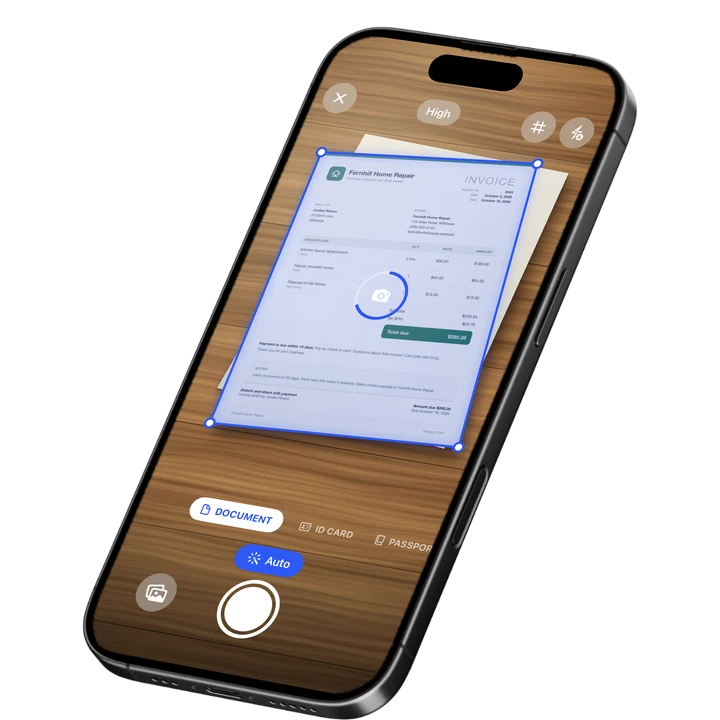
Open Filewise, point the camera at the receipt, and edge detection squares up the page and produces a crisp, readable PDF, even on the thin, curling paper pharmacies print on. Scan the front and back if a coupon or itemized list is printed on both sides, and Filewise keeps them as one document instead of two loose files.
Text recognition (OCR) runs on the iPhone, so once a receipt is scanned you can search your library for a provider's name, a dollar amount, or a date instead of scrolling through months of photos. Group a week or a quarter of receipts into a folder named for your HSA plan year, so if an administrator later asks for backup, you open one folder instead of hunting through Photos.
Key Features for HSA and FSA Receipts
- Sharp, dated scans: Live edge detection and auto-capture turn a receipt into a clean, readable PDF in one tap, so a faded thermal receipt stays legible long after the original has gone blank.
- On-device OCR search: Text recognition reads the receipt so you can search your scans by provider, date, or amount instead of scrolling through images.
- Multi-page batch scanning: Scan a whole envelope of receipts in one session with no page limit, then split or reorder them later if needed.
- Folders: Organize receipts into folders inside folders, for example by plan year or by dependent, so a claim packet is one tap away.
- Password protection: Add a PDF password before you email a batch of receipts to your plan administrator or your accountant.
- Export and share: Export as PDF or JPG and share by email, AirDrop, or a share link with an expiry date.
Pricing
See the App Store for current pricing and plans.
Best For
- Anyone with an HSA or FSA who needs proof ready before a claim gets flagged
- Parents tracking a family's medical, dental, and vision receipts in one place
- Freelancers and small-business owners who also file receipts for taxes
- Anyone who has lost a reimbursement because a paper receipt faded or went missing
2. Expensify - Best for Building Expense Reports
Expensify is an expense-report app that reads a receipt photo and pulls out the merchant, date, and amount to build a report automatically (September 2026). It fits people who already run expense reports for work and want their HSA receipts filed the same way.
Key Features
- SmartScan reads receipt data into expense report fields automatically
- Categorizes spending and exports reports for approval or reimbursement
- Syncs to accounting tools many small businesses already use
- Works alongside a corporate card or personal reimbursement workflow
Pricing
Expensify lists a Monthly Subscription at $4.99 on the US App Store (September 2026).
Best For
- People who already build expense reports for work and want HSA receipts in the same flow
- Small-business owners tracking mixed business and medical spending
3. Shoeboxed - Best for Mailing In Paper Receipts
Shoeboxed is a receipt and mileage tracking service where you can mail in a physical stack of paper receipts for someone else to data-enter and file (September 2026). It suits people who would rather post a shoebox of receipts than scan them one at a time.
Key Features
- Human data entry from mailed-in paper receipts
- Mileage tracking alongside receipt storage
- Searchable receipt archive once entries are processed
- Plans built around volume of receipts per month
Pricing
Shoeboxed lists a Starter Plan at $4.99 and other tiers up to a Pro Plan at $19.99 on the US App Store (September 2026).
Best For
- People with a large backlog of paper receipts who prefer not to scan them
- Anyone who wants receipt data entered for them rather than doing it themselves
4. Genius Scan - Best for a Quick Single Receipt
Genius Scan (The Grizzly Labs) is a fast, simple scanner that suits grabbing one receipt quickly and moving on (4.9 from 1,365,119 ratings, September 2026). It is a solid pick when you just need one clean PDF and are not building a filing system.
Key Features
- Quick capture with automatic edge detection
- Export as PDF or JPG
- Genius Scan Plus and Ultra tiers add extra export and cloud options
Pricing
Genius Scan lists Plus at $0.99 to $11.99 and Ultra at $4.99 to $49.99 on the US App Store (September 2026).
Best For
- A single receipt scanned in a hurry
- Readers who want the simplest possible scan-and-export flow
5. Adobe Scan - Best for OCR Accuracy
Adobe Scan (Adobe Inc.) is a well-known scanner with strong text recognition, rated 4.88 from 1,594,067 ratings (September 2026). It suits readers who want accurate OCR on printed receipts and already use other Adobe tools.
Key Features
- OCR that reads printed and some handwritten text
- Links scans to Adobe Acrobat and Adobe PDF Pack for further editing
- ID card capture mode
Pricing
Adobe Scan lists Premium at $9.99 monthly and other tiers, plus Adobe PDF Pack at $9.99 on the US App Store (September 2026).
Best For
- Readers who already use Adobe Acrobat for other paperwork
- Printed receipts where OCR accuracy matters most
6. CamScanner - Best for a Large Batch of Receipts
CamScanner (INTSIG Information) is a widely used scanner with a large feature set, rated 4.84 from 1,924,088 ratings (September 2026). It suits scanning a whole quarter's worth of receipts in one long session.
Key Features
- Batch scanning across many pages in one session
- OCR text recognition
- Cloud storage tiers for larger archives
Pricing
CamScanner lists Premium Account plans from $4.99 to $59.99 on the US App Store (September 2026).
Best For
- Clearing out a large backlog of receipts in one sitting
- Readers who want cloud storage bundled with scanning
How to Choose an App for HSA and FSA Receipts
The factor that matters most is whether the scan stays legible and findable months later, since that is exactly when a plan administrator asks for it. A few other factors decide the rest.
- Legibility over time: Thermal receipts fade fast. A sharp, high-contrast scan protects you even after the original paper has gone blank.
- Searchability: OCR means you can find a receipt by typing a provider name or amount instead of scrolling through a camera roll.
- Organization: Folders by plan year or by dependent turn a pile of receipts into a claim packet you can hand over in one file.
- Sharing: A password on the PDF, or a share link, matters when you are emailing receipts to an administrator or an accountant.
If you also handle bookkeeping alongside medical receipts, the same scanning habits carry over to the general best PDF scanner apps for iPhone and to the tools accountants use to scan documents for accountants.
Frequently Asked Questions
What is the best HSA receipts app in 2026?
Filewise is the best HSA receipts app in 2026 because it produces a sharp, dated PDF from a paper receipt in seconds and lets you search your scans by provider or amount, and folders keep a plan year's receipts together for when an administrator asks for proof.
What information does an HSA or FSA receipt need to show?
A qualifying receipt needs to show who received the service, the provider's name, the date, a description of what was purchased or performed, and the amount charged. A credit card slip alone usually does not show all of this, which is why keeping the itemized paper receipt or a clear scan of it matters (IRS Publication 502).
Can I scan a receipt printed on both sides?
Yes. Scan the front, then the back, and keep them as pages of the same document instead of two separate files, so the full receipt travels together when you share it or file it.
How long should I keep HSA and FSA receipts?
Keep receipts for as long as your plan administrator's audit window and your own tax records require, since a claim can be reviewed well after it was paid. This is general information, not tax advice, so check your plan's specific rules.
Can I search old receipts by provider name?
Yes, if the app runs text recognition on the receipt. Filewise reads the text on the iPhone when you scan, so you can later search your library by provider name, date, or amount instead of opening each file one by one.
Is it worth password-protecting a folder of medical receipts?
Yes. Medical receipts often show a provider's name and sometimes a condition or medication, so a password on the PDF before you share a batch by email is a sensible habit, especially for a folder covering a full plan year.
Our Pick for the Best HSA Receipts App
Filewise is the best pick for most people because the whole point of an HSA or FSA receipt is that it still has to be legible and findable when a claim gets flagged, and that is exactly what a sharp, organized scan, searchable in the app, gives you. If you already run expense reports for work, Expensify's automatic data extraction may fit your existing workflow better, and if you would rather mail in a shoebox of paper, Shoeboxed does that for you.
For most HSA and FSA holders, the fastest habit is the one you can do at the counter: scan the receipt, and move on. Get Filewise and keep every receipt ready before your plan administrator ever asks for it.
🔒 Face ID lock | 📱 Built for iPhone