Best Scanner App for Accountants (2026)
TL;DR
The best scanner app for accountants in 2026 is Filewise, because it scans client records into a redacted PDF, its text searchable in the app, and locks it with a password before it leaves the office. Adobe Scan suits text recognition, Expensify suits expense data from receipts, and CamScanner suits high-volume batch scanning. This guide compares 5 apps.
 Filewise - PDF Scanner
Scan documents to PDF on iPhone
- Get a sharp, professional PDF in one tap.
- Find any word later with on-device text recognition.
- Sign and send polished documents.
- Confidential files stay locked behind Face ID.
- Reliable and native, built for iOS.
On-device text recognition. Secure, built for iOS.
Best Scanner App for Accountants in 2026
The best scanner app for accountants in 2026 turns client paperwork into a clean PDF, its text searchable in the app, and keeps sensitive numbers under control. The top picks are:
- Filewise - Best overall scanner app for accountants (redacted, password-protected client records, searchable in the app)
- Adobe Scan - Best for text recognition on scanned statements
- Expensify - Best for expense data pulled from client receipts
- CamScanner - Best for high-volume batch scanning
- iLovePDF - Best for editing PDFs beyond scanning
A client drops off a folder of receipts, a W-2 arrives as a photo on a phone, and a bank statement needs to be scanned and filed before the return goes out. An accountant needs a scanner app that keeps client numbers private, finds a document again months later, and files everything by client and year.
1. Filewise - Best Overall Scanner App for Accountants
Filewise scans client paperwork into a sharp PDF, reads the text so you can find it again in the app, then lets you cover a Social Security number before it goes anywhere and lock the finished file with a password. That covers the three things client records need most: clarity, privacy, and organization.
Get Filewise to scan a client's paperwork, redact anything sensitive, and file it away in seconds.
How Filewise Handles Client Records
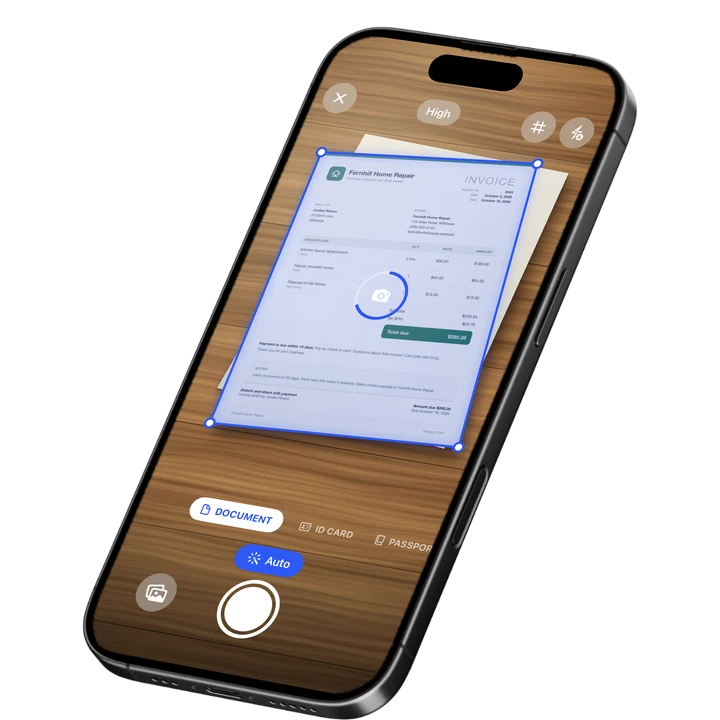
Document mode scans a stack of receipts, statements, or forms in one batch with no page limit, so a full client folder becomes one organized PDF instead of dozens of loose photos. Text recognition reads the scanned text in up to 25 languages, so a document can be found again later by searching its content instead of scrolling through folders. Some languages need a newer version of iOS.
Before a document leaves your hands, redaction boxes cover a Social Security number or account number, burned into the exported file rather than sitting on top of it. A PDF password then locks the finished record, and App Lock with Face ID or a PIN keeps the app itself closed to anyone else who picks up your phone.
A Safe Folder adds another layer for the most sensitive files, and the 30-day trash means a document deleted by mistake during a busy week is not gone for good right away.
Key Features for Accountants
- Text recognition and search: Read scanned text in up to 25 languages and search your documents by that text afterward.
- Redaction: Cover a Social Security number or account number, burned into the exported PDF.
- PDF password: Lock a client's financial records before sharing them.
- Export as DOCX: Turn recognized text into a Word file when you need editable text rather than an image.
- Folders: Organize records by client and tax year.
- App Lock: Face ID, Touch ID, or a PIN keeps the app closed to anyone else.
Pricing
See the App Store for current pricing and plans.
Best For
- Accountants handling client receipts, statements, and tax forms
- Keeping a Social Security number or account number private before sharing a document
- Organizing records by client and fiscal year
- Finding a specific scanned document again by searching its text
2. Adobe Scan - Best for Text Recognition on Scanned Statements
Adobe Scan reads the text on a scanned page and links into the wider Adobe Acrobat ecosystem, which suits accountants who already work with Acrobat for client files.
Key Features
- Text recognition on scanned documents
- Links into Adobe Acrobat for further editing
- ID card scan mode
- Wide adoption with a large existing user base
Pricing
In-app purchases range from about $3.99 to $69.99 across monthly and yearly plans (US App Store, September 2026). Rated 4.88 from 1,594,067 ratings (September 2026).
Best For
- Accountants already using Adobe Acrobat for client files
- Statements that need to be searched by text later
3. Expensify - Best for Expense Data Pulled from Client Receipts
Expensify reads a photographed receipt and pulls out the amount, date, and merchant automatically, which suits an accountant building an expense report for a client from a pile of paper receipts.
Key Features
- Automatic data extraction from photographed receipts
- Expense report building for client reimbursement
- Categorizing spending for a report
Pricing
A Monthly Subscription lists around $4.99 on the US App Store (September 2026). Rated 4.63 from 157,160 ratings (September 2026).
Best For
- Building a client expense report from a stack of receipts
- Automatic data extraction instead of manual entry
4. CamScanner - Best for High-Volume Batch Scanning
CamScanner is one of the most widely used scanner apps, with a broad feature set that suits an accountant scanning a large volume of client paperwork during tax season.
Key Features
- Batch scanning and OCR text recognition
- A wide range of plan tiers and add-ons, including fax credits
- Cloud storage for scanned documents
- Large, long-established user base
Pricing
In-app purchases range from about $0.99 to $69.99 across several plan tiers (US App Store, September 2026). Rated 4.84 from 1,924,088 ratings (September 2026), the largest rating count in the category.
Best For
- High-volume scanning during a busy tax season
- Accountants who want a wide range of built-in options
5. iLovePDF - Best for Editing PDFs Beyond Scanning
iLovePDF is a PDF editor built for working with files after they are already digital, which suits an accountant merging several statements into one file or making small edits to an existing PDF.
Key Features
- Merging and editing existing PDF files
- Scanning built into the same app
- Tools for converting between file formats
Pricing
Premium plans list around $44.99 yearly on the US App Store (September 2026). Rated 4.76 from 51,650 ratings (September 2026).
Best For
- Merging several client statements into one file
- Editing an existing PDF rather than scanning a new one
How to Choose a Scanner App for Accountants
The right app depends on what kind of client work you handle most. Four things matter most.
- Keeping client data private: A Social Security number or account number sometimes needs to be covered before a document is shared, and a password on the finished file adds another layer before it leaves your hands.
- Finding a document again: Text recognition that lets you search scanned documents by their content saves time when a client calls about a receipt from eight months ago.
- Extracting expense data: If client work involves building expense reports from receipts, a specialist tool like Expensify saves manual entry that a general scanner does not handle.
- Organizing by client and year: Folders sorted by client and tax year keep records easy to find during a busy filing season.
The IRS generally recommends keeping supporting business records for at least three years, longer in some cases such as employment tax records, according to IRS recordkeeping guidance. This is general information, not tax or legal advice, and specific retention periods can vary by situation.
If you also handle small business clients more broadly, see our guide to the best scanner app for small business. Accountants who need to compress a large client file before emailing it can see how to compress a PDF on iPhone.
Frequently Asked Questions
What is the best scanner app for accountants?
Filewise is the best scanner app for accountants because it scans client paperwork into a PDF, its text searchable in the app, redacts sensitive numbers, and locks the finished file with a password. Those three things cover most of what client records need before they are filed or shared.
Can I redact a Social Security number on a scanned document?
Yes. Filewise lets you cover a Social Security number or account number with a redaction box that is burned into the exported PDF, so the number cannot be revealed later the way it could with a highlight or box drawn on top of the text.
How long should I keep digital copies of client tax records?
The IRS generally recommends keeping supporting records for at least three years, with longer periods for some employment tax records. This is general information, not tax or legal advice, so check current IRS guidance or a tax professional for a specific client situation.
Can I search my scanned documents by their text later?
Yes. Filewise recognizes text on a scanned page and lets you search your documents by that text afterward, which makes it faster to find one client's receipt or statement among a large set of scans.
Can I share a scanned document with a client through a link instead of email?
Yes. Filewise can create a share link to a document with an expiry date, and you can revoke the link or see how many times it has been viewed. This keeps a sensitive file from sitting in an email inbox indefinitely.
Can I export a scanned document as a Word file instead of a PDF?
Yes. Filewise can export the recognized text from a scan as a Word (DOCX) file, alongside PDF, JPG, and TXT options, which is useful when you need editable text rather than an image of the page.
Our Pick for the Best Scanner App for Accountants
For most client work, Filewise covers the full task: scanning a stack of receipts or statements, redacting anything sensitive, and locking the finished file before it goes anywhere.
Expensify is the stronger pick specifically for pulling expense data out of receipts, and CamScanner suits a high volume of scanning during a busy filing season.
Get Filewise and keep your next client's records organized, searchable, and secure.
🔒 Face ID lock | 📱 Built for iPhone