Best App to Scan Invoices on iPhone (2026)
TL;DR
The best app to scan invoices on iPhone in 2026 is Filewise, because it turns a paper invoice into a sharp PDF, its text searchable in the app, and keeps it in folders you organize yourself. Adobe Scan is best for OCR, Genius Scan for a clean, simple interface, and Expensify for full expense reports. This guide compares 6 apps.
 Filewise - PDF Scanner
Scan documents to PDF on iPhone
- Get a sharp, professional PDF in one tap.
- Find any word later with on-device text recognition.
- Sign and send polished documents.
- Confidential files stay locked behind Face ID.
- Reliable and native, built for iOS.
On-device text recognition. Secure, built for iOS.
Best App to Scan Invoices on iPhone in 2026
The best apps to scan invoices on iPhone in 2026 are:
- Filewise - Best overall for scanning and keeping invoices as clean PDFs, searchable inside the app
- Adobe Scan - Best for OCR on typed invoice text
- Genius Scan - Best for a clean, minimal interface
- Scanner Pro - Best for an add-on expense report tool
- CamScanner - Best for a wide feature set in one app
- Expensify - Best for full expense reports with receipt data pulled into fields
A stack of paper invoices is easy to lose, and a photo roll full of blurry shots is hard to search when you need one specific invoice for a client dispute or your taxes. Scanning invoices into clean PDFs on your iPhone, right when they land on your desk, keeps that paper trail in one place, alongside the rest of the paperwork covered in our best scanner app for small business guide.
1. Filewise - Best Overall App to Scan Invoices
Filewise turns a paper invoice into a sharp, cropped PDF in a few taps, then reads the text so you can find every invoice again after scanning, without retyping anything. That is the core job for most freelancers and small businesses: get the invoice off your desk and into a file you can find again in seconds.
Get Filewise to scan your next stack of invoices into clean PDFs before they get lost in a drawer.
How Filewise Handles Invoices
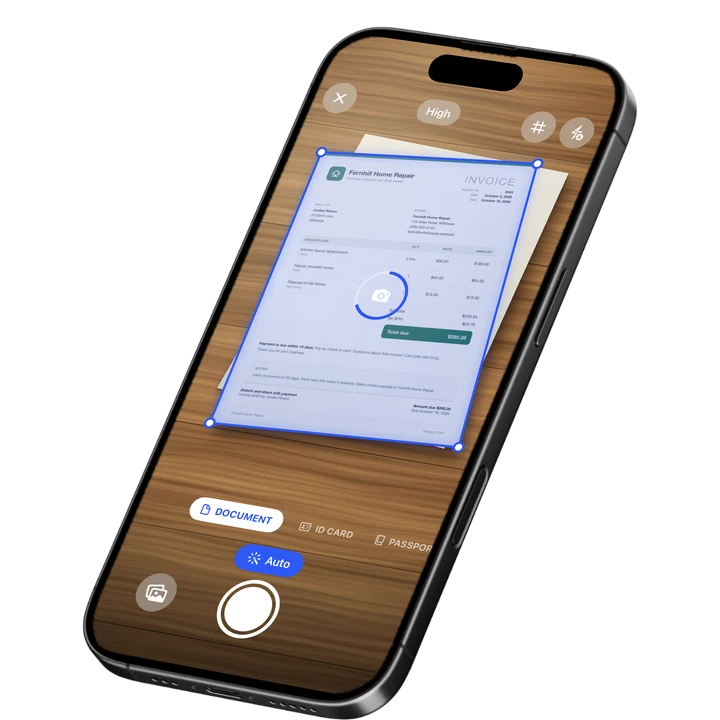
Scan each invoice in Document mode, and live edge detection squares up the page as you shoot, even if the paper is slightly crooked on your desk. Text recognition then runs on the device, so you can search your scans for a client name, an invoice number, or an amount later, without opening every file one by one. Batch scanning with no page limit means a multi-page invoice or a whole folder of receipts from one trip becomes a single PDF instead of dozens of loose images.
Once scanned, you decide where each invoice goes. Create folders by client, month, or project, star the ones you need quickly, and use the 30-day trash if you delete one by mistake. If an invoice needs to be sent on with sensitive pricing details removed, redact that part before you export it.
Key Features for Invoices
- Sharp, cropped scans: Edge detection and auto-capture turn a photo of an invoice into a clean, straight PDF.
- On-device text recognition: Search your scans by the text on the invoice after scanning, right on your iPhone.
- Multi-page batch scanning: Scan a multi-page invoice or a stack of receipts as one PDF, with no page limit.
- Folders you organize: Create folders by client, month, or project, and sort, star, or filter as your invoice pile grows.
- Export as PDF or DOCX: Export a clean PDF for records, or a Word file with the recognized text.
- Redaction: Black out a rate or account number before forwarding an invoice to someone else.
Pricing
See the App Store for current pricing and plans.
Best For
- Freelancers who need every invoice in one searchable place
- Small business owners keeping a clean paper trail for taxes
- Anyone who wants an invoice scanned and filed in under a minute
- Redacting pricing details before forwarding an invoice
2. Adobe Scan - Best for OCR on Invoice Text
Adobe Scan is a scanning app from Adobe with automatic capture and on-device text recognition, useful when you want the typed totals and line items on an invoice to be part of what you can search later.
Key Features
- Automatic edge detection and capture
- Text recognition (OCR) on every scan
- Business card scan mode
- Ties into the wider Adobe Acrobat ecosystem
Pricing
Adobe Scan Premium is listed from about $3.99 to $69.99 across its plans (September 2026).
Best For
- Anyone who wants OCR on every invoice by default
- People already using Adobe Acrobat for other paperwork
3. Genius Scan - Best for a Clean, Minimal Interface
Genius Scan, from The Grizzly Labs, holds a 4.9 rating from 1.37 million reviews (September 2026), the highest average of the major scanner apps, built around a clean, fast scanning workflow.
Key Features
- Fast perspective correction and cropping
- Batch scanning into a single PDF
- A simple, uncluttered interface
- Works fully offline
Pricing
Genius Scan Plus is listed at $0.99 to $11.99, and Genius Scan Ultra from $39.99 to $49.99 (September 2026).
Best For
- Freelancers who scan a handful of invoices a month
- Anyone who wants a minimal interface over a large feature list
4. Scanner Pro - Best for an Add-On Expense Report Tool
Scanner Pro, from Readdle, holds a 4.87 rating from 335,985 reviews (September 2026) and offers an Expense Report add-on alongside its core scanning tools, aimed at turning a batch of receipts into a formatted report.
Key Features
- Text recognition with full-text search
- An Expense Report add-on purchase
- iCloud sync between devices
- Custom workflows for repeat scanning tasks
Pricing
Scanner Pro is free to download, with Scanner Pro Plus and the Expense Report add-on priced separately (September 2026).
Best For
- People who want a formatted expense report built from scanned receipts
- Anyone already using other Readdle apps
5. CamScanner - Best for a Wide Feature Set
CamScanner, from INTSIG, holds a 4.84 rating from over 1.9 million reviews (September 2026), the largest review count in the category, with a broad set of scanning and document tools.
Key Features
- OCR in multiple languages
- Cloud storage for scanned files
- Fax credits as an add-on
- A large existing user base
Pricing
CamScanner Premium plans are listed from about $4.99 to $69.99 (September 2026).
Best For
- Anyone who wants one app with a large set of document tools
- People already familiar with CamScanner from other uses
6. Expensify - Best for Full Expense Reports
Expensify is an expense and travel management service built around a different job than scanning and keeping invoices: its SmartScan tool reads a receipt and pulls the amount, date, and merchant into a structured expense report.
Key Features
- SmartScan reads receipt data into report fields
- Expense report generation and approval workflows
- Mileage and travel tracking
- Company card reconciliation for teams
Pricing
Expensify's Monthly Subscription is listed at $4.99 (September 2026), with additional pricing for team plans.
Best For
- Businesses that need receipts turned into structured expense reports
- Teams that need approval workflows on top of scanned receipts
How to Choose an App to Scan Invoices on iPhone
Most freelancers and small businesses just need invoices scanned, kept, and easy to search later. Start there, and only add a dedicated expense tool if your workflow needs structured reports.
- Scan quality: A crooked or blurry scan is hard to read later, so edge detection and cropping matter more than any other single feature. If an invoice needs to leave your phone locked down, our guide to the best app to password protect a PDF on iPhone covers that step.
- Searching later: On-device text recognition means you can find one invoice among hundreds by typing a client name or amount.
- Where invoices live: Decide on a simple folder structure, by client or by month, before your invoice pile grows.
- Structured reports: If you need receipt totals pulled into a formal expense report for a team, a dedicated expense tool covers that job better than a general scanner. Our best scanner app for accountants guide covers folder structures built for tax season if your invoice pile is part of a bigger bookkeeping habit.
Frequently Asked Questions
What is the best app to scan invoices on iPhone?
Filewise is the best app to scan invoices on iPhone because it turns a paper invoice into a sharp, cropped PDF and makes the text searchable after scanning, so you can find any invoice by typing a client name or amount later. Adobe Scan and Genius Scan are also solid picks for straightforward invoice scanning.
Can I scan a multi-page invoice as one file?
Yes. Filewise's batch scanning captures every page of a multi-page invoice in one session and exports it as a single PDF, instead of one file per page.
How do I find a specific invoice after I have scanned hundreds of them?
Text recognition makes the words on each scanned invoice searchable, so typing a client name, an invoice number, or an amount brings up the matching file. Keeping invoices in folders by client or month also narrows the search before you even type anything.
Do I need a separate app if I want receipt totals pulled into an expense report automatically?
If you need receipt amounts and merchant names pulled into structured report fields, a dedicated expense tool like Expensify is built for that specific job. If you mainly need invoices scanned, kept, and easy to search, a scanner app covers that on its own.
Should I redact anything on an invoice before sending it to someone else?
If the invoice includes a bank account number or another sensitive detail the recipient does not need, redacting that line first is worth the extra step. Filewise's redaction tool covers this before you export or forward the file, and adding a password on top covers anything still worth locking down.
Our Pick for the Best App to Scan Invoices on iPhone
Filewise is the strongest overall pick for most freelancers and small businesses, since the core job is scanning an invoice cleanly and being able to find it again months later, and Filewise's scan quality and on-device text search cover exactly that. If your business needs receipt totals pulled automatically into a formal expense report, Expensify is the better tool for that specific step.
Get Filewise and keep every invoice as a clean PDF you can find in seconds.
🔒 Face ID lock | 📱 Built for iPhone