Best Offline Scanner App for iPhone in 2026
TL;DR
The best offline scanner app for iPhone in 2026 is Filewise, because scanning, text recognition and editing all work with no connection at all. Genius Scan also scans fully offline with a quick, no-frills capture flow, Adobe Scan needs a sign-in first, and CamScanner suits large offline batches. This guide compares 6 apps.
 Filewise - PDF Scanner
Scan documents to PDF on iPhone
- Get a sharp, professional PDF in one tap.
- Find any word later with on-device text recognition.
- Sign and send polished documents.
- Confidential files stay locked behind Face ID.
- Reliable and native, built for iOS.
On-device text recognition. Secure, built for iOS.
Best Offline Scanner App for iPhone in 2026
The best offline scanner apps for iPhone in 2026 are:
- Filewise - Best overall for scanning, OCR and editing with no connection
- Genius Scan - Best for quick, no-frills offline capture
- Adobe Scan - Best for OCR accuracy once you are signed in
- CamScanner - Best for a large batch of pages in one offline session
- iScanner - Best for editing a scan after capture
- Scanner Pro - Best for power users on the road
A job site with no signal, a flight without WiFi, a basement archive room: plenty of real scanning happens where there is no connection at all. An offline scanner app needs to capture the page, clean it up, and let you read and edit the text without waiting on a network. Not every scanner app treats this the same way, since some ask you to sign in before you can even open the camera. This matters most for the readers in our guides to the best scanner app for truck drivers and the best scanner app for contractors, who often work without reliable signal.
1. Filewise - Best Overall Offline Scanner App for iPhone
Filewise scans, reads text with on-device OCR, and lets you edit a document, sign it, redact it and set a password, all without a connection. That covers the everyday work: capturing paper, making it searchable, and finishing it into a document you can send later once you are back online.
Get Filewise to scan, search and edit documents anywhere, with no connection required for any of it.
How Filewise Handles Offline Scanning
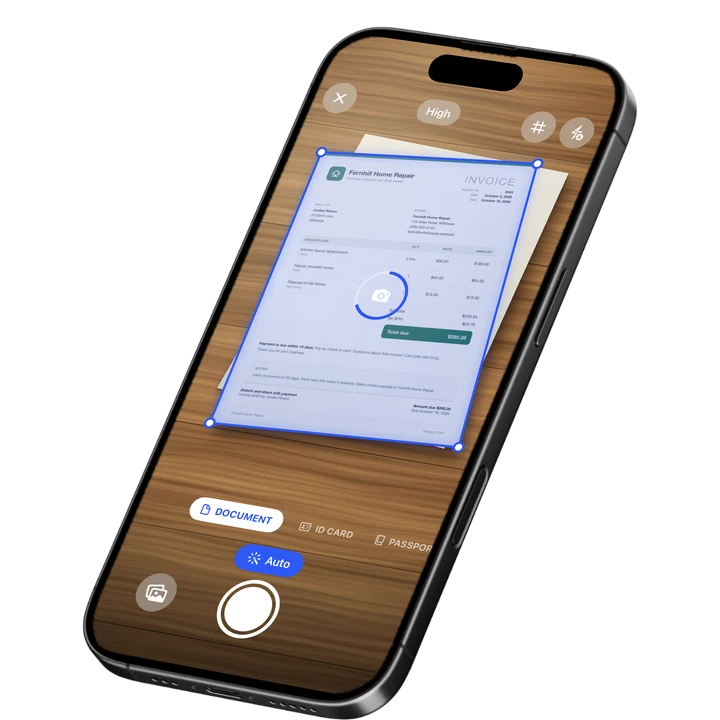
Point the camera at a page and live edge detection squares it up and auto-captures, all processed on the iPhone itself. Scan a whole stack of pages into one multi-page PDF with no page limit, apply a filter, and rotate pages, none of which needs a network.
Text recognition (OCR) also runs on the device, so a contract or a form scanned in a basement with no signal is still searchable the moment it is scanned, not after it later syncs online. From there you can fill in fields, add a signature, redact a line, add a password, and export as PDF, JPG, TXT or DOCX, all offline.
The one part of Filewise that connects online is Ask AI, which summarizes a document, translates it, or answers questions about it. That needs sign-in and a connection, so it is the feature to save for when you are back on WiFi, while scanning, OCR, filling, signing and exporting keep working the whole time you are offline.
Key Features for Offline Scanning
- On-device scan and OCR: Live edge detection, auto-capture and text recognition all run on the iPhone with no connection needed.
- Multi-page batch scanning: Capture a full stack of pages in one offline session with no page limit.
- Fill, sign and redact offline: Add text, a signature, checkmarks or a redaction box to a scanned document without a network.
- Password protection offline: Lock a PDF with a password before you ever get back online.
- Export formats offline: Save as PDF, JPG, TXT or DOCX (text) and use the share sheet once you have signal again.
- App Lock: Face ID, Touch ID or a PIN lock the app itself, useful when you are scanning sensitive paper away from your desk.
Pricing
See the App Store for current pricing and plans.
Best For
- Anyone scanning where there is no signal: job sites, basements, flights, rural areas
- Field workers who need a document filled, signed and exported before they are back online
- Travelers who want scans searchable the moment they are captured, not after a later sync
- Anyone who wants sensitive scans locked behind Face ID while working away from a desk
2. Genius Scan - Best for Quick, No-Frills Offline Capture
Genius Scan (The Grizzly Labs) is built to work fully offline for basic scanning, and it is rated 4.9 from 1,365,119 ratings, the highest average of the major scanner apps (September 2026). It suits readers who want a fast, no-frills capture without extra tools to learn.
Key Features
- Scans and stores documents locally on the device
- Optional cloud sync only if you choose to set it up
- OCR is available on the paid Plus and Ultra tiers
Pricing
Genius Scan lists Plus at $0.99 to $11.99 and Ultra at $4.99 to $49.99 on the US App Store (September 2026).
Best For
- Readers who want to open the camera and start scanning right away
- A simple offline scan with optional cloud sync later
3. Adobe Scan - Best for OCR Accuracy Once Signed In
Adobe Scan (Adobe Inc.) is rated 4.88 from 1,594,067 ratings (September 2026) and is known for strong text recognition. It asks you to sign in with an Adobe ID before you can start scanning at all, so plan to do that step while you still have a connection.
Key Features
- Accurate OCR on printed pages
- Links to Adobe Acrobat and Adobe PDF Pack
- Requires sign-in with an Adobe ID to open the scanner
Pricing
Adobe Scan lists Premium at $9.99 monthly and other tiers on the US App Store (September 2026).
Best For
- Readers who sign in once at a desk and then scan later
- Anyone who wants OCR accuracy on dense printed text
4. CamScanner - Best for a Large Offline Batch
CamScanner (INTSIG Information) has the largest rating count in the category, at 4.84 from 1,924,088 ratings (September 2026). It suits scanning a large stack of pages in one long offline session before syncing later.
Key Features
- Batch scanning across many pages in one session
- OCR text recognition
- Cloud storage tiers for later syncing
Pricing
CamScanner lists Premium Account plans from $4.99 to $59.99 on the US App Store (September 2026).
Best For
- A large stack of documents scanned in one sitting
5. iScanner - Best for Editing After the Scan
iScanner (BP Mobile) is rated 4.76 from 1,403,483 ratings (September 2026). It bundles scanning with an editor, so touch-ups like brightness and contrast are available in the same app.
Key Features
- Scanning plus a PDF editor
- Filters for brightness and contrast
- Weekly and other plan options
Pricing
iScanner lists Premium plans from $3.99 to $19.99 on the US App Store (September 2026).
Best For
- Readers who want to edit a scan's contrast or brightness right after capture
6. Scanner Pro - Best for Power Users on the Road
Scanner Pro (Readdle) is rated 4.87 from 335,985 ratings (September 2026). It is a full-featured scanner for frequent travelers who want extras like an expense report add-on alongside scanning.
Key Features
- Fast capture with edge detection
- Export presets for common document types
- Optional expense report add-on
Pricing
Scanner Pro lists Plus at $3.99 to $59.99 on the US App Store (September 2026).
Best For
- Frequent travelers who want a full-featured scanner for the road
How to Choose an Offline Scanner App for iPhone
The factor that matters most is whether the whole job, not just the camera capture, works with no connection. A few checks tell you quickly.
- How quickly can you start capturing a page? The fastest apps open straight to the camera, which matters if you only remember you need to scan something once you are already offline.
- Does OCR run on the device? Text recognition that happens locally means a scan is searchable right away, not after it syncs.
- Can you finish the document offline? Filling in fields, signing, redacting and adding a password should not need a connection either.
- What still needs a connection? Features like AI summaries or cloud backup are reasonable to save for later, as long as the core scanning work does not depend on them.
Frequently Asked Questions
What is the best offline scanner app for iPhone?
Filewise is the best offline scanner app for iPhone because scanning, on-device OCR, and editing tools like signing, redaction and passwords all work with no connection, so the only part that needs WiFi is the optional Ask AI feature.
Can I scan documents on a flight with no WiFi?
Yes. Scanning, edge detection and text recognition all run on the iPhone itself in apps built for offline use, so a flight with no WiFi is a fine time to catch up on scanning paperwork.
Does OCR work without an internet connection?
It depends on the app. Filewise runs text recognition on the device, so a scan is searchable immediately with no connection. Some other apps only offer OCR on a paid tier and may handle it differently, so check before you rely on it offline.
Do my offline scans sync once I am back online?
It depends on the app. Filewise backs up to the Filewise cloud once you are signed in and connected, and Genius Scan offers optional cloud sync you can set up if you want it. Either way, the scans themselves stay on the device until you choose to connect.
Can I sign or fill out a form with no internet connection?
Yes, in Filewise. Adding text, checkmarks, dates and a signature to a scanned form all happen on the device, so you can finish a form offline and send it once you are back online.
What Filewise features need a connection?
Ask AI, which summarizes a document, translates it, or answers questions about it, needs sign-in and a connection. Scanning, OCR and everyday editing keep working the whole time you are offline.
Our Pick for the Best Offline Scanner App
Filewise is the best pick for offline work because it covers the whole job, capture, OCR, and editing, without needing a signal at any step. If you would rather skip account setup entirely, Genius Scan is a solid choice for basic offline scanning, and if OCR accuracy on dense text matters most and you can sign in ahead of time, Adobe Scan is worth considering.
Next time you are heading somewhere with no signal, scan first and edit on the way. For the wider picture on choosing any scanner, see our best PDF scanner apps for iPhone. Get Filewise and get documents scanned, searchable and finished before you ever need to reconnect.
🔒 Face ID lock | 📱 Built for iPhone