Best Scanner App for Contractors (2026)
TL;DR
The best scanner app for contractors in 2026 is Filewise, because it scans job site paperwork into a sharp PDF and lets you fill in and sign change orders in the same app. Adobe Scan suits text recognition, Expensify suits expense report data from receipts, and Genius Scan suits fast capture. This guide compares 5 apps.
 Filewise - PDF Scanner
Scan documents to PDF on iPhone
- Get a sharp, professional PDF in one tap.
- Find any word later with on-device text recognition.
- Sign and send polished documents.
- Confidential files stay locked behind Face ID.
- Reliable and native, built for iOS.
On-device text recognition. Secure, built for iOS.
Best Scanner App for Contractors in 2026
The best scanner app for contractors in 2026 turns permits, change orders, and job site paperwork into a clean PDF without a trip back to the office. The top picks are:
- Filewise - Best overall scanner app for contractors (scans, fills in, and signs job site paperwork in one app)
- Adobe Scan - Best for text recognition on scanned permits and invoices
- Expensify - Best for expense report data from material receipts
- Genius Scan - Best for fast capture on a job site
- Scanner Pro - Best for quick page edits and reordering
A permit needs a copy for the file, a client wants a signed change order the same afternoon, and a stack of receipts from the supply store needs to be kept for the job cost. A scanner app for contractors has to handle all of it from a truck or a job site, not just a desk.
1. Filewise - Best Overall Scanner App for Contractors
Filewise scans job site paperwork into a sharp, multi-page PDF, and adds the tools a contractor reaches for next: filling in a form, signing a change order, or stamping a proposal with a watermark.
Get Filewise to scan a permit or change order on site and have a signed, finished PDF before you leave the job.
How Filewise Handles Job Site Paperwork
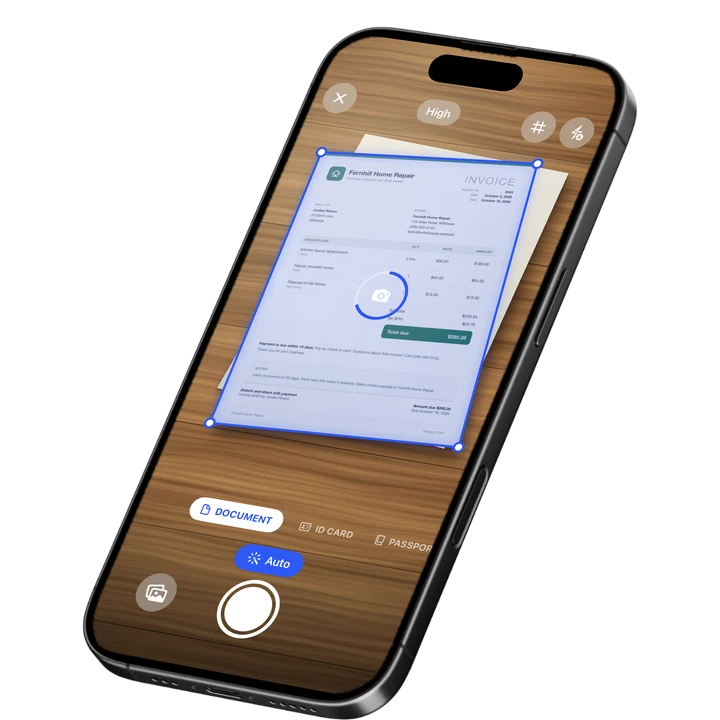
Document mode captures a permit, invoice, or work order with live edge detection and auto capture, and Original, A4, Letter, or Legal page sizes keep the scan matched to the paper it came from. A stack of receipts or a multi-page contract scans in one session with no page limit.
Filling in a punch list or work order is built in too: add typed text in a choice of fonts, checkmarks, crosses, or dots to mark completed items, and a date stamp for when the work was done. When a change order needs a signature, draw one with a finger or place a saved signature, and copy it to every page of a longer document.
Once a document is scanned and marked up, it can go straight to a client or a permit office as a PDF, JPG, or a Word file with the recognized text, shared through AirPrint, the share sheet, or Save to Files, so nothing has to be printed just to hand it over.
Key Features for Contractors
- Page sizes for real paperwork: Original, A4, A5, Letter, Legal, and Business Card sizes match the documents you actually scan.
- Fill in forms: Add text, checkmarks, crosses, dots, and a date stamp to work orders and punch lists.
- Signatures: Draw one with a finger or turn a photo of your signature into a clean image, then reuse it on change orders.
- Watermark and page numbers: Stamp a proposal or invoice before sending it to a client.
- Batch scanning with no page limit: Scan a full permit packet or a stack of receipts in one pass.
- Folders: Keep paperwork organized by job site or client.
Pricing
See the App Store for current pricing and plans.
Best For
- Contractors who need to sign a change order on site
- Keeping permits, contracts, and receipts organized by job
- Filling in a punch list or work order without paper
- Sending a client a clean, watermarked proposal
2. Adobe Scan - Best for Text Recognition on Scanned Permits and Invoices
Adobe Scan reads the text on a scanned page, which helps when a permit or invoice needs to be searched later by a specific detail. It suits contractors already working inside the Adobe ecosystem.
Key Features
- Text recognition on scanned documents
- Links into Adobe Acrobat for further editing
- ID card scan mode
- Wide adoption with a large existing user base
Pricing
In-app purchases range from about $3.99 to $69.99 across monthly and yearly plans (US App Store, September 2026). Rated 4.88 from 1,594,067 ratings (September 2026).
Best For
- Permits and invoices that need to be searched by text later
- Contractors already using Adobe Acrobat
3. Expensify - Best for Expense Report Data from Material Receipts
Expensify reads a photographed receipt and pulls out the amount, date, and merchant to build an expense report automatically, which suits a contractor tracking material costs across several jobs.
Key Features
- Automatic data extraction from photographed receipts
- Expense report building for reimbursement or job costing
- Categorizing spending by project
Pricing
A Monthly Subscription lists around $4.99 on the US App Store (September 2026). Rated 4.63 from 157,160 ratings (September 2026).
Best For
- Contractors tracking material and supply receipts across jobs
- Building an expense report automatically from photographed receipts
4. Genius Scan - Best for Fast Capture on a Job Site
Genius Scan focuses on quick, accurate capture, which suits a contractor scanning a permit or invoice between tasks without stopping for long.
Key Features
- Fast auto edge detection and capture
- Plus and Ultra tiers with extra export options
- A simple, focused capture flow
- Straightforward PDF export
Pricing
In-app purchases range from about $0.99 to $49.99 (US App Store, September 2026). Rated 4.9 from 1,365,119 ratings (September 2026), the highest average among the largest scanner apps.
Best For
- A quick single scan between job site tasks
- Contractors who want scanning kept simple
5. Scanner Pro - Best for Quick Page Edits and Reordering
Scanner Pro from Readdle makes it easy to fix a scan after the fact, such as reordering pages in a permit packet or adding a fax for an office that still expects one.
Key Features
- Page reordering and quick edits after scanning
- A fax add-on for sending documents directly
- An expense report add-on
- Clean, simple scanning interface
Pricing
In-app purchases range from about $0.99 to $59.99 (US App Store, September 2026). Rated 4.87 from 335,985 ratings (September 2026).
Best For
- Reordering pages in a multi-document permit packet
- Contractors who occasionally need to fax a document
How to Choose a Scanner App for Contractors
The right app depends on what kind of paperwork you handle most on a given job. Four things matter most.
- Filling in forms on site: A punch list or work order often needs text, checkmarks, or a date added right there, without printing it first.
- Signing change orders: A change order that needs a client's or your own signature moves faster when the signature tool is in the same app as the scan.
- Tracking material receipts: If job costing depends on receipts, an app built for expense report data, like Expensify, saves manual entry that a general scanner does not handle.
- Keeping jobs organized: Folders sorted by job site or client keep a permit, a contract, and a stack of receipts from one job together and easy to find later.
Real estate paperwork often overlaps with contractor work too. See our guide to the best scanner app for real estate agents if you handle leases or listing paperwork, and our roundup of the best scanner app for small business for general job paperwork beyond contracting.
Frequently Asked Questions
What is the best scanner app for contractors?
Filewise is the best scanner app for contractors because it scans job site paperwork into a sharp PDF and lets you fill in forms and sign change orders in the same app. That covers most of what a contractor needs to handle a permit, a work order, or a client agreement on site.
Can I sign a change order on my iPhone without printing it?
Yes. A scanner app with a built-in signature tool lets you scan the change order, add a signature by drawing it or placing a saved one, and export the signed document as a PDF, all without printing anything.
Can I fill in a work order or punch list on my phone?
Yes. Filewise lets you add typed text, checkmarks, crosses, or dots to a scanned form, along with a date stamp, so a work order or punch list can be filled in on site instead of on paper.
How do I keep receipts and paperwork organized by job?
Sorting scans into folders by job site or client keeps a permit, a contract, and a stack of receipts from one job together. Naming folders consistently, such as by job address or client name, makes it easier to find a specific document later.
Is there an app that pulls the amount and date from a receipt automatically?
Yes. Expensify reads a photographed receipt and pulls out details like the amount, date, and merchant to help build an expense report, which is useful for a contractor tracking material costs across several jobs.
Can I scan a permit at the size it was printed?
Yes. Filewise offers page sizes including Original, A4, Letter, and Legal, so a scanned permit or contract matches the size of the paper it came from instead of being forced into one fixed size.
Our Pick for the Best Scanner App for Contractors
For most day-to-day job site paperwork, Filewise covers the whole task: scanning a permit or contract, filling in a work order, and signing a change order before you leave the site.
When job costing depends on pulling data out of material receipts, Expensify is the better fit for that specific job. Adobe Scan suits contractors who want scanned paperwork exported with a searchable text layer.
Get Filewise and turn your next stack of job site paperwork into an organized, signed PDF.
🔒 Face ID lock | 📱 Built for iPhone