Best Scanner App for Real Estate Agents (2026)
TL;DR
The best scanner app for real estate agents in 2026 is Filewise, because it scans and signs leases, redacts sensitive tenant details, and organizes files by property. DocuSign is best for sending contracts to clients for signature, Adobe Scan is best for Acrobat users, and Genius Scan is best for fast, simple scanning. This guide compares five apps.
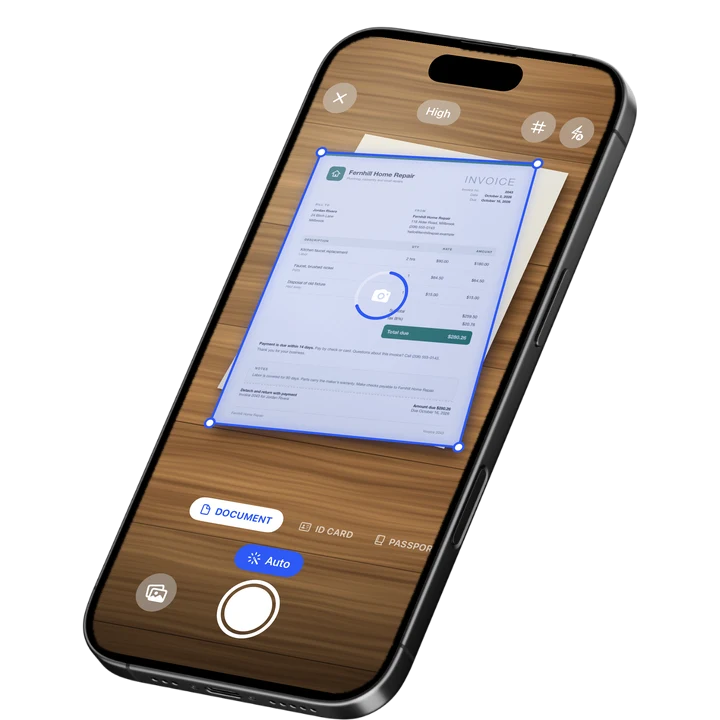

On-device OCR. Secure, built for iOS.
Best Scanner App for Real Estate Agents in 2026
The best scanner app for real estate agents in 2026 is Filewise, and here is the full ranking:
- Filewise - Best overall scanner app for real estate agents (scan, sign, and organize leases and disclosures by property)
- DocuSign - Best for sending contracts to clients for signature
- Adobe Scan - Best for existing Acrobat users
- Genius Scan - Best for fast, simple scanning
- Scanner Pro - Best for fax and expense report add-ons
A real estate agent's paperwork moves fast: a lease signed on a kitchen counter, a disclosure form scanned at the office, a tenant application with sensitive details that need to stay private, and a folder for every property in progress. The five apps below cover that mix on iPhone, from your own signature to sending a contract out for someone else's.
1. Filewise - Best Overall Scanner App for Real Estate Agents
Filewise is the best scanner app for real estate agents because it takes a lease, disclosure, or listing agreement from paper to a signed, organized PDF, filed by property, without printing anything or juggling a second app.
Get Filewise to scan a lease at a showing and have your signed copy filed before you leave the property.
How Filewise Handles Real Estate Paperwork
Scan a lease, disclosure form, or inspection report in Document mode, and live edge detection captures and crops each page automatically. Multi-page batch scanning with no page limit means a full lease packet goes in one session, not one page at a time.
Once a document is scanned, add your own signature directly on the page for anything you are signing yourself, such as a listing agreement or an addendum. For tenant applications, ID Card mode captures both sides of a driver's license or ID card on one page at real size, and ID scans stay off automatic cloud backup by default, which matters for documents that carry someone else's personal information. Redact sensitive lines like a Social Security number or account number before you file or share an application.
Text recognition reads the printed text on leases and disclosures, so you can search for a specific property or clause later, and folders let you organize every deal by property or client as it moves through your pipeline.
Key Features
- Multi-page batch scanning with no page limit: scan a full lease packet or disclosure set in one session.
- Signature tool: sign a listing agreement or addendum on the page and reuse your saved signature.
- ID Card mode: both sides of a tenant's ID on one page at real size, excluded from automatic backup by default.
- Redaction and blur: hide sensitive applicant details before you share or file a document.
- Folders inside folders: organize scans by property or client, with star, rename, and sort.
- Export as PDF or DOCX, with a password: send a protected copy to a title company or lender.
Pricing
See the App Store for current pricing and plans.
Best For
- Signing your own copy of a listing agreement, lease, or addendum.
- Scanning and protecting tenant ID copies for rental applications.
- Redacting sensitive financial or personal details before sharing a file.
- Organizing paperwork by property or client as deals move forward.
2. DocuSign - Best for Sending Contracts to Clients for Signature
DocuSign is built for sending a contract out to a buyer, seller, or other party and collecting their signature remotely, with a tracked audit trail of who signed and when. DocuSign for REALTORS is a version built specifically for real estate transactions.
Key Features
- Send-for-signature workflow with routing to multiple parties.
- Audit trail showing who signed and when.
- DocuSign for REALTORS, built for real estate contracts.
- Templates for repeat document types.
Pricing
DocuSign lists a DocuSign for REALTORS plan at $34.99 among its in-app purchases on the US App Store (September 2026).
Best For
- Agents who need a buyer, seller, or other party to sign a contract remotely.
- Deals that need a tracked audit trail of who signed and when.
3. Adobe Scan - Best for Existing Acrobat Users
Adobe Scan fits naturally into a workflow that already runs through Adobe Acrobat, since a scanned disclosure or lease lands in the same Adobe Document Cloud as everything else.
Key Features
- PDF export with a text layer you can search.
- ID card scan mode.
- Direct link to Adobe Acrobat and Adobe Document Cloud.
- Auto-crop and multi-page capture.
Pricing
Adobe Scan lists Adobe Scan Premium at $9.99 a month and Adobe Scan Plus from $4.99 a month on the US App Store (September 2026).
Best For
- Agents already paying for Adobe Acrobat or Creative Cloud.
4. Genius Scan - Best for Fast, Simple Scanning
Genius Scan, from The Grizzly Labs, keeps scanning fast and simple, which suits an agent who wants to scan a form between showings and move on.
Key Features
- Fast auto-capture with manual crop correction.
- Genius Scan Plus and Ultra tiers for extra export and cloud options.
- Multi-page PDF export.
- Batch scanning.
Pricing
Genius Scan lists Genius Scan Plus at $0.99 and Genius Scan Ultra from $4.99 to $49.99 on the US App Store (September 2026).
Best For
- Quick scans of a single form with no extra setup.
5. Scanner Pro - Best for Fax and Expense Report Add-Ons
Scanner Pro, from Readdle, adds fax sending and an expense report add-on, which still matters for agents who work with title companies or lenders that ask for a faxed document, or who track mileage and expenses across showings.
Key Features
- Fax Pack add-on for sending documents by fax.
- Expense Report add-on.
- Multi-page PDF export.
- Auto-crop and batch scanning.
Pricing
Scanner Pro lists Scanner Pro Plus from $3.99 to $59.99 and a Fax Pack at $0.99 on the US App Store (September 2026).
Best For
- Agents who occasionally need to fax a document to a title company or lender.
How to Choose a Scanner App for Real Estate Agents
The right scanner app for a real estate agent depends on whose signature is going on the document and how sensitive the paperwork is.
- Who is signing: your own signature on a listing agreement is a different job than collecting a buyer's or seller's signature remotely.
- Sensitive applicant details: look for redaction and control over backup if you handle tenant applications with ID copies or financial details.
- Organizing by property: a growing pipeline of deals needs folders you can search, not a single long list of scans.
- Sending documents onward: decide if a title company or lender needs a plain PDF, a faxed copy, or a document routed for someone else's signature.
Frequently Asked Questions
What is the best scanner app for real estate agents?
Filewise is the best scanner app for real estate agents, because it scans leases and disclosures into clean PDFs, lets you sign your own copy on the page, captures tenant ID copies at real size, and organizes everything by property in folders. For contracts that need a buyer's or seller's signature sent remotely, DocuSign is built specifically for that job.
Can I sign a lease or listing agreement on my iPhone?
Yes. Filewise lets you draw a signature on a scanned lease or listing agreement, or add a saved signature, then copy it to every page a longer document needs. This works for anything you are signing yourself, without printing the document first.
How do I keep tenant applications and ID copies private?
Filewise's ID Card mode captures both sides of an ID on one page, and those scans stay off automatic cloud backup by default, so a copy stays on your phone unless you choose otherwise. You can also redact sensitive lines, like a Social Security number, before you file or share an application, and lock the app with Face ID, Touch ID, or a PIN.
Can I send a contract to a buyer and seller for their signatures?
DocuSign is built for that job, with a send-for-signature workflow that routes a contract to multiple parties and tracks an audit trail of who signed and when, including a DocuSign for REALTORS plan aimed at real estate transactions. Filewise is the right tool for signing and organizing your own copy of a document.
Do I need to scan documents for each property separately?
You do not need a separate app, just separate folders. Filewise lets you organize scanned leases, disclosures, and applications into folders by property or client, so paperwork for one deal stays apart from another as your pipeline grows.
Our Pick for the Best Real Estate Scanner App
For most of the scanning and signing agents do themselves, Filewise is the best pick because it turns a lease, disclosure, or tenant application into a signed, organized PDF filed by property, with sensitive details protected along the way. Our guide on the best ID card scanner apps for iPhone covers the tenant ID side in more depth, and our guide on how to sign a PDF on iPhone covers the signing steps.
When a contract needs a buyer's or seller's signature sent out and tracked, DocuSign is the specialist for that part of the deal. For a broader look at scanning for a small business, see our roundup of the best scanner apps for small business.
Get Filewise and keep every lease, disclosure, and application organized by property.
🔒 Face ID lock | 📱 Built for iPhone