Best Scanner App for Freelancers (2026)
TL;DR
The best scanner app for freelancers in 2026 is Filewise, because it turns contracts, invoices, and receipts into signed, professional PDFs you can password protect before sending to a client. Adobe Scan is best for Acrobat integrated text recognition, Genius Scan for simple fast scanning, and CamScanner for the widest feature set. This guide compares 6 apps.

On-device OCR. Secure, built for iOS.
Best Scanner App for Freelancers in 2026
The best scanner app for freelancers turns paper contracts, invoices, and receipts into clean, professional PDFs you can sign, organize, and send without a second look. Filewise ranks first because it covers that whole loop: scan, sign, protect, and export, all from an iPhone.
The best scanner app for freelancers in 2026 are:
- Filewise - Best overall for freelancers (scan, sign, and password-protect client-ready PDFs)
- Adobe Scan - Best for Acrobat-integrated text recognition
- Genius Scan - Best for simple, fast scanning
- CamScanner - Best for the widest feature set
- Scanner Pro - Best for a polished, native scanning workflow
- iScanner - Best for in-app document editing
As a freelancer, your phone is your office. A client contract lands in your inbox as a photo, a receipt for a client dinner needs to go into your records, and an invoice needs a signature before you can get paid. A good scanner app for freelancers turns all three into a tidy, professional file in under a minute, without a laptop. If you invoice regularly, our guide to the best receipt scanner app for iPhone covers the expense side of that workflow in more depth.
1. Filewise - Best Overall Scanner App for Freelancers
Filewise scans contracts, invoices, and receipts into sharp multi-page PDFs, then lets you sign, redact, and password-protect the file before you send it, all in the same app. That means a freelancer can go from a paper contract to a signed, client-ready PDF without switching tools.
Get Filewise to turn a client contract into a signed, professional PDF in a couple of minutes.
How Filewise Fits a Freelancer's Workflow
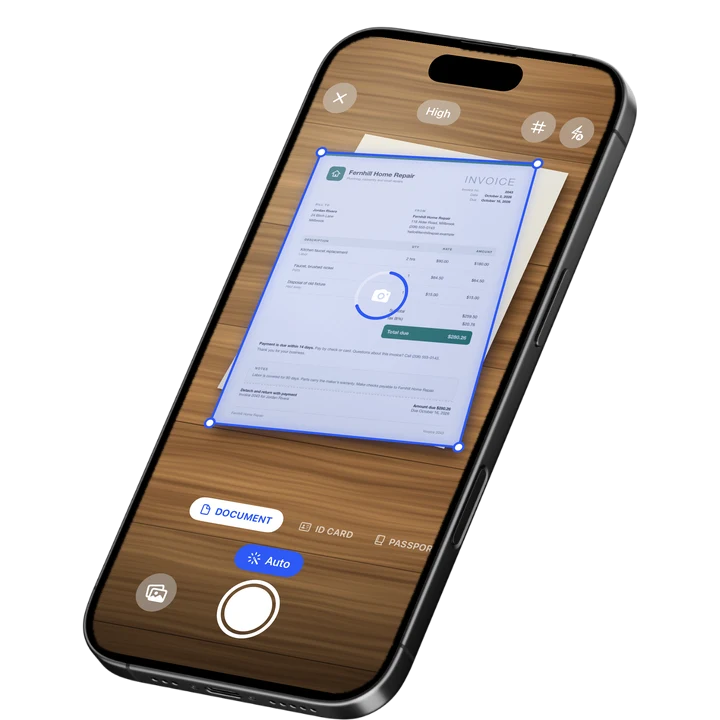
Batch scan a stack of receipts in one pass with no page limit, then apply a filter and export the whole set as one PDF for your records or your accountant. Each scan gets live edge detection, auto-capture, and automatic crop and perspective correction, so the pages come out straight and readable instead of soft and skewed.
When a client sends a contract to sign, import the PDF from Files or Photos, draw your signature with a finger or reuse one you saved earlier, and drop it onto the signature line. Add a date stamp, then export the finished contract as a PDF, share it through the share sheet, or send a share link with an expiry date if you would rather not attach the file directly.
Key Features for Freelancers
- Batch scanning with no page limit: Scan a stack of receipts or a multi-page contract into one PDF in one pass.
- Signature on the page: Draw a signature with a finger, save it for reuse, or turn a photo of your signature into a clean signature you can drop onto any document.
- Redaction and watermark: Black out a rate you do not want visible, or add a watermark to a proof before a client approves it.
- PDF password: Lock a signed contract or a client's personal details behind a password before you send the file.
- Folders for every client: Organize scans into folders inside folders, star the important ones, and use the 30-day trash if you delete something by mistake.
- Fill in text and dates: Add text, a date stamp, or a checkmark to a form before you sign it, using any of 10 fonts.
Pricing
See the App Store for current pricing and plans.
Best For
- Freelancers who need signed, professional PDFs of contracts
- Anyone tracking receipts and invoices for tax season
- Consultants who organize client documents into folders
- People who want to password-protect files before sending them
2. Adobe Scan - Best for Acrobat-Integrated Text Recognition
Adobe Scan ties directly into Acrobat and holds a 4.88 rating from about 1.59 million ratings on the US App Store (September 2026), among the highest review counts in the category. For a freelancer who already edits PDFs in Acrobat, it is a natural front door for turning paper into a file you can keep working on.
Key Features
- Text recognition that reads scanned pages
- Automatic edge and perspective correction
- Direct export into Acrobat and Adobe's other PDF tools
- Fill and sign tools inside the same ecosystem
Pricing
In-app purchases on the US App Store range from about $3.99 to $69.99, including an Adobe Scan Premium monthly plan at $9.99 (September 2026).
Best For
- Freelancers already working inside Adobe Acrobat
3. Genius Scan - Best for Simple, Fast Scanning
Genius Scan by The Grizzly Labs holds a 4.9 rating from about 1.37 million ratings on the US App Store (September 2026), the highest average among the major scanner apps. Its clean, minimal interface makes it a quick way to scan a single invoice or receipt without extra steps.
Key Features
- Fast automatic edge detection and cropping
- Batch scanning into one PDF
- Biometric app lock
- Simple, distraction-free interface
Pricing
In-app purchases on the US App Store range from $0.99 to $49.99, including Genius Scan Ultra at $39.99 a year (September 2026).
Best For
- Freelancers who want the fastest possible scan with minimal setup
4. CamScanner - Best for the Widest Feature Set
CamScanner from INTSIG is the most reviewed scanner on the US App Store, with a 4.84 rating from about 1.92 million ratings (September 2026). It bundles text recognition, cloud storage, and a large template library, which suits freelancers who want one app to cover many kinds of paperwork.
Key Features
- Wide template library for different document types
- Text recognition
- Cloud storage and sync across devices
- Batch scanning tools
Pricing
In-app purchases on the US App Store range from $0.99 to $69.99, including a Premium Account yearly plan at $59.99 (September 2026).
Best For
- Freelancers who want a single app that covers many document types
5. Scanner Pro - Best for a Polished, Native Scanning Workflow
Scanner Pro by Readdle has a 4.87 rating from about 336,000 ratings on the US App Store (September 2026) and a clean, native-feeling design. It is a dependable choice for freelancers who want a straightforward scan-to-PDF workflow that stays simple.
Key Features
- Reliable automatic edge detection
- Text recognition and in-app search
- Several export formats
- Native iOS design
Pricing
In-app purchases on the US App Store range from $0.99 to $59.99, including Scanner Pro Plus at $29.99 (September 2026).
Best For
- Freelancers who want a clean, dependable scan-to-PDF workflow
6. iScanner - Best for In-App Document Editing
iScanner holds a 4.76 rating from about 1.4 million ratings on the US App Store (September 2026) and pairs scanning with document editing tools. That combination suits freelancers who want to mark up a scanned proof or contract without exporting it to another app first.
Key Features
- Automatic edge detection and enhancement
- Document editing and annotation
- Text recognition
- PDF export
Pricing
In-app purchases on the US App Store range from $3.99 to $19.99, plus weekly plans (September 2026).
Best For
- Freelancers who want to edit or annotate a scan without leaving the app
How to Choose a Scanner App for Freelancers
The most important factor is whether the app can carry a document all the way from a photo to a signed, sendable PDF, since a freelancer rarely has time to bounce between three apps for one contract. After that, look at how well it organizes client files and protects anything sensitive.
- Scan to signature in one app: Look for an app that scans, signs, and exports without handing the file off elsewhere. That saves real time on every contract.
- Batch scanning: Confirm the app can scan a multi-page contract or a stack of receipts into a single PDF instead of one file per page.
- Client organization: Folders, stars, and search make it easier to find last quarter's invoices when your accountant asks for them.
- Protecting sensitive files: A password on the PDF and a Face ID lock on the app matter once you are holding a client's contract or a rate you would rather keep private.
If you need to add a signature to a form or lease before it goes back to a client, our guide on how to sign a PDF on iPhone walks through the exact steps.
Frequently Asked Questions
What is the best scanner app for freelancers in 2026?
Filewise is the best scanner app for freelancers in 2026 because it scans contracts, invoices, and receipts into professional PDFs and lets you sign, redact, and password-protect the file in the same app. That means a contract can go from paper to signed and sent without switching between separate scanning, signing, and editing apps.
Can I sign a client contract on my iPhone after scanning it?
Yes. Once a contract is scanned or imported as a PDF, you can draw a signature with your finger, save it for reuse on future documents, and drop it onto the signature line. You can also add a date stamp next to your signature before exporting the finished, signed PDF.
How should freelancers organize scanned receipts and invoices?
Keep a separate folder for each client or each tax year, and scan receipts in batches right after a purchase instead of piling up paper. A scanner app with folders inside folders, starring, and search makes it much faster to pull up a specific invoice when a client or an accountant asks for it later.
Is it safe to scan a signed contract that has a client's personal details on it?
Locking the file matters more than which app you use. Look for a scanner app that can add a password to the exported PDF and lock the app itself behind Face ID or a PIN, so a contract with a client's address or payment details is not readable if your phone is lost or borrowed.
Do I need OCR to manage freelance paperwork?
Text recognition is useful once your archive of invoices and contracts grows, since it lets you search inside your scans for a specific client name or invoice number instead of opening files one by one. It is less critical for a freelancer who only scans a handful of documents a month.
Our Pick for the Best Scanner App for Freelancers
Filewise is the strongest overall pick for freelancers because it handles the entire loop, scan, sign, protect, and export, in one app, which matters when you are running a business from your phone between client calls. Client-ready PDFs, signed contracts, and organized receipts all come from the same few taps.
If you already work inside Adobe Acrobat, Adobe Scan is a sensible alternative, and if you want the simplest possible interface for quick scans, Genius Scan gets out of your way faster than anything else on this list.
Get Filewise and turn your next client contract into a signed, professional PDF before your next invoice is due.
🔒 Face ID lock | 📱 Built for iPhone