Best Scanner App for Lawyers (2026)
TL;DR
The best scanner app for lawyers in 2026 is Filewise, because it redacts sensitive details, locks a case file behind Face ID, and adds a password before a document leaves the office. Adobe Scan is best for Acrobat-integrated scanning, Genius Scan for simple fast scanning, and CamScanner for the widest feature set. This guide compares 6 apps.
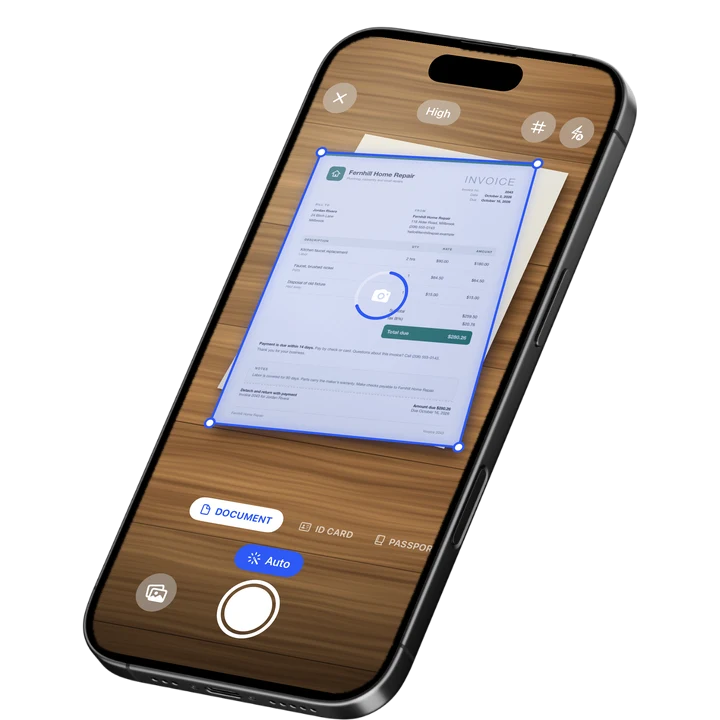

On-device OCR. Secure, built for iOS.
Best Scanner App for Lawyers in 2026
A scanner app for lawyers needs to do more than capture a page: it has to redact sensitive details, lock a file behind a password, and keep case documents organized by client. Filewise ranks first because it covers redaction, PDF passwords, and Face ID locking in the same app used to scan the document.
The best scanner app for lawyers in 2026 are:
- Filewise - Best overall for redacting and protecting case documents (redaction, PDF password, Face ID lock)
- Adobe Scan - Best for Acrobat-integrated scanning
- CamScanner - Best for the widest feature set
- Scanner Pro - Best for reliable, polished scanning
- Genius Scan - Best for simple, fast scanning
- iScanner - Best for in-app document editing
A deposition transcript, a signed exhibit, or a client's intake form often needs to go from paper to a clean PDF within minutes, with a name or an account number blacked out before anyone else sees it. A good scanner app for lawyers makes that a normal part of scanning, not a separate step. If your firm also processes a lot of client paperwork day to day, our guide to the best scanner app for small business covers the broader office workflow.
1. Filewise - Best Overall Scanner App for Lawyers
Filewise scans case documents into sharp multi-page PDFs and lets you redact sensitive details, add a password, and lock the file behind Face ID, all before it leaves your phone. That combination matters when a scan includes a client's Social Security number, a minor's name, or a financial account number.
Get Filewise to scan an exhibit or intake form and redact any sensitive detail before you send it anywhere.
How Filewise Handles Legal Documents
Scan a multi-page filing, a signed contract, or a client's ID with live edge detection and no page limit, so a long document stays as one file instead of a stack of loose pages. Apply page numbers and a footer to keep exhibits in order, then merge or reorder pages if a document needs to be assembled from more than one source.
Where a filing needs personal details blacked out, Filewise's redaction boxes and blur are burned into the exported PDF, not just drawn over the top. Federal court rules commonly require redacting details such as a Social Security number, a birth date, a minor's name, or a financial account number down to the last few digits before a document is filed, according to Federal Rule of Civil Procedure 5.2. This is general information, not legal advice. Check your court's local rules before filing.
Key Features for Legal Work
- Redaction and blur: Black out or blur a detail so it is removed from the exported PDF, not just hidden underneath a box.
- PDF password: Add a password to a case file before you send it by email or upload it to a portal.
- Face ID lock: Lock the app, a folder, or a single document behind Face ID, Touch ID, or a PIN.
- Page numbers and footer: Number exhibit pages automatically so a filing stays in order.
- Merge, split, and reorder: Assemble a filing from several scans, or split one long document into separate exhibits.
- Folders for every client or matter: Keep each client's documents in their own folder, with stars for the ones you reference often.
Pricing
See the App Store for current pricing and plans.
Best For
- Lawyers who need to redact personal details before filing a document
- Solo practitioners and small firms organizing case files by client
- Anyone who needs to password-protect a scan before sending it
- Paralegals assembling and numbering exhibits from paper originals
2. Adobe Scan - Best for Acrobat-Integrated Scanning
Adobe Scan holds a 4.88 rating from about 1.59 million ratings on the US App Store (September 2026) and connects directly to Acrobat, which many firms already use for filing and review. That makes it a convenient front door for scanning a document you plan to keep editing in Acrobat.
Key Features
- Text recognition that reads scanned pages
- Automatic edge and perspective correction
- Direct export into Acrobat and Adobe's other PDF tools
- Fill and sign tools inside the same ecosystem
Pricing
In-app purchases on the US App Store range from about $3.99 to $69.99, including an Adobe Scan Premium monthly plan at $9.99 (September 2026).
Best For
- Firms that already review and file documents in Adobe Acrobat
3. CamScanner - Best for the Widest Feature Set
CamScanner from INTSIG is the most reviewed scanner on the US App Store, with a 4.84 rating from about 1.92 million ratings (September 2026). It bundles text recognition, cloud storage, and a large template library, which suits a practice that scans many kinds of documents beyond case files.
Key Features
- Wide template library for different document types
- Text recognition
- Cloud storage and sync across devices
- Batch scanning tools
Pricing
In-app purchases on the US App Store range from $0.99 to $69.99, including a Premium Account yearly plan at $59.99 (September 2026).
Best For
- Practices that want one app covering many document types
4. Scanner Pro - Best for Reliable, Polished Scanning
Scanner Pro by Readdle has a 4.87 rating from about 336,000 ratings on the US App Store (September 2026) and a clean, native-feeling design. It suits a lawyer who wants a dependable scan-to-PDF workflow that stays simple between client meetings.
Key Features
- Reliable automatic edge detection
- Text recognition and in-app search
- Several export formats
- Native iOS design
Pricing
In-app purchases on the US App Store range from $0.99 to $59.99, including Scanner Pro Plus at $29.99 (September 2026).
Best For
- Lawyers who want a clean, dependable scan-to-PDF workflow
5. Genius Scan - Best for Simple, Fast Scanning
Genius Scan by The Grizzly Labs holds a 4.9 rating from about 1.37 million ratings on the US App Store (September 2026), the highest average among the major scanner apps. Its simple interface suits a quick scan of a single signed page between appointments.
Key Features
- Fast automatic edge detection and cropping
- Batch scanning into one PDF
- Biometric app lock
- Clean, minimal interface
Pricing
In-app purchases on the US App Store range from $0.99 to $49.99, including Genius Scan Ultra at $39.99 a year (September 2026).
Best For
- Lawyers who want the fastest possible scan with minimal setup
6. iScanner - Best for In-App Document Editing
iScanner holds a 4.76 rating from about 1.4 million ratings on the US App Store (September 2026) and pairs scanning with document editing tools. That combination suits a lawyer who wants to mark up a scanned draft without exporting it to another app first.
Key Features
- Automatic edge detection and enhancement
- Document editing and annotation
- Text recognition
- PDF export
Pricing
In-app purchases on the US App Store range from $3.99 to $19.99, plus weekly plans (September 2026).
Best For
- Lawyers who want to edit or annotate a scan without leaving the app
How to Choose a Scanner App for Lawyers
The most important factor is whether the app can remove a sensitive detail from a document permanently, since a box drawn over text is not the same as redaction that is burned into the file. After that, look at how the app protects and organizes case documents, much like the general buying advice in our best scanner apps for iPhone guide.
- True redaction: Confirm the app removes the underlying text or image, not just covers it with a shape you could lift off in another program.
- Password protection: A case file often needs to travel by email or through a client portal, so a PDF password matters before it leaves your phone.
- Organizing by client or matter: Folders you control, with search and stars, make it faster to find a specific filing when opposing counsel calls with a question.
- Exhibit numbering: Automatic page numbers keep a multi-page exhibit in order once it is printed or filed.
Frequently Asked Questions
What is the best scanner app for lawyers in 2026?
Filewise is the best scanner app for lawyers in 2026 because it redacts sensitive details with boxes and blur that are burned into the exported PDF, adds a password before the file leaves your phone, and locks documents behind Face ID. It also numbers exhibit pages and keeps each client's documents in their own folder.
How do I redact a Social Security number or account number before filing a document?
Scan the document, then use a redaction tool that removes the underlying text or image rather than one that only draws a box over it. Federal Rule of Civil Procedure 5.2 generally requires redacting a Social Security number, birth date, minor's name, or financial account number down to the last few digits in a public filing. This is general information, not legal advice, so check your court's specific local rules.
Can I password-protect a scanned PDF on my iPhone?
Yes. A scanner app that supports PDF passwords lets you lock a file with a password before you attach it to an email or upload it to a client portal, so only someone with the password can open it. Look for this feature directly inside the scanning app rather than needing a separate program.
How should a law firm organize scanned case files?
Keep a separate folder for each client or matter, and scan documents into that folder as soon as you receive them rather than letting paper pile up. Text recognition that lets you search inside your scans makes it much faster to find a specific filing or exhibit later, and starring frequently used documents saves time during a hearing.
Is it safe to scan client documents on a personal iPhone?
Locking the device and the app matters more than which scanner you use. Look for an app that can lock behind Face ID or a PIN and that lets you add a password to any file you export, so a client's documents are not readable if the phone is lost or borrowed.
Our Pick for the Best Scanner App for Lawyers
Filewise is the strongest overall pick for lawyers because redaction, a PDF password, and Face ID locking sit in the same app used to scan the document, which keeps a sensitive filing under control from the first tap. Numbered exhibit pages and per-client folders round out a workflow built around case files, not just images.
If your firm already reviews documents inside Adobe Acrobat, Adobe Scan is a sensible companion, and if you want the simplest possible scan of a single signed page, Genius Scan gets out of your way fastest.
Get Filewise and redact, protect, and organize your next case file before it leaves your phone.
🔒 Face ID lock | 📱 Built for iPhone