CamScanner vs Genius Scan: Which Scanner Wins? (2026)
TL;DR
CamScanner vs Genius Scan: pick CamScanner if you want a wide feature set with fax and cloud storage built in. Pick Genius Scan if you want a simple, lightweight scan. The real difference is bundled features versus a lighter app, plus OCR access, and Filewise fits best for signing and locking documents behind Face ID.
 Filewise - PDF Scanner
Scan documents to PDF on iPhone
- Get a sharp, professional PDF in one tap.
- Find any word later with on-device text recognition.
- Sign and send polished documents.
- Confidential files stay locked behind Face ID.
- Reliable and native, built for iOS.
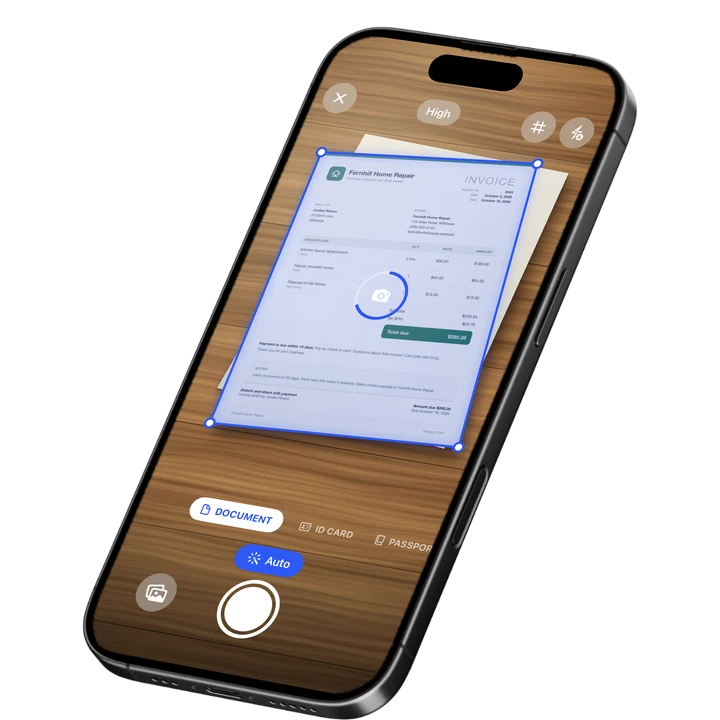
On-device text recognition. Secure, built for iOS.
CamScanner vs Genius Scan: The Short Answer
CamScanner suits readers who want one app with scanning, OCR, fax credits and cloud storage bundled together, while Genius Scan suits readers who want a simple, lightweight scan without a bundle of extra tools to learn. If neither fits, our lists of CamScanner alternatives and Genius Scan alternatives cover other options.
Both names come up constantly in "best scanner app" searches, and both have been around long enough to build a large user base, CamScanner at 4.84 from 1,924,088 ratings and Genius Scan at 4.9 from 1,365,119 ratings (September 2026). The decision usually comes down to two things: how much you want bundled into one app, and how much of that feature set you actually plan to use.
| CamScanner | Genius Scan | Filewise | |
|---|---|---|---|
| Best for | Wide feature set in one app | Simple, private scanning | Signing and protecting documents |
| OCR | Included, full quality in the paid tier | Paid tier only | On-device, included |
| ID card mode | Yes | Yes | Yes, both sides on one page |
| Signing in-app | Yes | Requires a separate Genius Sign app | Yes, on-device |
CamScanner vs Genius Scan: Scan Quality and Edge Detection
Both apps produce a clean, cropped scan from a phone camera, with CamScanner and Genius Scan each running automatic edge detection to square up the page. What each app does with that scan afterward differs by pricing tier, covered in the Pricing section below.
For a reader comparing raw output quality, both apps are well regarded, and OCR access turns out to be the bigger practical difference between them, covered in the next section.
CamScanner vs Genius Scan: OCR and Text Recognition
CamScanner includes OCR, but full-quality text recognition sits behind the Premium tier alongside watermark removal and a larger cloud quota (September 2026). Genius Scan also places OCR behind its paid Plus and Ultra tiers, so in both apps full OCR is a paid-tier feature rather than part of the initial download.
For readers who scan mostly to search old documents by keyword later, OCR access is worth checking against each app's current in-app purchase list before you commit to a workflow built around it. See our separate comparison of Genius Scan vs Adobe Scan for how OCR compares against a third option.
CamScanner vs Genius Scan: Signing and Annotating Documents
CamScanner lets you create and add an e-signature directly inside the app, along with a full set of annotation and watermark tools. Genius Scan supports adding a signature, date stamps and text annotations to a scan, including an auto-repeat option to place initials on every page at once, though signing a document from scratch uses a separate companion app, Genius Sign, rather than the main scanning app.
CamScanner is the more complete single-app option for signing without switching apps, while Genius Scan's annotation tools are strong for marking up a scan even if signing lives in a second app.
CamScanner vs Genius Scan: ID Cards and Privacy
CamScanner has a scanning mode built for capturing ID documents quickly. Genius Scan also scans ID cards, health documents and business cards into folders, and it is built to work fully offline, with Touch ID protection plus a PDF password available to lock documents on the device (September 2026).
CamScanner asks for an account to unlock its full feature set, while Genius Scan's offline-first design suits readers who want to keep things simple, with folders and editing all handled locally on the device.
CamScanner vs Genius Scan: Multi-Page PDFs and Organization
CamScanner handles long, multi-page documents well and adds them to a cloud library you can browse by folder, with the larger cloud quota unlocked on the paid tier. Genius Scan also groups scans into custom folders locally on the device, and its editing tools let you reorder, crop, rotate and clean up individual pages, including removing stains, creases and marks from an older document.
Both apps are capable here, so the practical difference is where the library lives by default: CamScanner leans on its own cloud storage, while Genius Scan keeps documents on the device unless you turn cloud sync on yourself.
CamScanner vs Genius Scan: Pricing in 2026
CamScanner's in-app purchases on the US App Store range from a Premium Account at $4.99 to $59.99 across monthly and annual options, plus small add-ons like a one-page fax credit at $0.99 (September 2026). Genius Scan lists Genius Scan Plus from $0.99 to $11.99 and Genius Scan Ultra from $4.99 to $49.99 on the US App Store (September 2026).
Both apps unlock OCR and full export quality through a paid tier rather than the initial download, so check the current in-app purchase list on each app's store page before you commit to one for a specific workflow. Genius Scan keeps OCR on its paid Plus and Ultra tiers.
Where Filewise Fits: Signing and Protecting Documents on iPhone
Readers comparing CamScanner and Genius Scan are usually choosing between a bigger feature set and a simpler, private one. Filewise sits alongside both by focusing on turning a scan into a finished, protected document, sharp OCR, a real signature, a redaction box, and a password, all handled on the iPhone.
Get Filewise to scan a document, sign it, and lock it behind Face ID or a password in the same session.
- ID Card mode: Scans both sides of an ID onto one A4 page at real ID size, so the whole card fits in a single, correctly proportioned scan.
- On-device signing: Draw a signature with a finger, save it for reuse, or turn a photo of your signature into a clean signature image, then copy it to every page.
- Redaction and watermark: Burn a redaction box or blur directly into the exported PDF, or add a watermark and page numbers.
- PDF password: Lock a finished document with a password before you share it.
- App Lock: Face ID, Touch ID or a PIN protect the app itself, alongside a Safe Folder for anything you want kept separate.
Choose CamScanner If...
- You want fax credits, cloud storage and OCR bundled into one subscription
- You scan often enough that a large rating base and long track record matter to you
- You want signing built into the same app you scan with
Choose Genius Scan If...
- You want to open the app and start scanning right away, without a wide bundle of extra tools
- Privacy and an offline-first design matter more than a bundled feature set
- You are comfortable using a companion app, Genius Sign, when you need to sign something
Choose Filewise If...
- You want a scan that ends as a signed, redacted or password-protected document, not just an image
- You want an ID scanned both sides onto one correctly sized page
- You want App Lock and a Safe Folder for sensitive scans
Frequently Asked Questions
Is CamScanner better than Genius Scan?
Neither is better overall. CamScanner offers a wider bundled feature set including fax and cloud storage, while Genius Scan offers a simpler, offline-first scan. The better pick depends on whether you want one all-in-one app or a lighter, more private one.
Do CamScanner and Genius Scan have free versions?
Both can be downloaded and used without paying first, with paid tiers unlocking OCR and full export quality in each. See the Pricing section above for the current price ranges on the US App Store (September 2026).
Can I sign a document in CamScanner or Genius Scan?
CamScanner lets you add an e-signature directly inside the app. Genius Scan supports adding signatures and annotations to a scan but relies on a separate companion app, Genius Sign, for creating a signature from scratch.
Is there a good alternative to CamScanner and Genius Scan?
Filewise is a solid alternative for readers who want the scan itself to finish as a protected document, with on-device OCR, a real signature, redaction, a watermark and a PDF password, plus Face ID App Lock and a Safe Folder for anything sensitive.
Which app is better for scanning an ID card?
CamScanner has a scanning mode built for ID documents, and Genius Scan can also capture ID cards into a folder alongside receipts and business cards. Filewise's ID Card mode goes a step further by placing both sides of the ID on one A4 page at real ID size, which suits printing or attaching the whole card as a single scan.
Do I need cloud storage to use either app?
No. Both CamScanner and Genius Scan work with local scans, and cloud storage is optional in each. CamScanner's cloud quota grows with the paid tier, while Genius Scan keeps documents on the device by default and only syncs to the cloud if you turn that on yourself.
Our Verdict on CamScanner vs Genius Scan
If you want the widest feature set in one subscription and are comfortable signing in to unlock it, CamScanner is the stronger all-in-one pick. If you want to open the app and start scanning right away with a lighter, simpler tool, Genius Scan is the better fit, especially for anyone scanning something they would rather keep off the cloud by default.
For the step after scanning, turning that page into a signed, redacted or password-protected PDF, Get Filewise and finish the document on the same device you scanned it with.
🔒 Face ID lock | 📱 Built for iPhone