Best Genius Scan Alternatives for iPhone (2026)
TL;DR
The best Genius Scan alternatives in 2026 are Filewise for signing and protecting scanned documents, Adobe Scan for Acrobat-integrated scanning, and CamScanner for the widest feature set. People look for an alternative when they want tools like signing, redaction, or a dedicated ID mode built into the same app they scan with. This guide compares 5 apps.
 Filewise - PDF Scanner
Scan documents to PDF on iPhone
- Get a sharp, professional PDF in one tap.
- Find any word later with on-device text recognition.
- Sign and send polished documents.
- Confidential files stay locked behind Face ID.
- Reliable and native, built for iOS.
On-device text recognition. Secure, built for iOS.
Best Genius Scan Alternatives in 2026
The best Genius Scan alternatives turn a simple scan into a document you can sign, protect, or file for a specific job, such as an ID, a passport, or a client contract. Filewise ranks first because it adds signing, redaction, and password protection to the same clean scanning experience.
The best Genius Scan alternatives in 2026 are:
- Filewise - Best overall Genius Scan alternative for signing and protecting scans
- Adobe Scan - Best for Acrobat-integrated scanning
- CamScanner - Best for the widest feature set
- Scanner Pro - Best for reliable, polished scanning
- iScanner - Best for in-app document editing
Genius Scan built a loyal following on a simple, fast interface, and plenty of people who use it for quick scans are happy to stay. Others start looking around once they need a scanner that also signs a lease, redacts a document, or has a dedicated mode for an ID card or passport.
Why People Look for a Genius Scan Alternative
People look for a Genius Scan alternative when the job needs more than a fast scan, such as signing a document, redacting a detail, adding a password, or capturing an ID at the right size. Genius Scan is well regarded for basic scanning, and switching is usually about a specific feature, not a problem with the app itself.
- Wanting to sign a document right after scanning it, in the same app
- Needing a dedicated mode for scanning an ID card or passport
- Wanting to redact or black out a sensitive detail before sharing a file
- Preferring an app built around organizing documents into folders by client or project
1. Filewise - Best Overall Genius Scan Alternative
Filewise scans a document with the same kind of fast, automatic edge detection Genius Scan users expect, then adds signing, redaction, a PDF password, and dedicated ID and passport modes on top. That combination covers the jobs that send people looking for something beyond basic scanning.
Get Filewise to scan, sign, and protect a document in the same app instead of switching between several tools.
How Filewise Replaces Genius Scan for Everyday Scanning
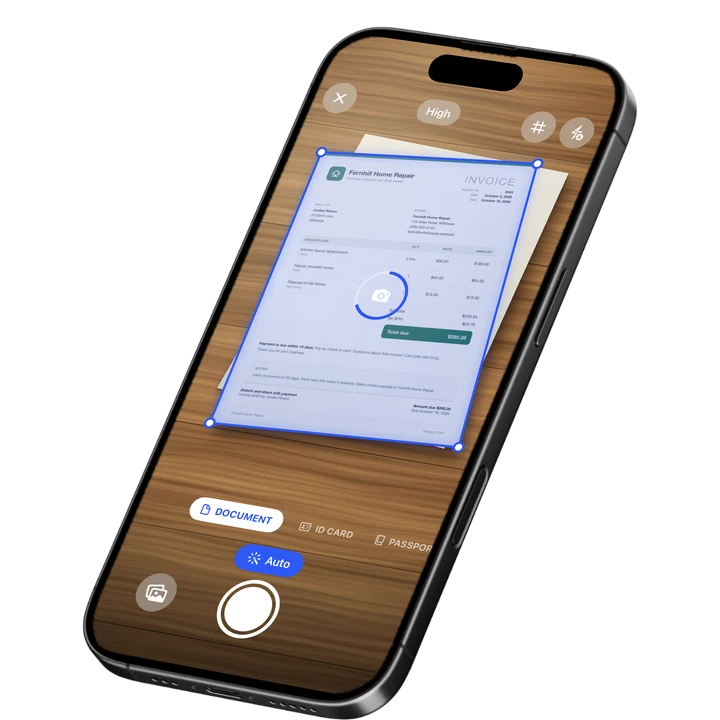
Point the camera at a page and Filewise squares it up automatically with live edge detection and auto-capture, the same one-tap experience most Genius Scan switchers are used to. Scan as many pages as you need in one pass, since there is no page limit, then apply a filter such as B&W or Magic Color to clean up the result.
Where Filewise picks up the extra work is after the scan. Draw a signature with your finger and drop it onto a lease or a contract, redact a detail so it is removed from the exported file, or add a password before you send the document anywhere. A dedicated Document, ID Card, or Passport mode lines up the page correctly depending on what you are scanning.
Key Features
- Live edge detection and auto-capture: The same fast, automatic scanning most switchers expect, with no page limit.
- Signature on the page: Draw a signature with your finger or reuse one you saved, then drop it onto any document.
- Redaction and blur: Remove a sensitive detail from the exported PDF, not just cover it with a box.
- ID Card and Passport modes: Scan an ID card at real size on one page, or a passport's photo page with a frame guide.
- PDF password: Lock a finished document with a password before you send it.
- Folders: Organize scans into folders inside folders, with stars for the ones you use most.
Pricing
See the App Store for current pricing and plans.
Best For
- People who want to sign a document right after scanning it
- Anyone who needs to scan an ID card or a passport at the correct size
- Users who want to redact a detail before sharing a scan
- Anyone organizing scans into folders by client or project
2. Adobe Scan - Best for Acrobat-Integrated Scanning
Adobe Scan holds a 4.88 rating from about 1.59 million ratings on the US App Store (September 2026) and connects directly into Acrobat. For someone who already edits PDFs in Acrobat, it is a natural front door for a scan that needs further work.
Key Features
- Text recognition that reads scanned pages
- Automatic edge and perspective correction
- Direct export into Acrobat and Adobe's other PDF tools
- Fill and sign tools inside the same ecosystem
Pricing
In-app purchases on the US App Store range from about $3.99 to $69.99, including an Adobe Scan Premium monthly plan at $9.99 (September 2026).
Best For
- People who already use Adobe Acrobat for other PDF work
3. CamScanner - Best for the Widest Feature Set
CamScanner from INTSIG is the most reviewed scanner on the US App Store, with a 4.84 rating from about 1.92 million ratings (September 2026). It bundles text recognition, cloud storage, and a large template library, which suits someone who wants one app to cover many kinds of documents.
Key Features
- Wide template library for different document types
- Text recognition
- Cloud storage and sync across devices
- Batch scanning tools
Pricing
In-app purchases on the US App Store range from $0.99 to $69.99, including a Premium Account yearly plan at $59.99 (September 2026).
Best For
- Users who want one app that covers many kinds of scanning tasks
4. Scanner Pro - Best for Reliable, Polished Scanning
Scanner Pro by Readdle has a 4.87 rating from about 336,000 ratings on the US App Store (September 2026) and a clean, native-feeling design. It suits someone who wants a dependable scan-to-PDF workflow that feels close to Genius Scan's simplicity.
Key Features
- Reliable automatic edge detection
- Text recognition and in-app search
- Several export formats
- Native iOS design
Pricing
In-app purchases on the US App Store range from $0.99 to $59.99, including Scanner Pro Plus at $29.99 (September 2026).
Best For
- People who want a clean, dependable scan-to-PDF workflow
5. iScanner - Best for In-App Document Editing
iScanner holds a 4.76 rating from about 1.4 million ratings on the US App Store (September 2026) and pairs scanning with document editing tools. That combination suits someone who wants to mark up a scan without exporting it to another app first.
Key Features
- Automatic edge detection and enhancement
- Document editing and annotation
- Text recognition
- PDF export
Pricing
In-app purchases on the US App Store range from $3.99 to $19.99, plus weekly plans (September 2026).
Best For
- People who want to edit or annotate a scan without leaving the app
How to Move from Genius Scan to Filewise
Moving your existing scans over is mostly a matter of exporting them as PDFs and bringing those files into your new app, since neither app offers a direct one-tap transfer between them.
- Open Genius Scan, select the documents you want to keep, and export them as PDF or JPG files.
- Save the exported files to the Files app or your Photos library.
- Open Filewise and import the files from Files or Photos.
- Sort the imported documents into folders, and continue scanning new documents directly in Filewise from here on.
If you use Genius Scan mainly for signing leases or forms, our guide on how to sign a PDF on iPhone walks through that step in detail. Anyone comparing several scanners at once may also want our roundup of CamScanner alternatives or Adobe Scan alternatives for a wider view of the field.
Frequently Asked Questions
What is the best Genius Scan alternative for iPhone?
Filewise is the best Genius Scan alternative for iPhone because it keeps the same fast, automatic scanning people like about Genius Scan and adds signing, redaction, a PDF password, and dedicated ID and passport modes. That covers jobs a basic scan alone does not, without switching to a second app.
Why do people switch away from Genius Scan?
Most people who look for a Genius Scan alternative are not unhappy with its scanning, which is fast and simple. They usually want a specific extra feature the job requires, such as signing a document right after scanning it, redacting a sensitive detail, or a dedicated mode for scanning an ID card or passport.
How do I move my scanned documents from Genius Scan to another app?
Export your documents from Genius Scan as PDF or JPG files, save them to the Files app or Photos, then import them into your new scanner app from there. From that point on, scan any new documents directly in the new app.
Can I sign a document in a Genius Scan alternative?
Yes. Several alternatives, including Filewise, let you draw a signature with your finger and place it directly on a scanned document, then export the signed file as a PDF. That saves printing a document just to sign it and scan it again.
Is there a scanner app with a dedicated ID or passport mode?
Yes. Filewise includes a Document mode for general scanning plus separate ID Card and Passport modes, so an identity document is captured at the correct size and framing instead of being cropped like a regular page.
Our Pick for the Best Genius Scan Alternative
Filewise is the strongest overall pick because it keeps the fast, simple scanning that made Genius Scan popular and adds the features that send people looking for an alternative in the first place, signing, redaction, a PDF password, and dedicated ID and passport modes.
If you already live inside Adobe Acrobat, Adobe Scan is a sensible alternative, and if you want the widest possible feature set in one app, CamScanner covers the most ground.
Get Filewise and scan, sign, and protect your next document without switching apps.
🔒 Face ID lock | 📱 Built for iPhone