Best Notes App Scanner Alternatives for iPhone (2026)
TL;DR
The best notes app scanner alternatives in 2026 are Filewise for signing and organizing scans, Adobe Scan for text recognition, and CamScanner for high-volume scanning. People look for a dedicated scanner when a task needs more than a quick single scan, such as a signature, a password, or folders to keep documents organized.
 Filewise - PDF Scanner
Scan documents to PDF on iPhone
- Get a sharp, professional PDF in one tap.
- Find any word later with on-device text recognition.
- Sign and send polished documents.
- Confidential files stay locked behind Face ID.
- Reliable and native, built for iOS.
On-device text recognition. Secure, built for iOS.
Best Notes App Scanner Alternatives in 2026
The best notes app scanner alternatives in 2026 add the tools a quick built-in scan does not cover. The top picks are:
- Filewise - Best overall notes app scanner alternative (signing, redaction, passwords, and folders in one app)
- Adobe Scan - Best for text recognition on scanned pages
- CamScanner - Best for high-volume scanning
- TurboScan - Best for people who want an established, long-running scanner app
- Tiny Scanner - Best for a lightweight, simple scanning app
The Notes app scanner is already on every iPhone, so it is often the first thing people try for a quick scan. As the number of scans grows, or a task needs more than a single page in a note, many people add a dedicated scanner app alongside it. Here is a notes app scanner alternative for a few common situations.
Why People Look for a Notes App Scanner Alternative
The built-in Notes app scanner works well for a quick single scan saved inside a note. A dedicated scanner app gets added when a task calls for something more specific.
- Signing a document right after scanning it, without switching to a second app.
- Covering sensitive information with a redaction tool before sharing a file.
- Locking a finished PDF with a password.
- Organizing a growing number of scans into folders and finding one again by searching its text.
- Scanning an ID card or passport at a size meant for that kind of document.
1. Filewise - Best Overall Notes App Scanner Alternative
Filewise scans a document into a sharp, multi-page PDF and adds what a dedicated scanner app is built for: signing, redacting, locking, and organizing, all without leaving the app.
Get Filewise to scan your next document and finish the whole job, from capture to a signed, organized PDF.
What Filewise Adds Beyond a Quick Notes Scan
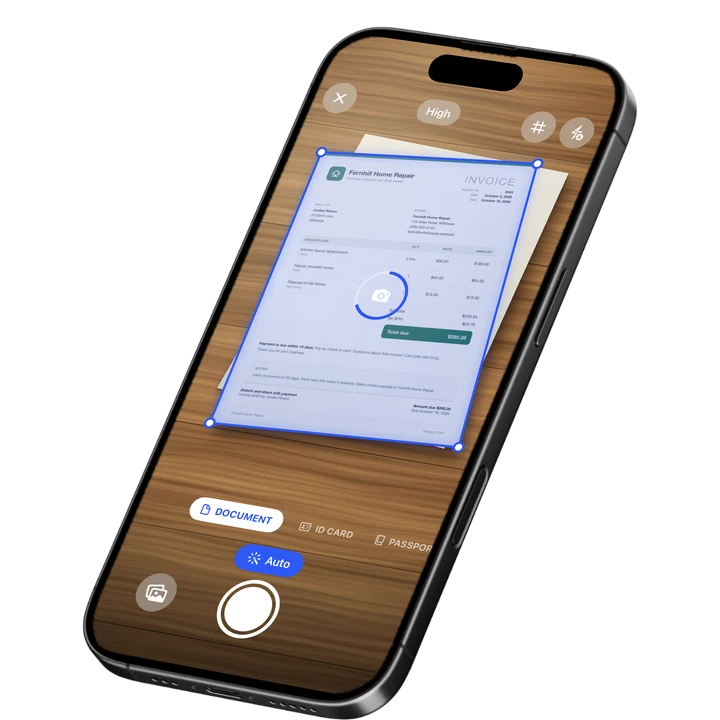
Document mode captures a page with live edge detection and auto capture, and a stack of pages scans into one PDF in a single session with no page limit. ID Card and Passport modes handle identity documents at the right size, which a general note-taking scan is not built for.
Once a document is scanned, signatures, redaction boxes, a PDF password, and a watermark are all available in the same app, along with folders, starring, and search after text recognition. A document scanned for a specific task, like a lease or a client record, stays organized alongside similar documents instead of sitting in a list of unrelated notes.
Key Features
- Batch scanning with no page limit: Scan a full document in one session.
- 7 filters: Including Magic Color and B&W, applied to one page or the whole document.
- Signatures: Draw one with a finger or turn a photo of your signature into a clean image, then reuse it.
- Redaction and watermark: Cover sensitive text or add a watermark, both burned into the exported file.
- PDF password and App Lock: Lock a document, and lock the app itself with Face ID, Touch ID, or a PIN.
- Folders and search: Organize documents by type or project, and find one later by its text.
Pricing
See the App Store for current pricing and plans.
Best For
- Anyone who wants scanning, signing, and organizing in one app
- Documents that need a signature or redaction right after scanning
- Keeping a growing set of scans sorted into folders
- Scanning an ID or passport at the right size
2. Adobe Scan - Best for Text Recognition on Scanned Pages
Adobe Scan reads the text on a scanned page and links into the wider Adobe Acrobat ecosystem, which suits anyone who wants a scanned document to be searchable by its text and already works with Acrobat.
Key Features
- Text recognition on scanned documents
- Links into Adobe Acrobat for further editing
- ID card scan mode
- Wide adoption with a large existing user base
Pricing
In-app purchases range from about $3.99 to $69.99 across monthly and yearly plans (US App Store, September 2026). Rated 4.88 from 1,594,067 ratings (September 2026).
Best For
- Documents that need to be searched by their text later
- Existing Adobe Acrobat users
3. CamScanner - Best for High-Volume Scanning
CamScanner is one of the most widely used scanner apps, with a broad feature set that suits someone scanning a large number of documents on a regular basis.
Key Features
- Batch scanning and OCR text recognition
- A wide range of plan tiers and add-ons, including fax credits
- Cloud storage for scanned documents
- Large, long-established user base
Pricing
In-app purchases range from about $0.99 to $69.99 across several plan tiers (US App Store, September 2026). Rated 4.84 from 1,924,088 ratings (September 2026), the largest rating count in the category.
Best For
- Scanning a large number of documents regularly
- People who want a wide range of built-in options
4. TurboScan - Best for an Established, Long-Running Scanner App
TurboScan from Piksoft has been a fixture in the scanner category for years, which suits someone who wants a well established app with a long track record.
Key Features
- Standard document scanning and PDF export
- A long-running app with a large, established user base
- Straightforward scanning interface
Pricing
TurboScan lists a Premium unlock around $14.99 on the US App Store, and a separate TurboScan Pro version is available as its own listing (September 2026). Rated 4.91 from 102,559 ratings for TurboScan and 4.92 from 296,654 ratings for TurboScan Pro (September 2026).
Best For
- Someone who wants a long-established scanner app
- Straightforward, no-frills document scanning
5. Tiny Scanner - Best for a Lightweight, Simple Scanning App
Tiny Scanner keeps its feature set small and focused, which suits someone who wants a simple scan-and-save app without a lot of extra tools to learn.
Key Features
- Simple, focused scanning flow
- Cloud export options
- Straightforward PDF export
Pricing
In-app purchases range from about $2.99 to $49.99 across weekly, monthly, and yearly plans (US App Store, September 2026). Rated 4.82 from 182,483 ratings (September 2026).
Best For
- A simple scan-and-save flow with fewer extra tools
- Someone who wants a lightweight app for occasional scanning
How to Move from the Notes App Scanner to Filewise
Anything already scanned in Notes can move over without redoing the scan.
- Open the note with the scanned document and tap the share icon.
- Save the PDF to Files or your Photos library.
- Open Filewise and import the file from Files or Photos.
- Sort it into a folder so it stays organized alongside anything you scan next.
Frequently Asked Questions
What is the best notes app scanner alternative for iPhone?
Filewise is the best notes app scanner alternative for iPhone because it scans a document into a sharp PDF and adds signing, redaction, and password protection in the same app. That covers what many people add a dedicated scanner app for once a single quick scan in Notes is not enough.
Is the Notes app scanner good enough for most documents?
For a quick, single-page scan saved inside a note, the built-in Notes app scanner works well. It becomes less convenient once a document needs a signature, a password, or to be found later among many other scans, which is where a dedicated scanner app adds more control.
Can I move a document I already scanned in Notes into a new app?
Yes. Share the scanned PDF from the note, save it to Files or Photos, and import it into a scanner app like Filewise. The original scan does not need to be redone.
What does a dedicated scanner app add that the Notes app does not have?
A dedicated scanner app typically adds tools like signatures, redaction, a PDF password, filters for different kinds of paper, an ID scan mode, and folders for organizing a larger number of documents, none of which are the focus of a general note-taking app.
Can I sign a document I scanned in the Notes app?
Yes, indirectly. Export the scanned PDF from Notes and open it in an app with a signature tool, such as Filewise, to add a signature. This is a common reason people bring a document from Notes into a dedicated scanner app.
Do I have to stop using the Notes app scanner if I add a dedicated scanner app?
No. Many people keep using the Notes app scanner for a quick, one-off scan and use a dedicated scanner app for documents that need more, such as signing, redaction, or long-term organizing.
Our Pick for the Best Notes App Scanner Alternative
For most documents that need more than a quick single scan, Filewise covers the added steps in one place: signing, redacting, locking, and organizing, without switching between apps.
Adobe Scan is a strong pick if text recognition and Acrobat integration matter most, and CamScanner suits anyone scanning a high volume of documents regularly. For more scanner apps to compare beyond this list, see our guide to Genius Scan alternatives and our roundup of the best PDF scanner apps for iPhone. For the built-in method itself, see how to scan in the Notes app on iPhone.
Get Filewise and turn your next scan into a signed, organized PDF.
🔒 Face ID lock | 📱 Built for iPhone