Best iScanner Alternatives for iPhone (2026)
TL;DR
The best iscanner alternatives in 2026 are Filewise for scanning and signing full documents, Adobe Scan for text recognition, and Genius Scan for fast batch capture. People compare scanner apps like iScanner against others to find the best fit for tasks such as signing, redacting, or organizing scans into folders.
 Filewise - PDF Scanner
Scan documents to PDF on iPhone
- Get a sharp, professional PDF in one tap.
- Find any word later with on-device text recognition.
- Sign and send polished documents.
- Confidential files stay locked behind Face ID.
- Reliable and native, built for iOS.
On-device text recognition. Secure, built for iOS.
Best iScanner Alternatives in 2026
The best iscanner alternatives in 2026 cover the same core job, turning paper into a clean PDF, with different strengths for different tasks. The top picks are:
- Filewise - Best overall iScanner alternative (scanning, signing, redaction, and passwords in one app)
- Adobe Scan - Best for text recognition on scanned pages
- Genius Scan - Best for a fast, simple scanning flow
- Scanner Pro - Best for a fax add-on and expense tracking
- SwiftScan - Best for people who remember it as Scanbot
iScanner is a widely used scanner app with a large user base, and plenty of people are happy with it. Others are simply comparing scanner apps before settling on one for a specific job, whether that is signing contracts, scanning IDs, or keeping receipts organized. If you are weighing an iscanner alternative, here is how the main options compare.
None of the apps below are a poor choice. Each one is built around a slightly different job, from fast single-page capture to a fuller set of tools for signing, redacting, and organizing documents, so the right pick depends on what you scan most often.
Why People Look for an iScanner Alternative
People look for an alternative to any scanner app, iScanner included, when a specific task needs a tool that fits it better. This is usually about features, not about the app being a poor choice in general.
- Some want built-in tools like redaction, an ID card mode, or a reusable saved signature, for jobs such as notarizing, signing contracts, or filing expense receipts.
- Others are comparing several scanner apps side by side before picking one for ongoing work, such as scanning contracts or keeping documents sorted into folders.
- Some want scanning and editing to keep working without a connection.
- Some want a specific export format, like a Word document with the recognized text, alongside the PDF.
1. Filewise - Best Overall iScanner Alternative
Filewise scans a document into a sharp, multi-page PDF and adds the tools many people reach for next: a signature, a redaction box, a password, or a share link, all in the same app.
Get Filewise to scan your next document and finish the whole job, from capture to a signed, secure PDF, without switching apps.
How Filewise Replaces iScanner for Everyday Scanning
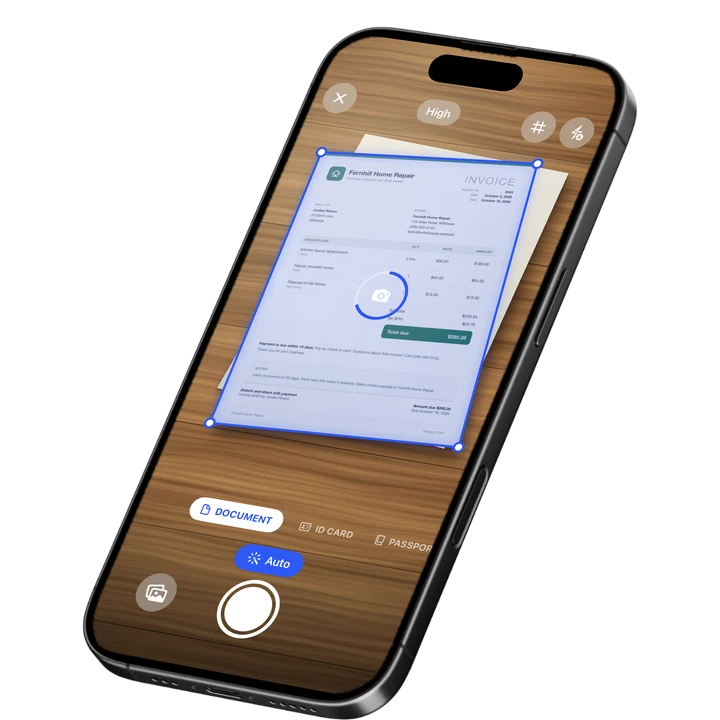
Document mode handles the core task with live edge detection, auto capture, and automatic crop, so a stack of pages scans quickly and lines up straight. ID Card and Passport modes handle identity documents at the right size, and Extract Text mode reads the text on a page.
Beyond the scan itself, Filewise adds signatures you can save and reuse, redaction boxes that are burned into the exported file, a PDF password, and a watermark or page numbers for a more finished document. Folders, starring, and search after text recognition keep everything easy to find again later.
Import from Photos and Files also means a document does not have to start as a fresh scan. A PDF, JPG, PNG, or HEIC file already on your phone, including anything exported from an old scanner app, can be brought in and organized the same way as a new scan, filters and page tools included.
Key Features
- Batch scanning with no page limit: Capture a whole stack of pages in one session.
- 7 filters: Including Magic Color and B&W, applied to one page or the whole document.
- Signatures: Draw one with a finger or turn a photo of your signature into a clean image, then reuse it.
- Redaction and watermark: Cover sensitive text or add a watermark, both burned into the exported file.
- PDF password: Lock a finished document before you share it.
- Text recognition: Read text in up to 25 languages, then search your scans by that text inside the app.
Pricing
See the App Store for current pricing and plans.
Best For
- Anyone who wants scanning, signing, and securing a document in one app
- Signing agents, freelancers, and small business owners handling contracts
- People who need an ID scanned at the right size
- Keeping a growing set of documents organized in folders
2. Adobe Scan - Best for Text Recognition on Scanned Pages
Adobe Scan reads the text on a scanned page and links into the wider Adobe Acrobat ecosystem, which suits anyone who already works with Acrobat or needs to search scanned text later.
Key Features
- Text recognition on scanned documents
- ID card scan mode
- Links into Adobe Acrobat for further editing
- Wide adoption with a large existing user base
Pricing
In-app purchases on the US App Store range from about $3.99 to $69.99 across monthly and yearly plans (September 2026). Rated 4.88 from 1,594,067 ratings (September 2026).
Best For
- Existing Adobe Acrobat users
- Documents that need to be searched by their text later
3. Genius Scan - Best for a Fast, Simple Scanning Flow
Genius Scan keeps its focus narrow: fast, accurate capture with a clean interface, which suits people who want scanning itself to be as quick as possible.
Key Features
- Fast auto edge detection and capture
- Plus and Ultra tiers with extra export options
- A simple, focused interface
- Straightforward PDF export
Pricing
In-app purchases range from about $0.99 to $49.99 (US App Store, September 2026). Rated 4.9 from 1,365,119 ratings (September 2026), the highest average among the largest scanner apps.
Best For
- People who want the fastest possible scan-to-PDF flow
- Keeping the app itself simple and focused
4. Scanner Pro - Best for a Fax Add-On and Expense Tracking
Scanner Pro from Readdle adds a fax option and an expense report tool alongside standard scanning, which suits people who occasionally need to send a document by fax or track a receipt for an expense report.
Key Features
- A fax add-on for sending documents directly from the app
- An expense report tool for tracking receipts
- Page reordering and quick edits after scanning
- Clean, simple scanning interface
Pricing
In-app purchases range from about $0.99 to $59.99 (US App Store, September 2026). Rated 4.87 from 335,985 ratings (September 2026).
Best For
- Occasional fax sending from a phone
- Tracking receipts alongside general scanning
5. SwiftScan - Best for People Who Remember It as Scanbot
SwiftScan is the current name for the app long known as Scanbot, renamed in 2021 by its developer, Maple Media. It suits people searching for the app under either name.
Key Features
- Standard document scanning and PDF export
- Multiple plan tiers, including monthly and annual options
- A fax credit add-on
- Familiar to long-time Scanbot users under a new name
Pricing
In-app purchases range from about $3.99 to $59.99 (US App Store, September 2026). Rated 4.76 from 18,942 ratings (September 2026).
Best For
- Long-time Scanbot users looking for the app's current version
- Straightforward document scanning
How to Move from iScanner to Filewise
Moving your existing scans over takes a few steps, and nothing about your current files is lost in the process.
- In iScanner, export the documents you want to keep as PDF or JPG files.
- Save them to Files or your Photos library on your iPhone.
- Open Filewise and import them from Files or Photos.
- Sort the imported documents into folders so they stay organized alongside anything you scan next.
Frequently Asked Questions
What is the best iScanner alternative for iPhone?
Filewise is the best iscanner alternative for iPhone because it scans a document into a sharp PDF and adds signing, redaction, and password protection in the same app. That covers scanning and the steps people often take right after scanning, without switching to a second app.
Is iScanner a good scanner app?
iScanner is a well rated, widely used scanner app with a large number of App Store reviews. Whether it is the right fit depends on the specific task, since some people want additional tools like redaction, an ID scan mode, or a reusable signature that fit a particular job better.
Can I move my old scans from iScanner to a new app?
Yes. Export your existing documents from iScanner as PDF or JPG files, save them to Files or Photos on your iPhone, and import them into the new app. None of your original scans need to be redone.
Which scanner app is best for scanning and signing a document in one place?
Filewise combines scanning with a signature tool, so a document can be captured, signed, and exported as a PDF without opening a second app. This suits contracts, forms, and any document that needs a signature right after it is scanned.
Do I need to pick just one scanner app?
No. Many people keep more than one scanner app installed and use whichever one fits the task in front of them, such as one for quick single scans and another for documents that need signing or redaction.
Will I lose any quality if I switch scanner apps?
No. The quality of a scan comes from the camera, lighting, and how well the app straightens and crops the page, not from which app you used before. A page scanned again in a new app, or a PDF exported from your old app and imported into a new one, keeps its original sharpness.
Our Pick for the Best iScanner Alternative
For most everyday scanning, signing, and organizing, Filewise covers the full task in one app, from the first scan to a signed, secured PDF with searchable text afterward.
Adobe Scan is a strong pick for anyone already inside the Adobe ecosystem, and Genius Scan suits someone who wants the fastest possible scan with fewer extra tools.
Get Filewise and turn your next scan into a finished, organized PDF.
🔒 Face ID lock | 📱 Built for iPhone