Best App to Scan and Sign Contracts on iPhone (2026)
TL;DR
The best scan and sign contracts app in 2026 is Filewise, because it turns a paper contract into a sharp PDF and adds your signature to every page in the same app. DocuSign suits sending contracts out for signature, Adobe Acrobat Reader suits filling PDF forms, and PDF Expert suits detailed edits. This guide compares 5 apps.
 Filewise - PDF Scanner
Scan documents to PDF on iPhone
- Get a sharp, professional PDF in one tap.
- Find any word later with on-device text recognition.
- Sign and send polished documents.
- Confidential files stay locked behind Face ID.
- Reliable and native, built for iOS.
On-device text recognition. Secure, built for iOS.
Best Scan and Sign Contracts App in 2026
The best scan and sign contracts app in 2026 turns a paper agreement into a clean PDF and lets you add your own signature without printing anything. The top picks are:
- Filewise - Best overall scan and sign contracts app (scans a full contract, then adds a reusable signature to every page)
- DocuSign - Best for sending a contract out for someone else to sign
- Adobe Acrobat Reader - Best for filling in PDF contract forms
- PDF Expert - Best for editing the contract text itself
- Genius Scan - Best for a fast, simple scan before signing elsewhere
A lease shows up as a stack of paper, a vendor sends a contract as an email attachment, or a client hands over a printed agreement at a job site. Either way, you need a sharp PDF and a signature on it today, not a trip to a printer or a scanner at the office. The right scan and sign contracts app does both jobs in one place.
1. Filewise - Best Overall Scan and Sign Contracts App for iPhone
Filewise scans a paper contract into a sharp, multi-page PDF, then lets you add your signature to every page without leaving the app. It works for a one-page agreement or a full lease with attachments.
Get Filewise to scan a contract and sign it in the same app, in under a minute.
How Filewise Handles Scanning and Signing Contracts
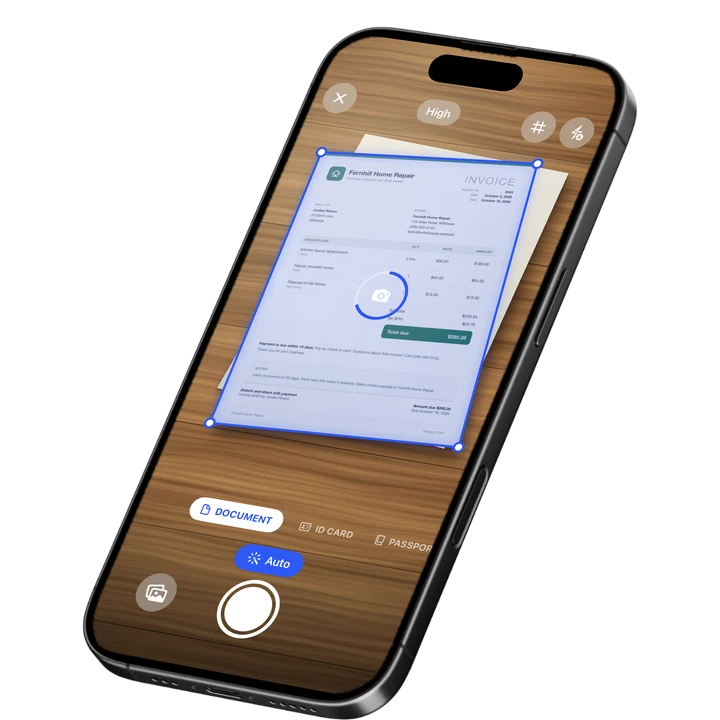
Open Document mode and Filewise finds the page edges automatically, corrects the angle, and captures the next page as soon as it is in frame. A ten-page lease scans as fast as you can turn the pages, with no limit on how many pages go into one PDF.
Once the contract is scanned, add your signature with a finger, or take a photo of a signature you already use on paper and let Filewise turn it into a clean signature with the background removed. Save it once, then copy it to every page that needs an initial or a full signature, so you are not redrawing it each time.
Before sending the signed contract back, add a password so only the other party can open it, and use folders to keep every version organized by client or property.
Key Features for Contracts
- Draw or photo signature: Draw a signature with a finger, or turn a photo of your signature into a clean signature with the background removed.
- Saved signature library: Save a signature once and reuse it, or copy it to every page of a multi-page contract.
- Batch scanning with no page limit: Capture every page of a long lease or agreement in one session with auto capture and automatic crop.
- Filters for legibility: Apply Magic Color or B&W to make a photocopied or faxed-in contract easier to read before you sign it.
- PDF password: Lock the signed contract with a password before you send it on.
- Folders and search: Keep every contract organized by client, property, or deal, and find one again by its text after scanning.
Pricing
See the App Store for current pricing and plans.
Best For
- Freelancers signing a new client service agreement
- Landlords and tenants signing a lease without a printer
- Small business owners signing vendor or supplier contracts
- Anyone who needs to scan and sign the same day a contract arrives
2. DocuSign - Best for Sending a Contract Out for Signature
DocuSign is built for the moment a contract needs to go to someone else and come back signed, with a record of who signed and when. It suits teams that need that audit trail more than a quick self-signature.
Key Features
- Send a contract to one or more people to sign in order
- A signing audit trail that records each signer's action
- Templates for contracts you send out often
- Real estate and business plan tiers for higher volume signing
Pricing
In-app purchases on the US App Store range from a Personal Edition around $14.99 to a Business Pro plan around $59.99 (September 2026). Rated 4.87 from 828,252 ratings (September 2026).
Best For
- Businesses that send the same contract out to multiple signers
- Anyone who needs a recorded audit trail of who signed and when
3. Adobe Acrobat Reader - Best for Filling In PDF Contract Forms
Adobe Acrobat Reader includes a Fill and Sign tool for contracts that arrive as a PDF form with blank fields. It suits people who already read contracts in Acrobat and want to add text and a signature in the same app.
Key Features
- Fill and Sign tool built into the reader app
- Add typed text and a signature to existing PDF fields
- Converts and edits PDFs with a Premium plan
- Wide use among people already inside the Adobe ecosystem
Pricing
In-app purchases range from about $9.99 to $14.99 monthly, with yearly plans from about $48.99 to $69.99 (US App Store, September 2026). Rated 4.65 from 656,070 ratings (September 2026).
Best For
- People who receive contracts as fillable PDF forms
- Existing Adobe Acrobat or Acrobat Reader users
4. PDF Expert - Best for Editing the Contract Text Itself
PDF Expert is a PDF editor from Readdle that lets you change the actual text of a document, not just add a signature on top of it. It suits contracts that need a clause corrected before anyone signs.
Key Features
- Edit text directly inside an existing PDF
- Add signature fields and annotations
- Merge, split, and reorganize multi-page contracts
- Works with cloud storage links for shared files
Pricing
Premium plans list around $49.99 on the US App Store, with a Basic tier around $9.99 (September 2026). Rated 4.67 from 216,009 ratings (September 2026).
Best For
- Anyone who needs to correct contract text before signing
- People merging several contract documents into one file
5. Genius Scan - Best for a Fast, Simple Scan Before Signing Elsewhere
Genius Scan focuses on quick, clean capture: point the camera at a page and it detects the edges and straightens the shot right away. It suits someone who wants a fast scan first and will add a signature in another app or by hand.
Key Features
- Fast auto edge detection and capture
- Plus and Ultra tiers for extra export options
- Simple, focused interface built around scanning
- Straightforward PDF export
Pricing
In-app purchases range from about $0.99 to $49.99 (US App Store, September 2026). Rated 4.9 from 1,365,119 ratings (September 2026), the highest average among the largest scanner apps.
Best For
- A quick single scan before signing in another app
- People who want scanning kept separate from editing
How to Choose a Scan and Sign Contracts App
The right choice depends on who signs the contract and how many pages it runs. Four things matter most.
- Who is signing: If you are signing your own copy, a scanner with a built-in signature tool is enough. If the contract needs to go out to someone else with proof of signing, a platform like DocuSign fits better.
- Page count: A one-page form is simple in any app. A full lease or multi-page agreement needs batch scanning with no page limit and a way to reorder pages if you scan out of order.
- Reusing your signature: Signing contracts often means signing the same way every time. A saved signature you can copy to every page saves time over redrawing it.
- Keeping it secure: Once a contract is signed, a password on the PDF keeps it from being opened by anyone but the intended recipient before you send it on.
If you also need to scan and sign documents for a lease or a rental agreement specifically, see our guide on the best scanner app for real estate agents. Freelancers who sign new client agreements often start with our guide to the best scanner app for freelancers. For the exact signing steps, see how to sign a PDF on iPhone.
Frequently Asked Questions
What is the best app to scan and sign a contract on iPhone?
Filewise is the best app to scan and sign a contract on iPhone because it scans a full multi-page contract into a sharp PDF and lets you add a reusable signature to every page in the same app. It also adds a password to the signed file before you send it on, which keeps the process to one app from start to finish.
Can I sign a contract on my iPhone without printing it?
Yes. A scanner app with a signature tool lets you photograph or scan the contract, then draw your signature with a finger or place a saved signature on the page, all without printing anything. The finished file exports as a PDF you can share the same way you would a printed and mailed copy.
Is a hand-drawn signature on a scanned contract legally binding?
In most everyday business situations, a hand-drawn signature added to a PDF is accepted, especially when both sides agree by email or text that this counts as signing. Some contracts, such as certain real estate or government forms, may require a specific signing method, so check with the other party or the form's instructions if you are unsure.
What is the difference between signing a contract myself and sending it out for signature?
Signing a contract yourself means you add your own signature to a copy you already have, which a scanner app with a signature tool handles well. Sending a contract out for signature means another person needs to sign a copy you send them, which is what a platform like DocuSign is built for, including a record of who signed and when.
Can I password protect a signed contract before I send it?
Yes. Filewise lets you add a password to an exported PDF, so a signed contract stays locked until the person you send it to enters the password to open it. This is a simple way to add a layer of protection to a document that already carries a signature.
Do I need a separate app to scan and one to sign a contract?
No. Apps like Filewise combine scanning and signing in one flow, so you photograph the paper contract, clean it up, and add your signature without switching apps. This is faster than scanning in one app and opening the file in a second app just to sign it.
Our Pick for the Scan and Sign Contracts App
For most people signing their own contracts, Filewise is the simplest path from a paper agreement to a signed, shareable PDF. It scans every page cleanly, keeps a reusable signature ready, and locks the finished file with a password before it goes out.
If a contract needs to go to someone else with proof of who signed and when, DocuSign is the better fit for that specific job. Adobe Acrobat Reader and PDF Expert are strong picks when the contract arrives as a PDF form or needs its text corrected before anyone signs.
Get Filewise and turn your next paper contract into a signed PDF without printing a page.
🔒 Face ID lock | 📱 Built for iPhone