Best Scanner App for Notary Signing Agents (2026)
TL;DR
The best scanner app for notary signing agents in 2026 is Filewise, because it scans a full loan signing package into one sharp PDF and copies an ID onto a single page for the file. Adobe Scan suits text recognition, Genius Scan suits fast batch scans, and Scanner Pro suits quick page edits. This guide compares 5 apps.
 Filewise - PDF Scanner
Scan documents to PDF on iPhone
- Get a sharp, professional PDF in one tap.
- Find any word later with on-device text recognition.
- Sign and send polished documents.
- Confidential files stay locked behind Face ID.
- Reliable and native, built for iOS.
On-device text recognition. Secure, built for iOS.
Best Scanner App for Notary Signing Agents in 2026
The best scanner app for notary signing agents in 2026 handles a full closing package quickly and keeps sensitive information under control. The top picks are:
- Filewise - Best overall scanner app for notary signing agents (ID card mode, redaction, and password protection in one app)
- Adobe Scan - Best for text recognition on scanned loan documents
- Genius Scan - Best for fast batch scanning of large stacks
- Scanner Pro - Best for quick page edits and reordering
- iScanner - Best for scanning and light markup on the go
A notary signing agent shows up to a closing with a stack of loan documents, witnesses the signatures, checks a government ID, and then needs to get a clean, complete copy back to the title company or lender, often the same day. A phone camera alone leaves crooked pages and shadows. A scanner app built for this work turns the whole package into one sharp PDF, with the ID and signatures where they belong.
1. Filewise - Best Overall Scanner App for Notary Signing Agents
Filewise scans a full closing package into one sharp, multi-page PDF, copies both sides of a driver's license onto a single page at real size, and locks the finished file with a password before it goes out. It covers the three parts of the job: the documents, the ID, and keeping the file secure.
Get Filewise to scan a full signing package, copy the borrower's ID, and lock the file with a password before you send it on.
How Filewise Handles a Notary Signing Package
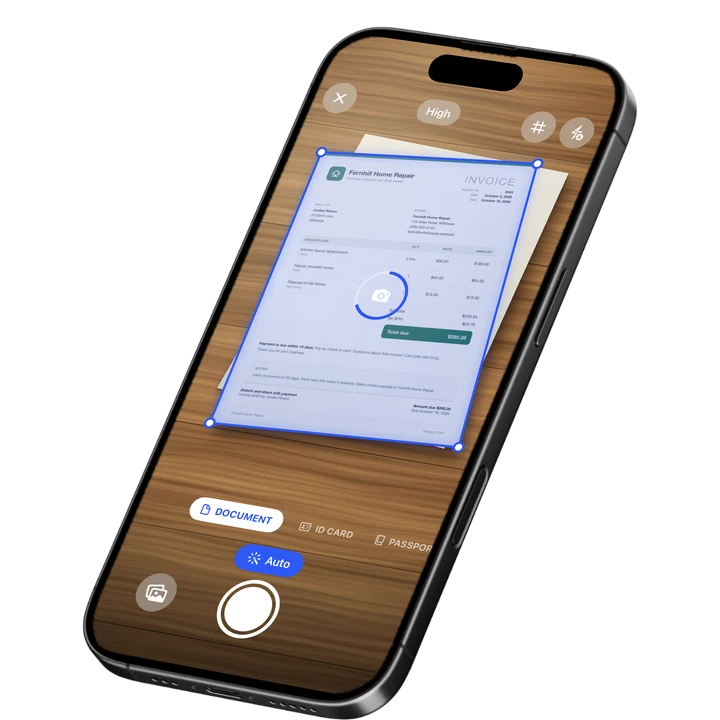
Document mode captures every page of the loan package in order, with auto capture and automatic crop so a stack of 100 or more pages stays sharp and lined up. ID Card mode is built for the identity check: it places both sides of a driver's license or other ID card on one A4 page at real ID size, so the copy in the file matches what a reviewer expects to see.
Before the package goes back to the title company or lender, redaction boxes let you cover a Social Security number or account number that should not travel with a copy sent to another party, and the redaction is burned into the exported PDF rather than sitting on top of it. A PDF password then locks the whole package until the right person opens it.
Key Features for Notary Work
- ID Card mode: Scan both sides of a driver's license or ID card onto one page at real ID size.
- Batch scanning with no page limit: Capture a full loan package in one pass with auto capture and automatic crop.
- Redaction: Cover a Social Security number or account number with a redaction box that is burned into the exported file.
- PDF password: Lock a completed signing package before you send it to the title company or lender.
- Share link with expiry: Send a package as a link that can expire after a set number of days instead of staying open forever.
- Folders: Organize scanned packages by closing date, borrower, or title company.
Pricing
See the App Store for current pricing and plans.
Best For
- Notary signing agents handling mortgage and refinance closings
- Anyone who needs to copy a government ID onto one page for a file
- Signing agents who need to keep a Social Security number private in a shared copy
- Loan signings with long, multi-document packages
2. Adobe Scan - Best for Text Recognition on Scanned Loan Documents
Adobe Scan reads the text on a scanned page, which helps when a closing package needs to be searched later for a specific clause or disclosure. It suits signing agents who already work inside the Adobe ecosystem.
Key Features
- Text recognition on scanned pages
- ID card scan mode
- Links to Adobe Acrobat for further editing
- Wide adoption among general document scanning users
Pricing
In-app purchases on the US App Store range from about $3.99 to $69.99 across monthly and yearly plans (September 2026). Rated 4.88 from 1,594,067 ratings (September 2026), the largest rating count among general scanner apps.
Best For
- Signing agents who already use Adobe Acrobat
- Packages that need to be searched by text after scanning
3. Genius Scan - Best for Fast Batch Scanning of Large Stacks
Genius Scan focuses on quick, accurate capture, which matters when a loan package runs to dozens of pages and a signing agent is working against the clock. It suits agents who want scanning to be as fast as possible.
Key Features
- Fast auto edge detection on each page
- Plus and Ultra tiers for extra export options
- A simple, focused capture flow
- Straightforward PDF export
Pricing
In-app purchases range from about $0.99 to $49.99 (US App Store, September 2026). Rated 4.9 from 1,365,119 ratings (September 2026), the highest average among the largest scanner apps.
Best For
- Signing agents who scan large packages back to back
- A simple, fast capture flow with fewer extra tools
4. Scanner Pro - Best for Quick Page Edits and Reordering
Scanner Pro from Readdle includes tools for fixing a scan after the fact, such as reordering pages or adding a fax, which suits an agent who needs to make a last change before sending a package out.
Key Features
- Page reordering and quick edits after scanning
- A fax add-on for sending documents directly
- An expense report add-on for tracking mileage and costs
- Clean, simple scanning interface
Pricing
In-app purchases range from about $0.99 to $59.99 (US App Store, September 2026). Rated 4.87 from 335,985 ratings (September 2026).
Best For
- Agents who need to reorder pages after a scan
- Anyone who wants a fax option built into the same app
5. iScanner - Best for Scanning and Light Markup on the Go
iScanner combines scanning with basic markup tools, which suits an agent adding a quick note or highlight to a page before sending it on from the car or a coffee shop between appointments.
Key Features
- Scanning with basic markup and annotation tools
- Weekly and other short-term plans for occasional use
- PDF export and simple organizing tools
Pricing
In-app purchases range from about $3.99 to $19.99, with weekly options as low as $3.99 (US App Store, September 2026). Rated 4.76 from 1,403,483 ratings (September 2026).
Best For
- Agents who want to add a quick note to a page before sending it
- Scanning between appointments on a phone alone
How to Choose a Scanner App for Notary Signing Agents
The right app depends on what a closing package needs before it leaves your hands. Four things matter most for this job.
- ID handling: A closing almost always starts with checking a government ID. A dedicated ID scan mode that places both sides on one page saves a step every signing.
- Keeping sensitive data private: A Social Security number or account number sometimes needs to be covered before a copy goes to a party who should not see it. Redaction that is burned into the file matters more than a highlight you could accidentally remove.
- Package size: A loan package can run long. Batch scanning with no page limit keeps a 100-page package in one file instead of several.
- Getting it there securely: A password on the finished PDF, or a share link that can expire, keeps a signed package from sitting open indefinitely after it is sent.
If you also handle scanning an ID as a standalone task, see our guide to the best ID card scanner app for iPhone. Many closings also involve signing the documents themselves. Our guide to the best app to scan and sign contracts on iPhone and how to create a digital signature cover that part of the job.
Frequently Asked Questions
What is the best scanner app for a notary signing agent?
Filewise is the best scanner app for a notary signing agent because it scans a full loan package into one PDF, copies both sides of a driver's license onto a single page, and can redact and password protect the file before it goes out. Those three tasks cover most of what a signing appointment requires.
Can I scan both sides of a driver's license onto one page?
Yes. A scanner app with an ID card mode, such as Filewise, places both sides of a license or ID card on a single page at real ID size, so the file matches what a reviewer expects to see rather than two separate photos.
How do I keep a Social Security number private when I send a scanned closing package?
A redaction tool that is burned into the exported PDF covers the number so it cannot be revealed later, unlike a highlight or box drawn on top of the text that could be removed. This is different from simply blurring a photo, since a proper redaction changes the underlying page.
Can I password protect a scanned loan package before I send it?
Yes. Adding a password to the exported PDF means only someone with the password can open the file, which is useful when a package needs to travel by email or a shared link to a title company or lender.
Do notary signing agents need a fax machine to send documents?
Not always. Many title companies and lenders now accept a PDF sent by email or a secure link instead of a fax, though some workflows still use fax as an option. Some scanner apps, including Scanner Pro, offer a fax add-on for situations where that is still the expected method.
How many pages can I scan into one file for a loan signing?
With an app built for batch scanning, there is no set page limit, so a full loan package can go into one PDF instead of several shorter files. This keeps the whole closing package together and easier to send as a single document.
Our Pick for the Best Scanner App for Notary Signing Agents
For most signing agents, Filewise covers the full appointment: scanning the package, copying the ID, redacting anything sensitive, and locking the file with a password before it goes back to the title company or lender.
Adobe Scan is a strong choice for agents who want text recognition on scanned pages, and Genius Scan suits anyone who wants the fastest possible capture on a long stack of documents.
Get Filewise and turn your next closing package into one secure, organized PDF.
🔒 Face ID lock | 📱 Built for iPhone