Best Scanner Pro Alternatives for iPhone (2026)
TL;DR
The best Scanner Pro alternatives in 2026 are Filewise for redaction and password protection, Adobe Scan for OCR, and Genius Scan for a simple interface. People compare alternatives to see how scan quality, signing, and document protection stack up against what Scanner Pro offers for the same job.
 Filewise - PDF Scanner
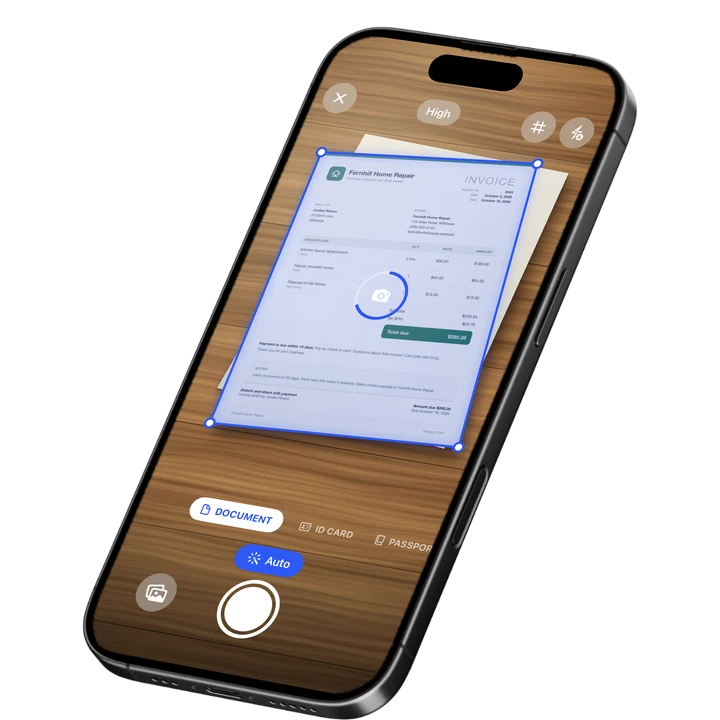
Scan documents to PDF on iPhone
- Get a sharp, professional PDF in one tap.
- Find any word later with on-device text recognition.
- Sign and send polished documents.
- Confidential files stay locked behind Face ID.
- Reliable and native, built for iOS.
On-device text recognition. Secure, built for iOS.
Best Scanner Pro Alternatives in 2026
The best Scanner Pro alternatives for iPhone in 2026 are:
- Filewise - Best overall Scanner Pro alternative for redaction, passwords, and signing
- Adobe Scan - Best for OCR and the Adobe ecosystem
- Genius Scan - Best for a simple, fast interface
- CamScanner - Best for a wide feature set
- iScanner - Best for AI document chat features
Scanner Pro has been a well-known name in document scanning for years, and plenty of people who use it also try other scanner apps to compare scan quality, text recognition, and what happens after the scan, like redacting or signing a document. It is a similar search to people who compare iScanner alternatives or Genius Scan alternatives for the same reasons.
Why People Look for a Scanner Pro Alternative
People compare Scanner Pro against other apps for the same reason they compare any two scanner apps: to see which one handles their specific documents better, whether that is scan sharpness, OCR accuracy, or what the app does once a document is protected or signed.
- Comparing scan quality and edge detection across a few real documents
- Checking whether an app redacts or password-protects a PDF, not just scans it
- Looking for a dedicated ID scanning mode
- Wanting text recognition and search built into the same app as scanning
- Wanting a signature tool built into the same app used for scanning, instead of a separate step
None of these reasons require anything to be wrong with Scanner Pro. Two scanner apps can both be well built and still fit different habits, and the only way to know which fits yours is to try the specific task you repeat most, whether that is scanning IDs, redacting a bank statement, or signing a form.
1. Filewise - Best Overall Scanner Pro Alternative
Filewise covers the same core job as Scanner Pro, turning paper into a clean PDF, and adds redaction, a PDF password, and signatures in the same app, so a document does not need to leave Filewise before it is ready to send.
Get Filewise to scan your next document and redact, sign, or password-protect it without switching apps.
How Filewise Compares for the Same Job
Both apps handle the core scanning task: point the camera, let edge detection square up the page, and export a PDF. Filewise adds a dedicated ID Card mode that places both sides of an ID on one page at real ID size, redaction and blur tools that burn a cover over sensitive text into the exported file, and a PDF password you set at export. Text recognition runs on the device, so scanned pages become searchable by their text without leaving your iPhone.
Key Features
- Redaction and blur: Cover sensitive text or images, burned into the exported PDF.
- PDF password: Lock a finished PDF with a password on export.
- Signatures: Draw a signature with a finger, save it, and reuse it across documents.
- ID Card mode: Capture both sides of an ID on one page at real ID size.
- On-device text recognition: Search your scans by their text after scanning.
- Multi-page batch scanning: Scan a long document as one PDF with no page limit.
Pricing
See the App Store for current pricing and plans.
Best For
- Anyone who needs to redact or password-protect a document after scanning
- Scanning and organizing IDs with a dedicated two-sided mode
- Signing a document on the spot with a reusable signature
- Keeping the whole scan-to-share process in one app
2. Adobe Scan - Best for OCR and the Adobe Ecosystem
Adobe Scan pairs automatic capture with on-device text recognition on every scan, and ties into Adobe Document Cloud, which suits anyone who already works inside Acrobat on a computer.
Key Features
- Automatic edge detection and capture
- Text recognition (OCR) on every scan
- Business card and ID capture modes
- Ties into the wider Adobe Acrobat ecosystem
Pricing
Adobe Scan Premium is listed from about $3.99 to $69.99 across its plans (September 2026).
Best For
- People already using Adobe Acrobat or Document Cloud
- Anyone who wants OCR by default on every scan
3. Genius Scan - Best for a Simple, Fast Interface
Genius Scan, from The Grizzly Labs, holds a 4.9 rating from 1.37 million reviews (September 2026), the highest average of the major scanner apps, built around getting from camera to finished PDF in as few taps as possible.
Key Features
- Fast perspective correction and cropping
- Batch scanning into a single PDF
- A minimal, uncluttered interface
- Works fully offline
Pricing
Genius Scan Plus is listed at $0.99 to $11.99, and Genius Scan Ultra from $39.99 to $49.99 (September 2026).
Best For
- Anyone who wants the fastest path to a finished PDF
- People who prefer a minimal interface
4. CamScanner - Best for a Wide Feature Set
CamScanner, from INTSIG, holds a 4.84 rating from over 1.9 million reviews (September 2026), the largest review count in the category, with a broad set of scanning and document tools.
Key Features
- OCR in multiple languages
- Cloud storage for scanned files
- Fax credits as an add-on
- A large existing user base
Pricing
CamScanner Premium plans are listed from about $4.99 to $69.99 (September 2026).
Best For
- Anyone who wants one app with a large set of document tools
- People already familiar with CamScanner from other uses
5. iScanner - Best for AI Document Chat Features
iScanner, from BP Mobile, holds a 4.76 rating from 1.4 million reviews (September 2026) and includes an AI chat tool that can summarize or rewrite text pulled from a scanned document.
Key Features
- AI chat that can summarize or rewrite scanned text
- OCR across a wide range of languages
- Standard scanning with edge detection and cropping
- Document management tools inside the app
Pricing
iScanner plans are listed from about $3.99 to $19.99, with a 1-week trial option (September 2026).
Best For
- People who want an AI chat tool alongside scanning
- Anyone comparing scanned text summaries across a few apps
How to Move from Scanner Pro to Filewise
Moving your existing documents over is straightforward, since Scanner Pro exports to standard PDF and JPG files that any app can open.
- Open Scanner Pro and export the documents you want to keep as PDF or JPG files
- Save them to Files or your Photos library on your iPhone
- Open Filewise and import them from Files or Photos into a folder
- Organize them into folders as you go, and redact or password-protect any file that needs it
- Use Filewise for new scans going forward
For a broader look at how the top scanner apps compare beyond Scanner Pro, see our best PDF scanner apps for iPhone guide.
Frequently Asked Questions
What is the best Scanner Pro alternative for iPhone?
Filewise is the best Scanner Pro alternative because it covers the same core scanning job and adds redaction, a PDF password, and signatures in the same app, so a document is ready to send without switching tools. Adobe Scan and Genius Scan are also strong picks depending on whether OCR or a simple interface matters more to you.
Why do people compare alternatives to Scanner Pro?
People compare Scanner Pro against other scanner apps for the same reasons they compare any two apps in this category: scan sharpness, how well text recognition works, and what happens after the scan, such as redacting, password-protecting, or signing the document.
How do I move my scanned documents from Scanner Pro to another app?
Export your documents from Scanner Pro as PDF or JPG files, save them to Files or Photos on your iPhone, then import them into the new app from there. This works for moving files into Filewise or any other scanner app.
Does Filewise scan IDs the same way Scanner Pro does?
Filewise includes a dedicated ID Card mode that captures both sides of an ID and places them on a single page at real ID size, in one step, which is worth checking against how any scanner app you compare handles ID documents.
Can I redact sensitive information on a scan with Scanner Pro alternatives?
It depends on the app. Filewise includes a redaction tool that burns a cover over sensitive text into the exported PDF, which is worth confirming in any alternative you compare if redacting documents is part of your workflow.
Our Pick for the Best Scanner Pro Alternative
Filewise is the strongest overall alternative because it does not stop at scanning: redaction, a PDF password, and signatures are all part of the same app, so a document goes from paper to protected and shareable without a detour through another tool. If OCR tied to Adobe's ecosystem matters more to you, Adobe Scan is a solid second choice, and Genius Scan is worth a look if you want the simplest, fastest interface available.
Get Filewise and turn your next scan into a document that is ready to redact, sign, and send.
🔒 Face ID lock | 📱 Built for iPhone