Best Scanner App for Landlords (2026)
TL;DR
The best scanner app for landlords in 2026 is Filewise, because it scans leases and receipts into clean PDFs and redacts a tenant's ID number before you file it. Adobe Scan is best for OCR, Genius Scan for a clean, simple interface, and Docusign for sending a lease out for signature. This guide compares 6 apps.
 Filewise - PDF Scanner
Scan documents to PDF on iPhone
- Get a sharp, professional PDF in one tap.
- Find any word later with on-device text recognition.
- Sign and send polished documents.
- Confidential files stay locked behind Face ID.
- Reliable and native, built for iOS.
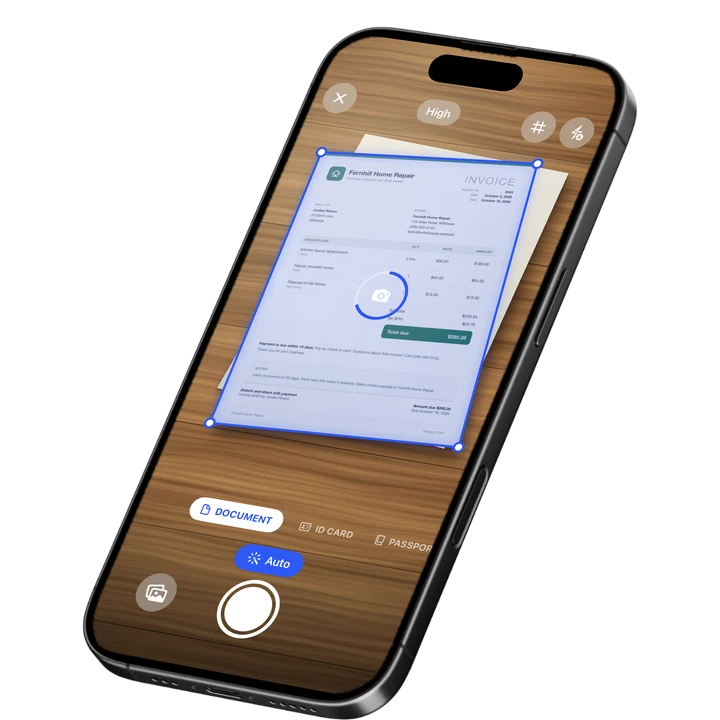
On-device text recognition. Secure, built for iOS.
Best Scanner App for Landlords in 2026
The best scanner apps for landlords in 2026 are:
- Filewise - Best overall for landlords (redacts tenant ID numbers and password-protects lease files)
- Adobe Scan - Best for OCR on move-in checklists and inspection notes
- Genius Scan - Best for a clean, minimal interface
- Scanner Pro - Best for landlords who already use other Readdle apps
- CamScanner - Best for a wide feature set in one app
- Docusign - Best for sending a lease out for a tenant's signature
Being a landlord means a folder full of paper: signed leases, a copy of each tenant's ID, move-in and move-out checklists, and receipts for every repair. Losing track of any one of those documents can turn into a dispute over a security deposit. A scanner app on your iPhone turns that folder into PDFs you can find and hand over the moment you need them, much like the paperwork covered in our best scanner app for real estate agents guide.
1. Filewise - Best Overall Scanner App for Landlords
Filewise scans a lease, a tenant's ID, or a repair receipt into a sharp PDF, and lets you black out a tenant's ID number or account details before you file the copy away. That combination, a clean scan plus a real redaction tool, is what a landlord needs for paperwork that other people's private information ends up in.
Get Filewise to scan a new lease or a tenant's ID and have a clean, ready-to-file PDF in under a minute.
How Filewise Handles Landlord Paperwork
Scan a signed lease as a multi-page PDF with no page limit, so a ten-page agreement stays as one file instead of ten photos. For a tenant's driver's license or ID card, switch to ID Card mode to capture both sides on a single page at real ID size. Before you file that ID copy, use the redaction tool to black out the ID number or date of birth if you only need proof that you checked it, not the full number on record.
For repair receipts and contractor invoices, a quick scan in Document mode with the Auto filter keeps the paper trail readable for tax season or a dispute. Add a PIN or Face ID lock on the folder that holds tenant documents, since it is the kind of paperwork you do not want open to anyone who picks up your phone.
Key Features for Landlords
- ID Card mode: Scan both sides of a tenant's ID onto one page at real ID size, in one capture.
- Redaction and blur: Black out an ID number, account number, or other sensitive detail before you file or share a copy.
- PDF password: Add a password to a lease or a file of tenant records before you send it by email.
- Multi-page batch scanning: Scan a full lease or a stack of receipts as one PDF with no page limit.
- Signatures: Sign a move-in checklist or an addendum yourself with a finger-drawn signature you can reuse.
- Folders and App Lock: Create a folder for each property or tenant, and lock the app with Face ID, Touch ID, or a PIN.
Pricing
See the App Store for current pricing and plans.
Best For
- Landlords who need a clean copy of a tenant's ID with the number redacted
- Filing signed leases and addenda as clean PDFs with searchable text after scanning
- Keeping repair and contractor receipts in one place by property
- Locking tenant paperwork behind Face ID on a shared or family phone
2. Adobe Scan - Best for OCR on Checklists and Notes
Adobe Scan is a scanning app from Adobe with automatic capture and on-device text recognition, which is useful for typed or handwritten move-in checklists you want to search later by keyword.
Key Features
- Automatic edge detection and capture
- Text recognition (OCR) so you can search scanned notes and forms
- Business card scan mode
- Ties into the wider Adobe Acrobat ecosystem
Pricing
Adobe Scan Premium is listed from about $3.99 to $69.99 across its plans (September 2026).
Best For
- Landlords who want OCR on typed inspection reports
- Anyone already using Adobe Acrobat for other paperwork
3. Genius Scan - Best for a Clean, Minimal Interface
Genius Scan, from The Grizzly Labs, holds a 4.9 rating from 1.37 million reviews (September 2026), the highest average of the major scanner apps, with a clean interface built around fast, no-fuss scanning.
Key Features
- Fast perspective correction and cropping
- Batch scanning into a single PDF
- A simple, uncluttered interface
- Works fully offline
Pricing
Genius Scan Plus is listed at $0.99 to $11.99, and Genius Scan Ultra from $39.99 to $49.99 (September 2026).
Best For
- Landlords who scan occasionally and want a simple app
- Anyone who prefers a minimal interface over a large feature list
4. Scanner Pro - Best for Readdle Users
Scanner Pro, from Readdle, holds a 4.87 rating from 335,985 reviews (September 2026) and includes on-device text recognition and full-text search across scans.
Key Features
- Text recognition with full-text search
- iCloud sync between devices
- Fax and expense report add-ons
- Custom workflows for repeat scanning tasks
Pricing
Scanner Pro is free to download, with Scanner Pro Plus available as a subscription and other add-ons priced separately (September 2026).
Best For
- Landlords who use other Readdle apps like PDF Expert
- People who want built-in fax or expense-report add-ons
5. CamScanner - Best for a Wide Feature Set
CamScanner, from INTSIG, holds a 4.84 rating from over 1.9 million reviews (September 2026), the largest review count in the category, with a broad set of scanning and document tools.
Key Features
- OCR in multiple languages
- Cloud storage for scanned files
- Fax credits as an add-on
- A large existing user base
Pricing
CamScanner Premium plans are listed from about $4.99 to $69.99 (September 2026).
Best For
- Landlords who want one app with many document tools
- Anyone already familiar with CamScanner from other uses
6. Docusign - Best for Getting a Lease Signed
Docusign is an e-signature platform, not a scanner, and it fills a different job: getting a lease or an addendum signed by a tenant who is not in the room with you, with a tracked audit trail.
Key Features
- Send a document to one or more people for signature
- Track when a document has been opened and signed
- Templates for a lease you send out often
Pricing
Docusign plans are listed from about $14.99 to $59.99 depending on the plan (September 2026).
Best For
- Sending a lease out for a tenant's signature before move-in
- Landlords who manage several properties and send the same forms repeatedly
How to Choose a Scanner App as a Landlord
The right app depends on which part of your paperwork causes the most friction. Start with the documents you handle most often, then match the features to that job.
- Tenant ID copies: Look for a dedicated ID scanning mode and a real redaction tool, not just a crop tool, as covered in our best app to redact a PDF on iPhone guide.
- Leases and checklists: A multi-page scanner with OCR keeps long documents searchable and easy to find later.
- Receipts and repairs: A quick scan-and-file habit matters more here than any single feature, similar to what small businesses need in our best scanner app for small business guide.
- Signatures: Decide whether you need to sign yourself, on the spot, or send a document out for a tenant to sign remotely.
Frequently Asked Questions
What is the best scanner app for landlords?
Filewise is the best scanner app for landlords because it scans leases and receipts into clean PDFs and lets you redact a tenant's ID number before you file the copy. Adobe Scan and Genius Scan are also solid picks depending on whether OCR or a clean, minimal interface matters more to you.
How should I store a copy of a tenant's ID safely?
Scan it with a dedicated ID mode so both sides are captured clearly, then consider redacting the full ID number if you only need to show that you verified it. Filewise's ID Card mode and redaction tool cover both steps, and locking the app or the folder with Face ID adds another layer if the phone is shared.
Can I scan a multi-page lease as one file?
Yes. A scanner app with multi-page batch scanning, like Filewise, lets you capture every page of a lease in one session and export it as a single PDF instead of a separate file per page.
Do I need a separate app to get a lease signed by a tenant?
If the tenant is not with you in person, an e-signature platform like Docusign is built for that job, with tracking to confirm when the document was signed. If you are both present, you can sign a printed or scanned copy directly with a scanner app's own signature tool.
Should I keep tenant paperwork in the same folder as everything else on my phone?
Keeping it separate makes it easier to find and easier to lock down. Filewise lets you create folders for each property or tenant and lock the app itself with Face ID, Touch ID, or a PIN, so tenant documents are not sitting in the open next to unrelated photos and files.
Our Pick for the Best Scanner App for Landlords
Filewise is the strongest overall pick because it covers the two jobs landlords repeat most: turning paper into a clean PDF and redacting the sensitive part of a tenant's ID before you file it. If you send leases out for signature to tenants who are not on-site, pair it with Docusign for that specific step, and lean on Adobe Scan if searchable checklists matter more to you than anything else.
Get Filewise and keep every lease, ID copy, and repair receipt as a clean, organized PDF.
🔒 Face ID lock | 📱 Built for iPhone