Best Scanner App for Students (2026)
TL;DR
The best scanner app for students in 2026 is Filewise, because it turns handouts and notes into clean PDFs, searchable inside the app, before an exam. Adobe Scan is best for Acrobat-integrated text recognition, Genius Scan for simple fast scanning, and CamScanner for the widest feature set. This guide compares 6 apps.
 Filewise - PDF Scanner
Scan documents to PDF on iPhone
- Get a sharp, professional PDF in one tap.
- Find any word later with on-device text recognition.
- Sign and send polished documents.
- Confidential files stay locked behind Face ID.
- Reliable and native, built for iOS.
On-device text recognition. Secure, built for iOS.
Best Scanner App for Students in 2026
A good scanner app for students turns a handout, a page of class notes, or a group project document into a clean PDF you can find again by keyword when you need it. Filewise ranks first because it scans class materials, recognizes the text, and lets you search inside your notes right when exam week hits.
The best scanner apps for students in 2026 are:
- Filewise - Best overall for turning handouts and notes into organized PDFs, searchable inside the app
- Adobe Scan - Best for Acrobat-integrated text recognition
- Genius Scan - Best for simple, fast scanning
- CamScanner - Best for the widest feature set
- Scanner Pro - Best for reliable, polished scanning
- Built-in iPhone Scanner - Best for a quick capture with no extra app
A semester produces a lot of paper: a handout your professor only printed, a page borrowed from a classmate's notes, a permission slip that needs a signature back by Friday. A scanner app for students turns each one into a digital file you can keep with the rest of that class's work instead of losing it in a backpack. For applying to college in the first place, our guide to the best app to scan documents for college applications covers that separate stage.
1. Filewise - Best Overall Scanner App for Students
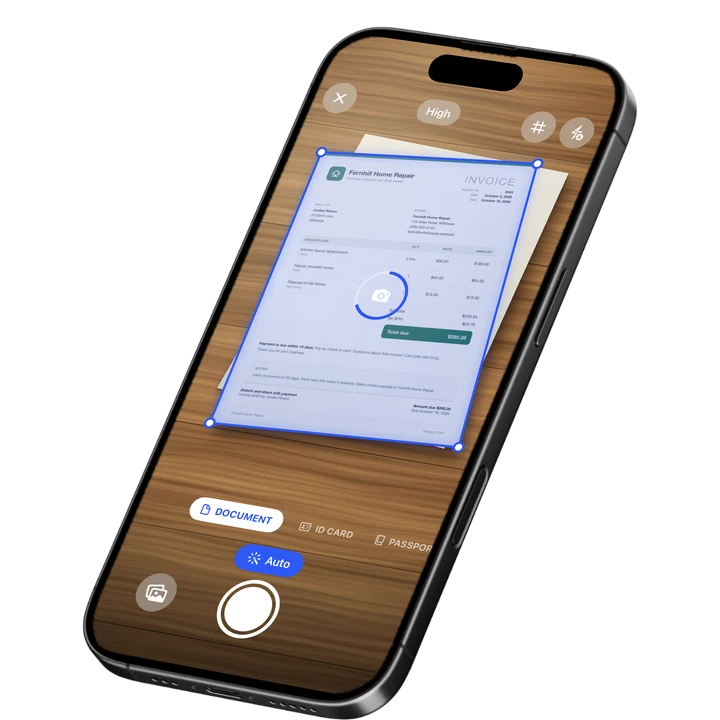
Filewise scans a handout, a worksheet, or a page of notes into a sharp PDF and recognizes the text inside it, so you can search your scans by keyword instead of flipping through every page before an exam. Multi-page batch scanning with no page limit means an entire packet goes into one file in one pass.
Get Filewise to scan your next handout and find it again by searching for a single word from it later.
How Filewise Fits a Student's Workflow
Scan a stack of handouts right after class with live edge detection and auto-capture, then keep each class's scans in its own folder so nothing gets mixed up between subjects. Text recognition runs on the device in up to 25 languages, and once it has read a page, you can search the text of that scan inside the app. Some languages need a newer version of iOS.
When a permission slip or an acknowledgment form needs a signature, draw one with your finger and drop it onto the line, then export the signed PDF to send back. For a group project, merge several classmates' scanned pages into one combined PDF before you submit it.
Key Features for Students
- Multi-page batch scanning: Scan an entire handout packet into one PDF with no page limit.
- Text recognition in up to 25 languages: Including English, Spanish, German, French, Chinese, Japanese, Korean and Arabic.
- Search your scans: Search the text of your scanned notes and handouts inside the app.
- Folders by class: Keep each class's scans in its own folder, with stars for the pages you reference most.
- Signature for forms: Sign a permission slip or an acknowledgment form with your finger before exporting it.
- Merge and reorder pages: Combine scans from a group project into one ordered PDF before submitting it.
Pricing
See the App Store for current pricing and plans.
Best For
- Students who want to search their notes and handouts by keyword before an exam
- Anyone keeping each class's paperwork organized in its own folder
- Students who need to sign and return a permission or acknowledgment form
- Group projects that combine scanned pages from more than one person
2. Adobe Scan - Best for Acrobat-Integrated Text Recognition
Adobe Scan holds a 4.88 rating from about 1.59 million ratings on the US App Store (September 2026) and ties directly into Acrobat. That suits a student who already writes papers or reads assigned PDFs in Acrobat and wants scanned handouts in the same place.
Key Features
- Text recognition tied into Acrobat
- Automatic edge and perspective correction
- Direct export into Acrobat and Adobe's other PDF tools
- Fill and sign tools inside the same ecosystem
Pricing
In-app purchases on the US App Store range from about $3.99 to $69.99, including an Adobe Scan Premium monthly plan at $9.99 (September 2026).
Best For
- Students who already use Adobe Acrobat for reading and writing papers
3. Genius Scan - Best for Simple, Fast Scanning
Genius Scan by The Grizzly Labs holds a 4.9 rating from about 1.37 million ratings on the US App Store (September 2026), the highest average among the major scanner apps. Its simple interface suits a student who wants to scan a handout between classes without extra steps.
Key Features
- Fast automatic edge detection and cropping
- Batch scanning into one PDF
- Biometric app lock
- Clean, minimal interface
Pricing
In-app purchases on the US App Store range from $0.99 to $49.99, including Genius Scan Ultra at $39.99 a year (September 2026).
Best For
- Students who want the fastest possible scan with minimal setup
4. CamScanner - Best for the Widest Feature Set
CamScanner from INTSIG is the most reviewed scanner on the US App Store, with a 4.84 rating from about 1.92 million ratings (September 2026). It bundles text recognition, cloud storage, and a large template library, which suits a student juggling many classes and document types at once.
Key Features
- Wide template library for different document types
- Text recognition
- Cloud storage and sync across devices
- Batch scanning tools
Pricing
In-app purchases on the US App Store range from $0.99 to $69.99, including a Premium Account yearly plan at $59.99 (September 2026).
Best For
- Students who want one app covering many kinds of coursework
5. Scanner Pro - Best for Reliable, Polished Scanning
Scanner Pro by Readdle has a 4.87 rating from about 336,000 ratings on the US App Store (September 2026) and a clean, native-feeling design. It is a dependable choice for a student who wants a straightforward scan-to-PDF workflow that does not get in the way.
Key Features
- Reliable automatic edge detection
- Text recognition and in-app search
- Several export formats
- Native iOS design
Pricing
In-app purchases on the US App Store range from $0.99 to $59.99, including Scanner Pro Plus at $29.99 (September 2026).
Best For
- Students who want a clean, dependable scan-to-PDF workflow
6. Built-in iPhone Scanner (Notes and Files) - Best for a Quick Capture
The scanner built into Notes and Files on iPhone photographs a page, corrects the perspective, and saves it as a PDF with no extra app to install. It works well for a single handout you need to save in a hurry between classes. Our guide on how to scan in the Notes app on iPhone covers the full steps.
Key Features
- Built into iOS, no extra app
- Automatic edge detection and perspective correction
- Saves as a PDF to Notes or Files
- Live Text can read text in the photo
Pricing
Built into iOS at no cost.
Best For
- A one-off scan of a single handout or worksheet
How to Choose a Scanner App for Students
The most important factor is whether you can find a scan again later, since a semester's worth of handouts is useless if you cannot locate the one page you need before an exam. After that, look at how the app organizes files by class and handles the occasional form that needs a signature.
- Searchable notes: Text recognition that lets you search inside your scans turns a pile of handouts into something you can actually study from.
- Folders by class or subject: Keeping each class separate saves time when a professor asks for a specific handout weeks later.
- Batch scanning: A packet of handouts or a multi-page worksheet should go into one file in one pass, not a scan per page.
- Signing forms: A permission slip or an acknowledgment form is easier to handle when you can sign it in the same app you scanned it with.
For more on getting the most out of text recognition once your notes are scanned, see our guide to the best OCR app for iPhone.
Frequently Asked Questions
What is the best scanner app for students in 2026?
Filewise is the best scanner app for students in 2026 because it scans handouts and notes into clean PDFs, recognizes the text in up to 25 languages, and lets you search your scans by keyword inside the app. Some languages need a newer version of iOS. Folders keep each class's paperwork separate, and you can sign a permission slip in the same app.
How can I find a specific page in my scanned notes later?
Use a scanner app with text recognition, then search your scans by a word or phrase from the page you are looking for instead of scrolling through every file. Keeping each class in its own folder also narrows down where to look before you even start searching.
Can I sign a permission slip after scanning it on my iPhone?
Yes. Once a form is scanned or imported as a PDF, you can draw a signature with your finger and place it directly on the signature line, then export the signed PDF to send back to school without printing anything.
How do I combine scanned pages from a group project into one file?
Scan or import each page, then use a page tool to merge them into a single PDF in the order you want. This keeps a group project as one tidy file instead of several separate scans that are easy to mix up.
Is it better to scan class notes or take a regular photo of them?
Scanning is worth the extra few seconds over a plain photo, since a scanner app corrects the angle and lighting so the page is easier to read later, and text recognition only works well on a clear, properly cropped scan. A crooked or blurry photo makes both reading and searching harder.
Our Pick for the Best Scanner App for Students
Filewise is the strongest overall pick for students because it turns a stack of handouts into organized notes, searchable inside the app, without extra steps, and it is ready for the occasional signed form or group project file too. Folders by class keep a whole semester in order.
If you already write papers inside Adobe Acrobat, Adobe Scan is a sensible companion, and if you want the simplest, fastest scan of a single handout, Genius Scan gets it done in the fewest taps.
Get Filewise and turn your next handout into a scan you can actually find again before the exam.
🔒 Face ID lock | 📱 Built for iPhone