Best Scanner App for Teachers (2026)
TL;DR
The best scanner app for teachers in 2026 is Filewise, because it scans worksheets and permission slips into clean PDFs, searchable inside the app, and lets you blur a student's name before sharing a page. Adobe Scan is best for OCR, Genius Scan for a clean interface, and forScore for sheet music. This guide compares 6 apps.
 Filewise - PDF Scanner
Scan documents to PDF on iPhone
- Get a sharp, professional PDF in one tap.
- Find any word later with on-device text recognition.
- Sign and send polished documents.
- Confidential files stay locked behind Face ID.
- Reliable and native, built for iOS.
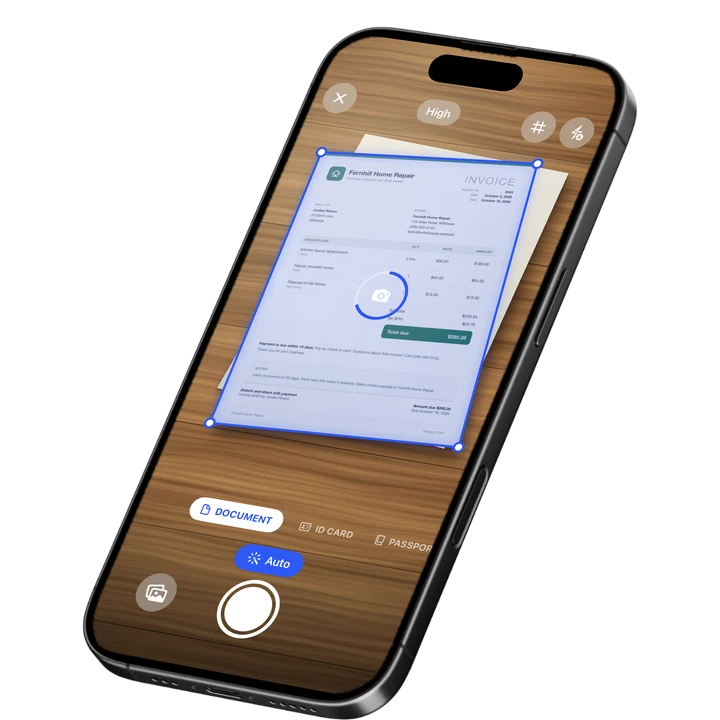
On-device text recognition. Secure, built for iOS.
Best Scanner App for Teachers in 2026
The best scanner apps for teachers in 2026 are:
- Filewise - Best overall for teachers (redacts student names before sharing a page publicly)
- Adobe Scan - Best for OCR on typed handouts and notes
- Genius Scan - Best for a clean, fast interface
- CamScanner - Best for a wide feature set
- Scanner Pro - Best for teachers who already use other Readdle apps
- forScore - Best for music teachers managing sheet music
A teacher's paperwork never really stops: worksheets to keep on file, permission slips to track, a graded stack of tests to record, and the occasional lesson plan a colleague wants a copy of. A scanner app on your iPhone turns that paper into PDFs you can find, share, and file without a trip to the copier, much like the habit covered in our best scanner app for students guide from the other side of the classroom.
1. Filewise - Best Overall Scanner App for Teachers
Filewise scans a worksheet, a permission slip, or a graded page into a sharp PDF, and lets you blur or black out a student's name before you share that page with a parent group, a colleague, or a wider audience where it should not appear.
Get Filewise to scan a stack of permission slips or worksheets into clean, organized PDFs before the end of the day.
How Filewise Handles Classroom Paperwork
Scan a worksheet or a permission slip in Document mode, and batch scanning with no page limit means a whole class set becomes one PDF instead of thirty separate photos. Text recognition runs on the device, so you can search your scans for a student's name or an assignment title later without opening every file. When a page needs to be shared more widely, such as a sample worksheet posted for other teachers or a class newsletter, the redaction and blur tools cover a student's name or photo before you send it.
For a lesson plan you fill in by hand, Filewise's text and fill-in tools let you add typed notes, dates, or checkmarks directly on a scanned page, and a signature tool covers signing off on a permission slip or a field trip form yourself. Scanning a full class set this way is the same multi-page workflow covered in our guide to scanning multiple pages into one PDF on iPhone.
Key Features for Teachers
- Redaction and blur: Cover a student's name or photo before sharing a page beyond your classroom.
- Multi-page batch scanning: Scan a full class set of worksheets or a permission slip stack as one PDF.
- On-device text recognition: Search your scans by a student's name or an assignment title after scanning.
- Fill in and sign: Add text, checkmarks, or a signature to a scanned form.
- Folders you organize: Create folders by class, unit, or term, and sort, star, or filter as your files grow.
- PDF password: Lock a file of grades or student records with a password before sharing it.
Pricing
See the App Store for current pricing and plans.
Best For
- Finding worksheets and permission slips by class from their scanned text
- Redacting a student's name before sharing a sample page publicly
- Filling in and signing permission slips or field trip forms
- Locking a file of grades or records behind a password
2. Adobe Scan - Best for OCR on Handouts and Notes
Adobe Scan is a scanning app from Adobe with automatic capture and on-device text recognition, useful for typed handouts or handwritten notes you want to search later by keyword.
Key Features
- Automatic edge detection and capture
- Text recognition (OCR) on every scan
- Business card scan mode
- Ties into the wider Adobe Acrobat ecosystem
Pricing
Adobe Scan Premium is listed from about $3.99 to $69.99 across its plans (September 2026).
Best For
- Teachers who want OCR on typed handouts by default
- Anyone already using Adobe Acrobat for lesson materials
3. Genius Scan - Best for a Clean, Fast Interface
Genius Scan, from The Grizzly Labs, holds a 4.9 rating from 1.37 million reviews (September 2026), the highest average of the major scanner apps, built around a fast, uncluttered scanning workflow.
Key Features
- Fast perspective correction and cropping
- Batch scanning into a single PDF
- A simple, uncluttered interface
- Works fully offline
Pricing
Genius Scan Plus is listed at $0.99 to $11.99, and Genius Scan Ultra from $39.99 to $49.99 (September 2026).
Best For
- Teachers who want the fastest path from paper to PDF between classes
- Anyone who prefers a minimal interface
4. CamScanner - Best for a Wide Feature Set
CamScanner, from INTSIG, holds a 4.84 rating from over 1.9 million reviews (September 2026), the largest review count in the category, with a broad set of scanning and document tools.
Key Features
- OCR in multiple languages
- Cloud storage for scanned files
- Fax credits as an add-on
- A large existing user base
Pricing
CamScanner Premium plans are listed from about $4.99 to $69.99 (September 2026).
Best For
- Teachers who want one app with a large set of document tools
- Anyone already familiar with CamScanner from other uses
5. Scanner Pro - Best for Readdle Users
Scanner Pro, from Readdle, holds a 4.87 rating from 335,985 reviews (September 2026) and includes on-device text recognition with full-text search across scans.
Key Features
- Text recognition with full-text search
- iCloud sync between devices
- Fax and expense report add-ons
- Custom workflows for repeat scanning tasks
Pricing
Scanner Pro is free to download, with Scanner Pro Plus available as a subscription and other add-ons priced separately (September 2026).
Best For
- Teachers who use other Readdle apps
- People who want built-in workflow automation for repeat scans
6. forScore - Best for Music Teachers
forScore is a sheet music reader for iPad and iPhone built for musicians and music teachers, with the ability to scan printed sheet music into its library alongside annotation and page-turning tools.
Key Features
- Scan printed sheet music into a searchable library
- Annotate scores directly on the page
- Organize sheet music into setlists
- Page-turning tools built for performance and practice
Pricing
forScore Pro is listed at $14.99, with a 30-day pass option at $2.99 (September 2026).
Best For
- Music teachers building a digital sheet music library
- Annotating and organizing scores for lessons and rehearsals
How to Choose a Scanner App as a Teacher
The right app depends on which part of your paperwork takes the most time. Start with what you scan most often, then match the features to that job.
- Student privacy: A redaction or blur tool matters whenever a page might be shared beyond your own class records.
- Class sets: Multi-page batch scanning turns a stack of the same worksheet into one file quickly.
- Finding things later: On-device text recognition lets you search scans by a student's name or a topic instead of scrolling through files, the same approach covered in our best OCR app for iPhone guide.
- Subject-specific needs: A music teacher managing scores has different needs than a general classroom teacher, which is where a specialist app like forScore fits.
Frequently Asked Questions
What is the best scanner app for teachers?
Filewise is the best scanner app for teachers because it scans worksheets and permission slips into clean PDFs, searchable inside the app, and lets you redact a student's name before sharing a page beyond your classroom. Adobe Scan and Genius Scan are also solid picks depending on whether OCR or a fast, simple interface matters more to you.
How do I share a sample worksheet without showing a student's name?
Scan the page, then use a redaction or blur tool to cover the student's name or any handwritten identifying detail before you export and share it. Filewise's redaction tool burns that cover into the exported file, so the name cannot be recovered from the shared copy.
Can I scan a whole class set of the same worksheet at once?
Yes. Filewise's multi-page batch scanning captures each page in sequence and exports the set as one PDF, which is faster than saving each worksheet as a separate file.
Is there a scanner app built for sheet music specifically?
Yes. forScore is built for musicians and includes scanning printed sheet music into a searchable library, along with annotation and page-turning tools suited to lessons and rehearsals, which goes beyond what a general document scanner offers.
Should I password-protect a file of student grades on my phone?
If the file contains grades or other student records, adding a password before sharing it, and keeping the app itself locked with Face ID or a PIN, adds two layers of protection on a phone that may be shared or lost.
Our Pick for the Best Scanner App for Teachers
Filewise is the strongest overall pick for most classroom teachers, since the core jobs, scanning worksheets, keeping them searchable in the app, and redacting a student's name before wider sharing, are all handled in one app. Music teachers managing scores are better served by pairing it with forScore, and Adobe Scan is worth a look if OCR on typed handouts is your main need.
Get Filewise and turn today's worksheets and permission slips into clean, organized PDFs.
🔒 Face ID lock | 📱 Built for iPhone